
10 Best 5S Audit Software and Apps for Manufacturing Plants [Reviewed & Compared]

Table of contents

Share:


Quick summary
5S audit software replaces paper checklists, whiteboards, and manual boards with scheduled digital audits, corrective action tracking, and real-time scoring. Most tools handle the audit itself fine. The real difference is what happens after: whether findings get closed, and whether a slipping score gets caught before it becomes the new normal. Here are our top three picks:
| # | Platform | Best for |
|---|---|---|
| 1 | Weever | Large, multi-site process manufacturers |
| 2 | Ease.io | Automotive and aerospace manufacturing |
| 3 | SafetyCulture | Small plants running 5S audits, looking for high free-tier limits |
Why plants are moving from paper to 5S inspection software
Every plant reaches a point where the same 5S issues keep showing up. Was this area actually audited this month? Who's supposed to fix the missing label on rack 4? Why does the same corner fail every quarter?
When those answers live on a paper checklist or a whiteboard nobody updates, teams spend their time chasing information instead of fixing the floor. With 5S audit software, those questions get answered automatically. Every audit is scheduled, every finding is assigned, and every score is visible the moment the walk is done.
The market offers plenty of tools for this, and that's where plants get stuck. In this guide, we'll explain what 5S audit software is and how the 10 best tools in 2026 compare.
Why listen to us?


.avif)
Weever was built by people who understand manufacturing from the inside. Our team is no stranger to factory floor challenges and have lived the problems plant leaders face every day: standards followed differently across shifts, audits completed without real attention, and findings that never make it to resolution.
That shows up in the results. At Adient's Liverpool plant, 5S scores climbed from 85% to 97% and monthly open issues dropped from over 60 to under 5 after moving off paper and Excel. Today, Weever supports 5S programs at companies including Adient, Royal Canin, Mars Snacking, and Monin. The feedback we receive from operators, supervisors, and plant managers gives us a practical view of what works on the floor, what creates friction, and what teams are likely to ignore.
What is 5S audit software?
5S audit software is a digital tool for scheduling, scoring, and documenting 5S audits. It replaces paper checklists and whiteboards that rely on someone remembering to update them.
The first four steps of 5S (Sort, Set in Order, Shine, and Standardize) help teams organize the work area and define how it should be maintained. The fifth step, Sustain, makes sure those standards continue across every shift. Regular 5S audits help teams catch missing labels, misplaced tools, blocked areas, and other signs that the workplace is slipping back into old habits.
Manufacturers use 5S audit software to run those checks against their own standards while capturing photos, red tags, findings, and corrective actions in the same workflow. This keeps follow-up connected to the original audit instead of leaving it to memory.
Platforms vary in scope. Some focus on completing audits, while others also include corrective action tracking, multi-site reporting, and integrations with existing systems. The strongest options work on shared shop-floor devices and support QR-code access, helping plants run audits consistently across shifts, languages, and sites.
How apps and software help with 5S auditing
Most plants running 5S manually aren't struggling with the method. They're struggling with paper forms, Excel trackers, and physical boards that all show a different version of the truth. An action gets flagged in one system, tracked in another, and forgotten in a third. Here's where dedicated software actually changes that.
- Keep audits on schedule: A recurring calendar by area, line, site, shift, or auditor replaces the "we'll get to it when things slow down" pattern that turns monthly audits into quarterly ones.
- Make inspections easier on the floor: Mobile checklists, QR-code access, shared devices, and offline mode take the audit out of a laptop and Excel, and put it where the work actually happens.
- Capture visual evidence: Photos with sketches and annotations replace the vague, text-heavy checklists ("good/very good") that made scoring inconsistent and subjective in the first place.
- Calculate scores immediately, and weight them: A safety or quality miss counts for more than a cosmetic one, so the score reflects real risk instead of treating every finding the same.
- Keep corrective actions moving: An owner, a due date, and reminders replace the "who's supposed to fix this?" gap that leaves action items sitting in Gensuite, ETQ, or a supervisor's inbox until someone remembers.
- Compare progress across areas and sites: One dashboard replaces the site-by-site, tool-by-tool patchwork that makes it nearly impossible to prove ROI or standardize how 5S runs across a multi-plant operation.
10 best 5S audit software and apps compared
| # | Platform | Best for | Starting price | Key differentiator |
|---|---|---|---|---|
| 1 | Weever | Large, multi-site process manufacturers | Custom, site-wide pricing | Configurable scoring and action tracking across 5S, AM, safety, sanitation, and quality, with AI-flagged score drift |
| 2 | Ease.io | Automotive and aerospace manufacturing | $720/site/month | Auditor qualifications and CQI-8/AS9100D compliance built in |
| 3 | SafetyCulture | Small plants running 5S audits, looking for high free-tier limits | Free (up to 10 users); $24/user/month paid | Large public template library across different manufacturing plant types |
| 4 | Lumiform | Digitizing existing inspection forms | $112/month | AI-assisted form creation, translation, and photo validation |
| 5 | GoAudits | Replacing paper inspections | $10/user/month | Free checklist conversion and branded report exports |
| 6 | Tulip | Plants already using Tulip for other shop-floor apps | $100/interface/month | 5S scores can sit alongside machine, sensor, and production data in the same dashboard |
| 7 | Alpha TransForm | Building custom mobile field apps | Free tier (up to 3 users); $30/user/month paid | No-code builder for fully custom field data apps |
| 8 | Inspectly360 | AI-assisted visual inspections | Custom (Growth/Enterprise tiers) | On-device AI flags defects and drafts the inspection record |
| 9 | Tervene | Lean daily management | Custom quote | Layered, leadership-based audit scheduling with escalation |
| 10 | Quentic | EHS and certification audits | Available upon request | Multi-country ISO certification and EHS compliance |
1. Weever - Best 5S software for multi-site process manufacturing plants
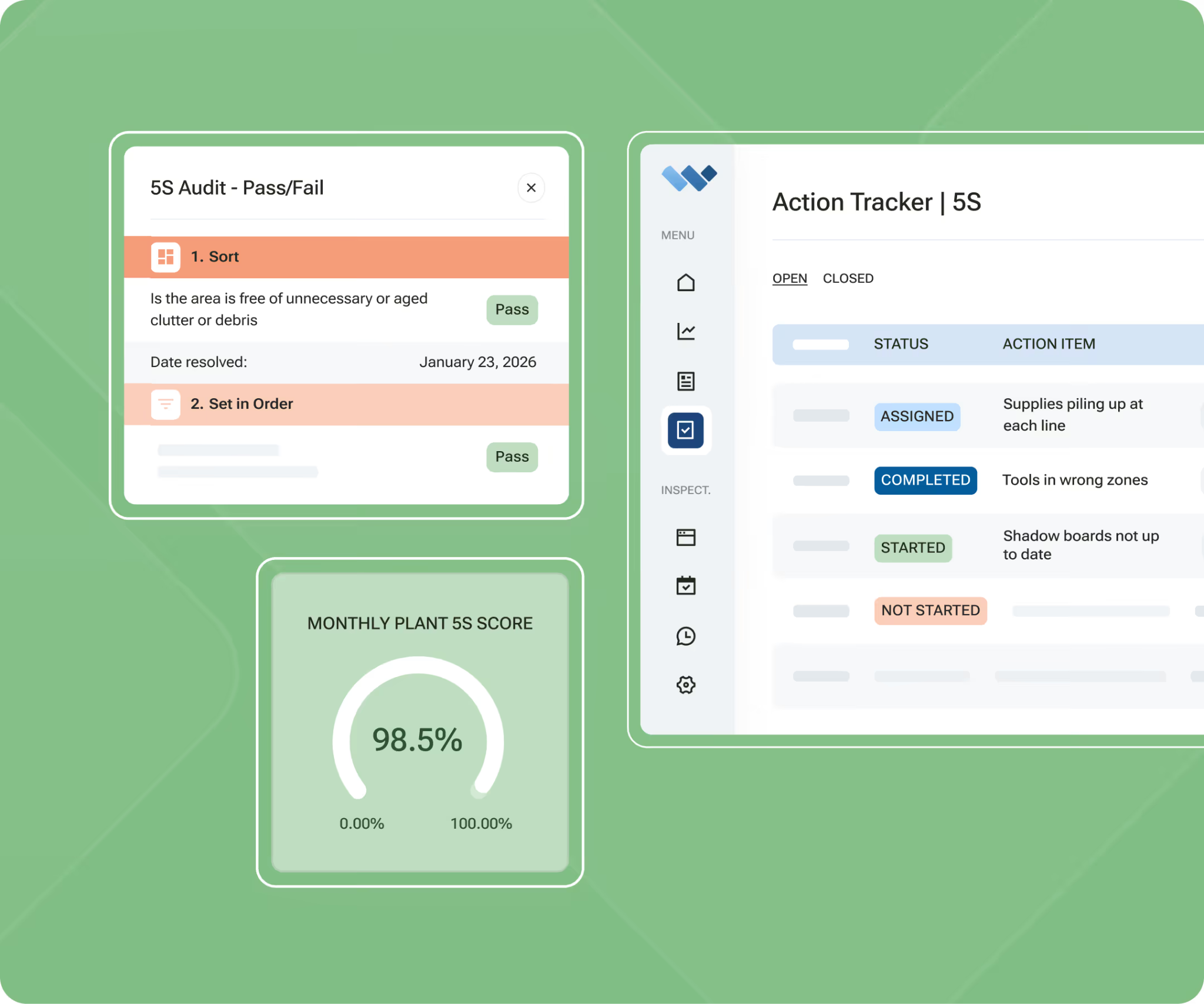
Weever is a connected frontline operations platform built for food and beverage, CPG, and other process manufacturers. It replaces paper audits, whiteboards, and scattered spreadsheets with a digital 5S process that is easier to run consistently.
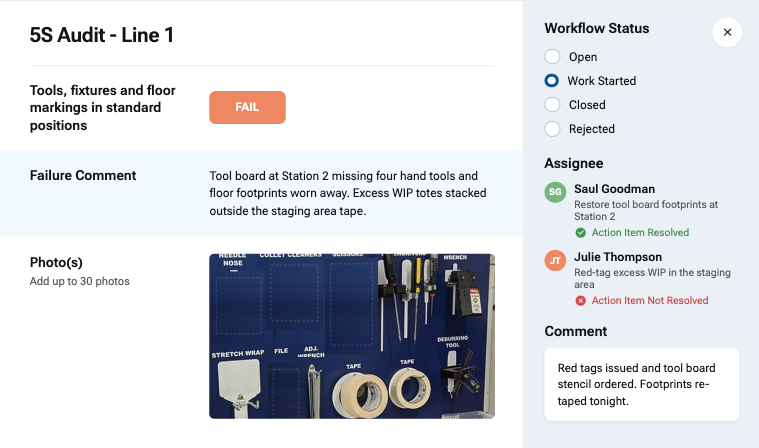
Auditors complete scheduled 5S inspections from a shared tablet, phone, or workstation device. They score Sort, Set in Order, Shine, Standardize, and Sustain against the plant’s own standards while adding photos, comments, signatures, and red tags directly to the checklist.
Instead of ending with a completed scorecard, Weever keeps every finding moving. If an auditor identifies an issue, it can be assigned to the responsible area owner with a due date and reminders. The record stays linked to the original audit until the corrective action is closed.
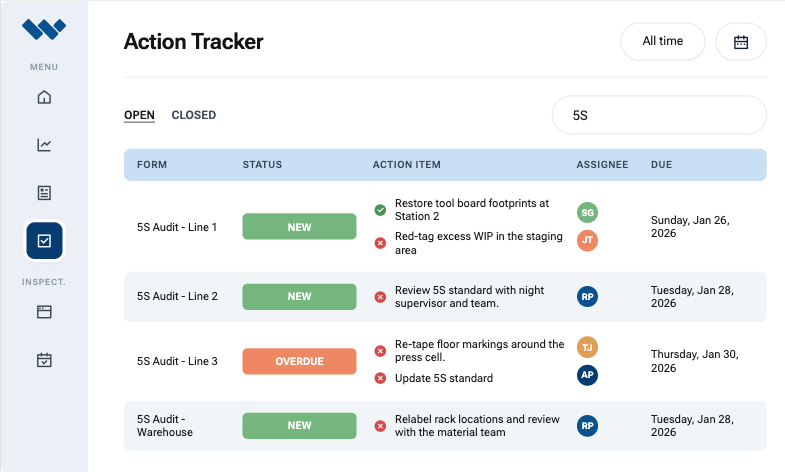
During a Sort audit, for instance, an operator may find obsolete material stored beside a production line. They photograph it, submit a red tag, and assign its removal before leaving the area. Supervisors can then see what was found, who owns the action, and whether it has been resolved.
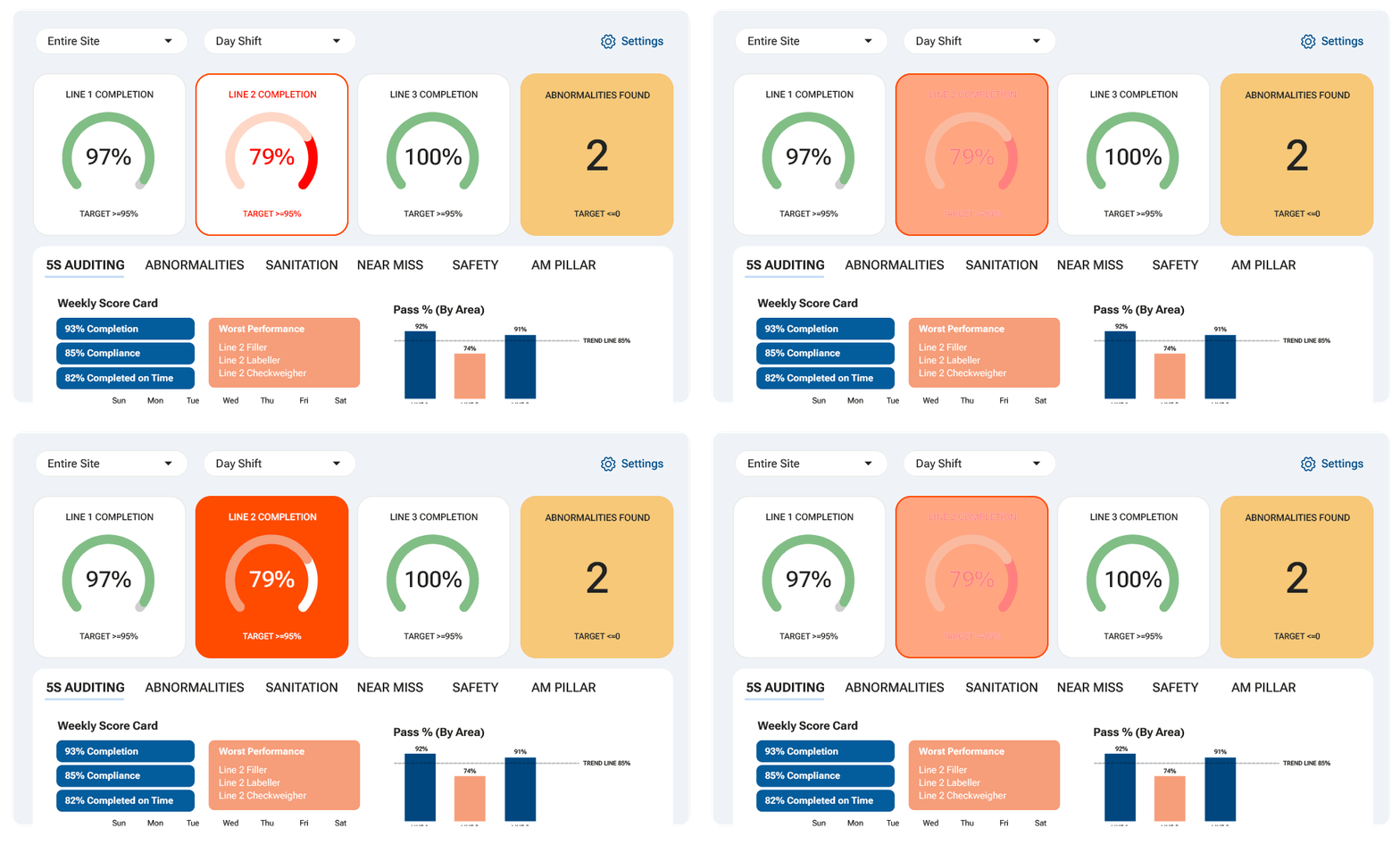
As audits continue, Weever updates dashboards with scores, open actions, overdue items, recurring findings, and historical trends. Managers can compare performance by workstation, department, site, or region instead of piecing information together from spreadsheets and manual boards.
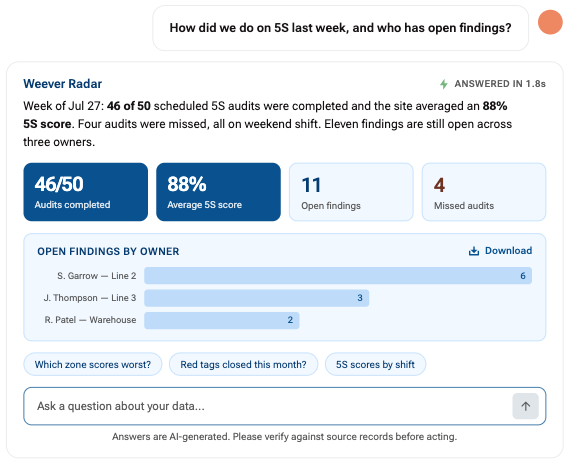
Plant managers can also use Weever Radar™, an optional AI layer, to catch early signs of decline between formal reviews. For example, if Shine scores keep dropping on one line or the same criterion fails repeatedly, Radar surfaces the pattern so supervisors can step in before it becomes routine.
For multi-site operators, each facility can tailor scoring weights, evidence requirements, and approval steps to its own floor. Shared templates still keep the wider 5S program consistent across sites, without ignoring differences in equipment, layouts, or local risks.
Key Features
- Mobile 5S audit scorecards: Complete scheduled audits with photos, comments, signatures, and real-time scoring on a shared tablet or phone.
- Automatic action items: A failed item or red tag becomes an owned, due-dated action the moment it's logged.
- Digital red-tagging: Flag an item that doesn't belong, log it with a photo, and track it through to resolution.
- Multi-site 5S dashboards: Compare scores, open actions, and repeat issues across areas, plants, and corporate views.
- Weever Radar™: An optional AI layer that flags failing criteria and sliding scores between reviews, catching Sustain-phase drift early.
- Enterprise integrations: Connect audit and action data with ERP, CMMS, SAP, Microsoft Dynamics, Power BI, and SSO systems.
- QR-code audit access: Scan a code at the workstation or production area to open the correct audit instantly, no manual navigation.
- Weighted scoring: Score safety or quality failures higher than minor findings, so critical issues carry more weight in the final score.
- Multilingual audit forms: The same checklist adapts to the languages spoken across a plant's frontline crew.
Pros
- Scoring rules and forms can be set up to match each plant's own risk areas, without custom development
- Unlimited users per site mean the whole floor can take part, not just a few designated auditors
- Photos and timestamps attached to every finding create a defensible audit trail
- The same system can later run autonomous maintenance, safety, sanitation, and quality programs
Cons
- Overkill for teams that simply want a basic, checklist-only 5S app
Why we picked this
Configurability is what separates Weever from other 5S inspection software. Instead of forcing every facility into the same workflow, plants can tailor audits around their own standards, risk priorities, and approval processes.
The platform also supports immediate follow-up when a check fails. Conditional workflows, required fields, and automatic actions help standardize responses. The audit layout also follows the same flow as the paper process teams already know, so adoption is fast.
What Customers are saying
Weever's biggest selling point for 5S is closing the loop between a failed audit item and a fixed one, while keeping scores moving in the right direction. Adient's experience shows what that looks like on the floor:
"Issues are resolved, and quickly. 5S scores are increasing and sustained throughout, and the team is extremely happy with what we have achieved in a short space of time." - Tim Clansey, Training Manager and 5S Champion at Adient
Customers also highlight how accessible Weever is for frontline operators:
"Having cloud-based forms on devices around the facility makes them so much more accessible, which makes it painless for operators to quickly provide a report." - Johanna Velez, VP Quality Assurance at Monin
Ease of use is another strong point that customers often talk about:
"Weever is really user friendly and will have a massive positive impact on our operations and training team." - Mel Cadle, Op Ex Lead Process Engineer at HelloFresh
Pricing
Weever offers site-wide pricing with unlimited users, so operators, auditors, supervisors, managers, and plant leaders can all participate without seat count limiting access.
Book a demo to see how Weever runs 5S audits on your floor.
2. Ease.io - Best for automotive and aerospace manufacturing
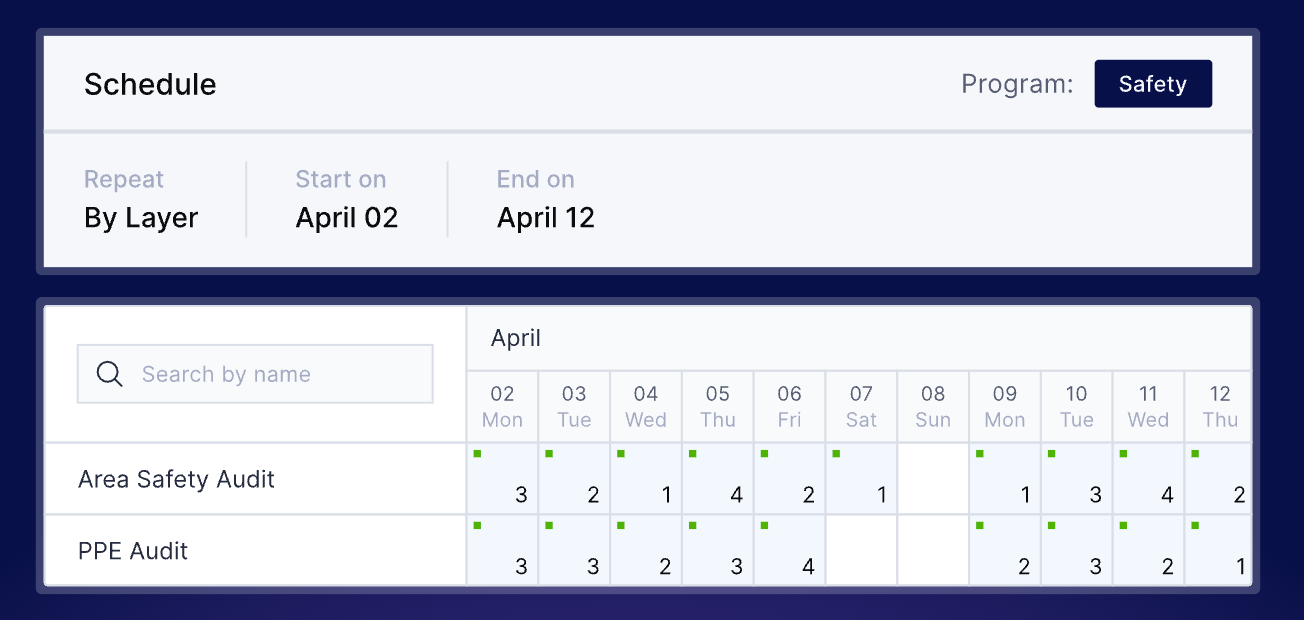
EASE.io is a manufacturing audit platform built around layered process audits, quality inspections, and compliance programs. Its clearest fit is automotive and aerospace plants working under standards such as IATF 16949 and AS9100D.
For 5S, EASE is most relevant when audits sit alongside wider quality requirements. Plants can rotate questions across frequent checks, apply automotive audit guidelines, and ensure only qualified employees are assigned to specific assessments.
Key features
- Auditor Qualifications: Attach competency requirements to an audit so only eligible employees can be scheduled.
- Question Randomization: Pull changing questions from a tagged library across recurring assessments.
- Industry Compliance Support: Run audits aligned with CQI-8, automotive customer-specific requirements, and AS9100D programs.
Pros
- Built specifically for manufacturing audit programs
- Strong automotive and aerospace compliance coverage
- Connects auditor training with assessment eligibility
Cons
- Report setup can take time when teams need highly specific views
- Most relevant when layered audits are already part of the operating system
Why we picked this
EASE.io earns its spot for how deeply it fits into automotive and aerospace compliance work, not as a general audit tool with those industries added on. Question rotation, auditor qualifications, and CQI-8 alignment are all built for plants already running layered process audits.
Pricing
EASE offers three plans:
- EASE: $720/site/month
- EASE Plus: $890/site/month
- EASE Pro: $1,290/site/month
3. SafetyCulture — Small plants running 5S audits, looking for high free-tier limits
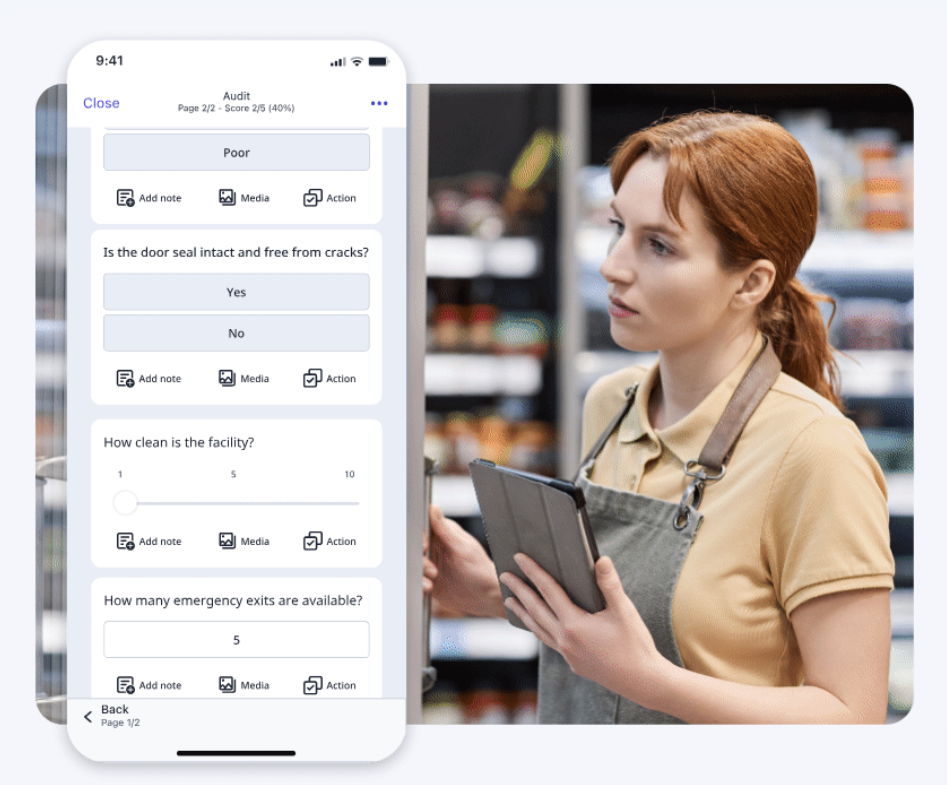
SafetyCulture is a general inspection platform with a Public Library that includes editable 5S, Gemba, GMP, and manufacturing audit templates. A plant can copy a checklist, replace irrelevant questions, add its own scoring, and issue the revised version without building the form from a blank screen.
It also converts existing XLSX, PDF, JPEG, and PNG files into editable templates. This is useful when a site has accumulated paper forms and Excel audits but does not want to recreate every question manually.
Key features
- Public Template Marketplace: Browse and customize thousands of templates created by SafetyCulture and its community.
- AI Checklist Creation: Generate editable checklists from prompts, photos, PDFs, Excel files, or existing documents.
- Offline Mobile Inspections: Complete inspections without internet access and sync the data once the device reconnects.
Pros
- Makes it easy to digitize existing PDFs, spreadsheets, and paper forms
- Offers ready-made templates across many industries, not only manufacturing
- Supports offline work in facilities with unreliable connectivity
Cons
- Report customization can feel limited
- Automation and integrations may be complex to configure
Why we picked this
SafetyCulture was included for its public template library, AI-assisted checklist creation, and offline inspection support. These features make it suitable for teams managing several inspection types across different departments.
Pricing
- Free: Up to 10 users and five active inspection templates
- Premium: $24 per user/month annually or $29 monthly
- Enterprise: Custom pricing
4. Lumiform - Best for digitizing existing inspection forms
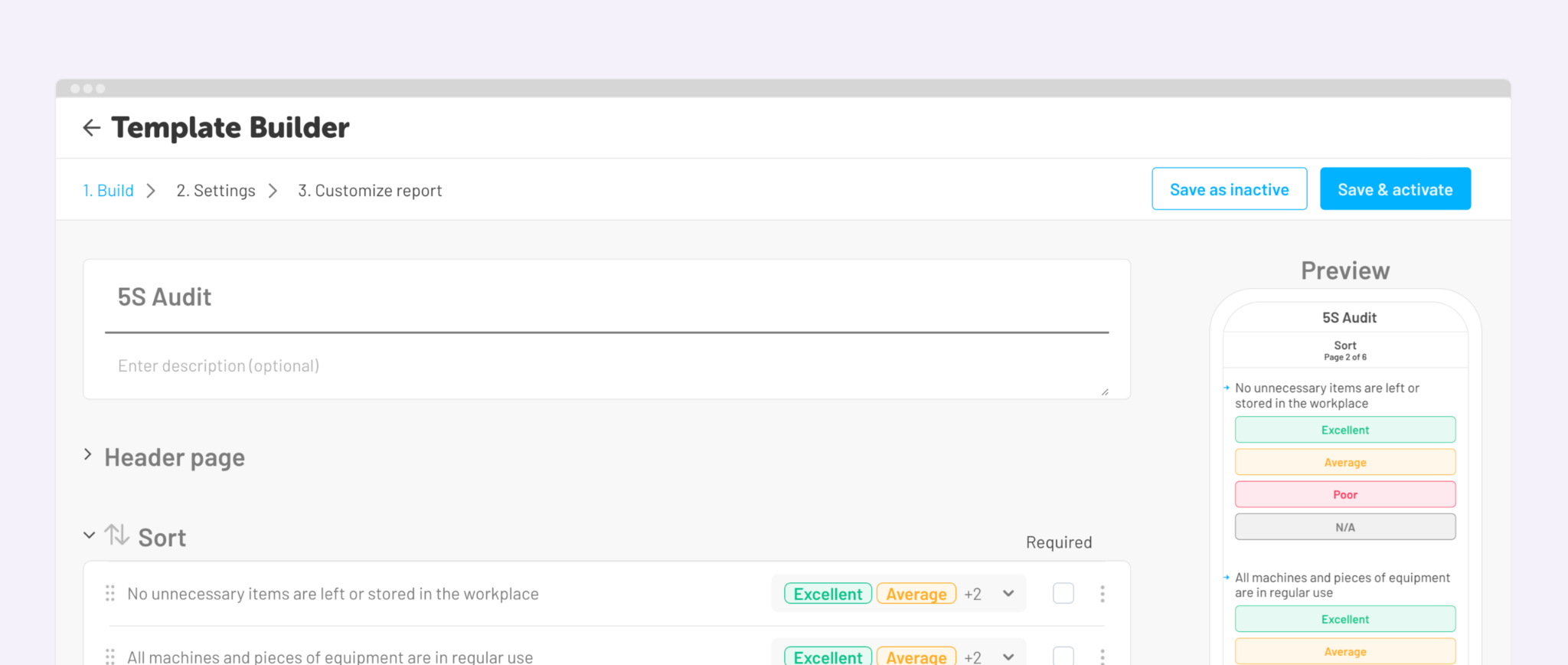
Lumiform is a mobile inspection platform that helps teams move existing paper and spreadsheet-based audits into a digital format. Users can upload PDF, Word, Excel, or image files, generate forms with AI, or start from a library of more than 12,000 templates.
For 5S teams, it helps reduce the work involved in recreating existing checklists. Imported forms can then be reviewed and prepared for mobile use rather than rebuilt manually from a blank page.
Key Features
- AI Form Translations: Converts one master audit into more than 60 languages based on the user’s device setting.
- AI Form Creation: Converts PDF, Word, or Excel documents into templates or creates a form from a written prompt.
- AI Photo Validation: Checks submitted photos against configured standards and returns immediate compliance feedback.
Pros
- Offers several ways to create digital inspection forms
- Large template library provides a quick starting point
- Structured Excel imports give teams control over form layout
Cons
- 5S is one use case within a broader inspection platform
- Imported forms still require review before fields, logic, and workflows are ready for use
Why we picked this
Lumiform earns a place because it reduces the setup work involved in moving existing inspections online. Teams can begin with their current documents, an AI-generated form, or a ready-made template instead of starting every 5S checklist from scratch.
Pricing
Starts at $112 per month. However, both Professional and Enterprise plans require a vendor quote.
5. GoAudits - Best for replacing paper inspections
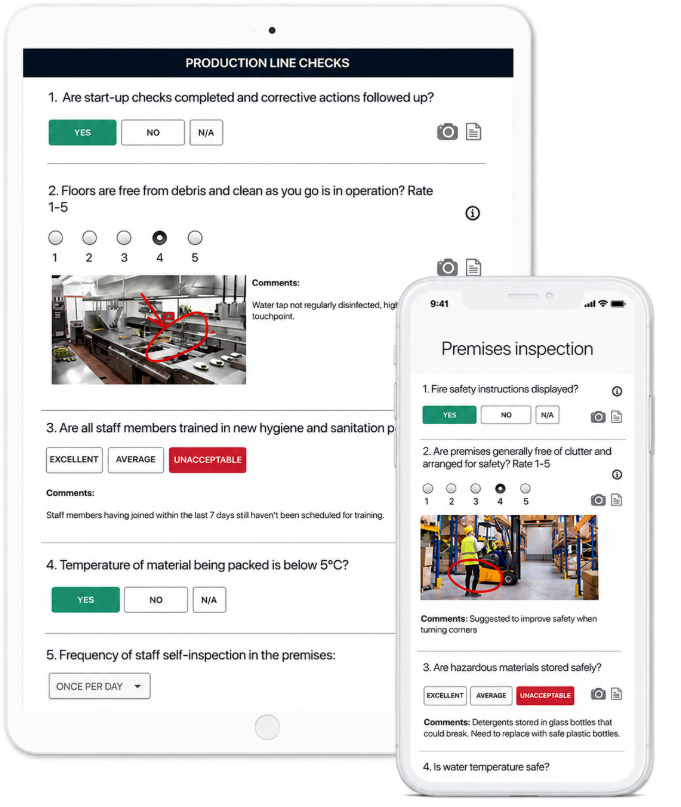
GoAudits is a customizable digital inspection and auditing platform that helps replace paper forms and manually prepared audit records.
The platform stands out for its reporting flexibility. Reports can be customized with branded layouts and cover pages, exported to Word or Excel, and automatically shared with selected recipients. GoAudits also offers free checklist setup by converting existing forms into digital checklists.
Key features
- Branded Report Templates: Customize inspection reports with company logos, colors, layouts, and professionally designed cover pages.
- Word and Excel Exports: Download completed inspection reports in editable Word or Excel formats for further analysis or external sharing.
- Free Checklist Conversion: GoAudits’ team can convert existing paper forms and checklists into digital templates at no additional cost.
Pros
- Voice-to-text and speech-to-text notes
- Permissions, user roles, and organizational hierarchies
- Photo capture for individual audit questions
Cons
- Confusing permissions and hierarchies
- No XLSX upload support
Pricing
- Starter: $10/user/month
- Enterprise: $30/user/month
6. Tulip - Best for plants already using Tulip for other shop-floor apps
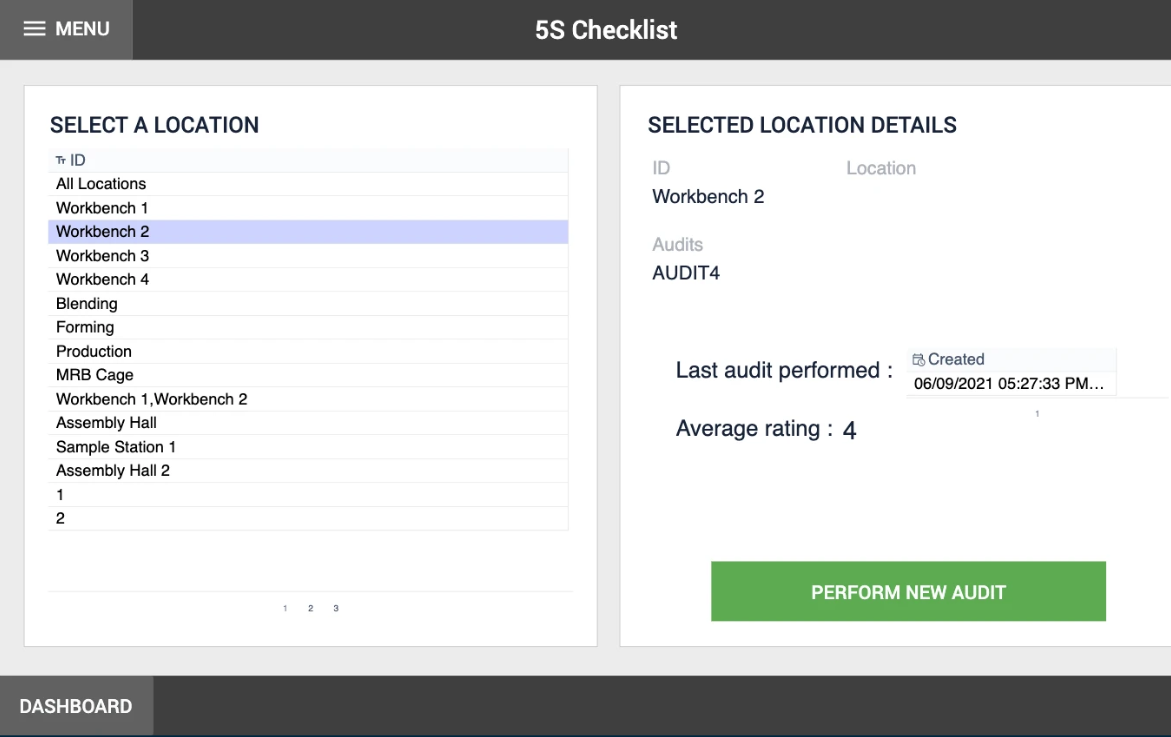
Tulip is a composable operations platform rather than conventional 5S audit checklist software. Its library includes a dedicated 5S Checklist app with 25 checks covering the five audit categories, automatic result storage, and an included dashboard.
Its main appeal for 5S specifically is convenience for teams already standardized on Tulip for other shop-floor apps. Tulip's audit tooling is built to pair 5S scores with machine, sensor, or production data in the same dashboard, for plants that want 5S context next to equipment performance rather than in a separate report.
Key features
- 5S Radar Chart Widget: Compares one audit or aggregated results against a defined target score.
- Prebuilt 5S Checklist app: 25 checks covering all five audit categories, with automatic result storage.
- Edge IO and Edge MC: Connect Tulip applications to industrial equipment, sensors, and peripheral devices.
Pros
- Quick deployment
- Supervisors get an at-a-glance read on how a site is tracking against target, without building a separate report
- A natural fit for plants already running other Tulip apps
Cons
- Users note a learning curve for anything beyond the prebuilt template, since deeper customization uses the same builder as Tulip's broader platform
- Tulip Tables are less suited to large or complex datasets
Why we picked this
Tulip was included for teams that already run other shop-floor apps on Tulip and want their 5S checklist on the same platform, rather than for 5S-specific capability on its own.
Pricing
- Essentials: Starts at $100 per interface per month
- Enterprise: Custom pricing
7. Alpha TransForm - Best for building custom mobile field apps
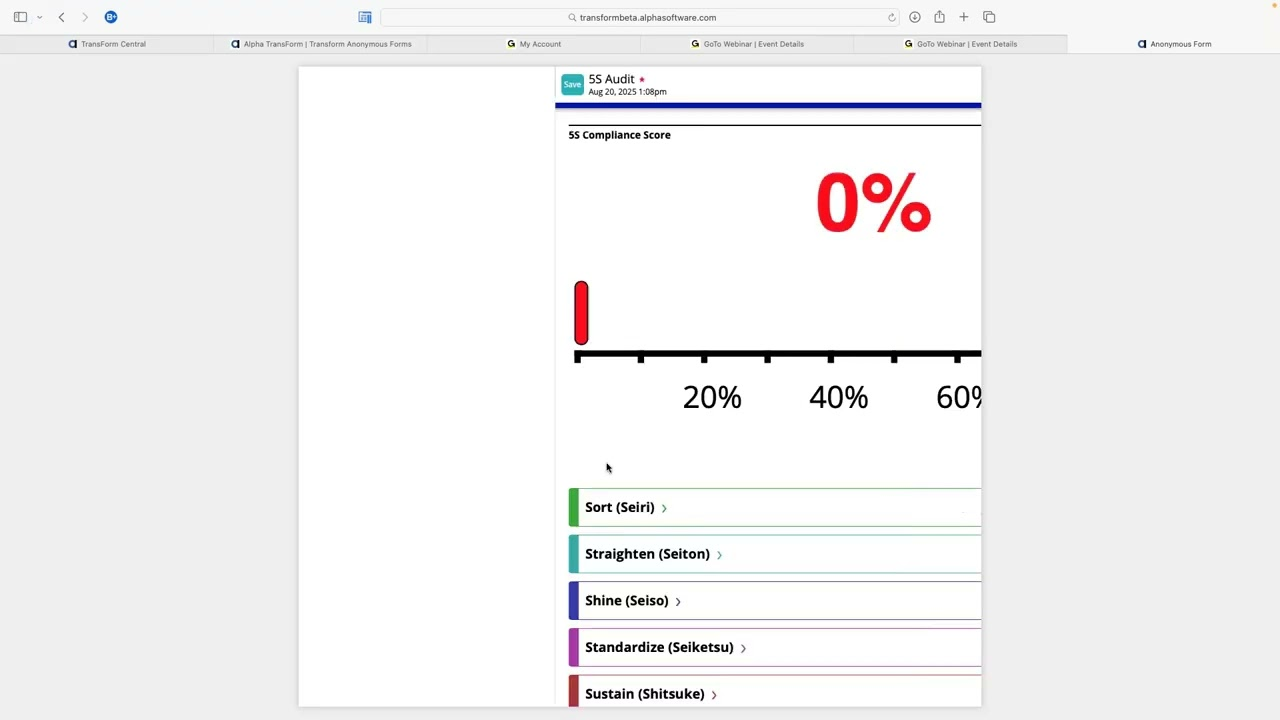
Alpha TransForm is a no-code platform for building custom mobile and web applications around field data collection. Teams can create forms, add business logic, signatures, GPS details, and barcode scans, then connect that data to back-office systems.
Its main value is flexibility at the app level. Rather than starting from a fixed 5S product, teams build the application structure, screens, rules, and data flows around their own process.
Key Features
- No-code form builder: Build and deploy a custom inspection form without developer resources.
- Offline data collection: Complete forms without a connection; data syncs once the device reconnects.
- GPS location tagging: Automatically attach a location stamp to a submitted form, useful for confirming an inspection happened at the right place.
Pros
- Supports highly tailored mobile app experiences
- Handles several field data types in one application
- Works across mobile and web environments
Cons
- Barcode values must be entered manually in the browser version
- Web Filler GPS can be less precise for field records than native mobile GPS
Why we picked this
Alpha TransForm is a strong fit for teams that want to get any paper form, 5S included, into digital use quickly, without waiting on a longer implementation process.
Pricing
Alpha TransForm offers a free tier for up to three users. Its Business plan costs $30 per user per month, with volume pricing available for larger deployments.
8. Inspectly360 - Best for AI-assisted visual inspections
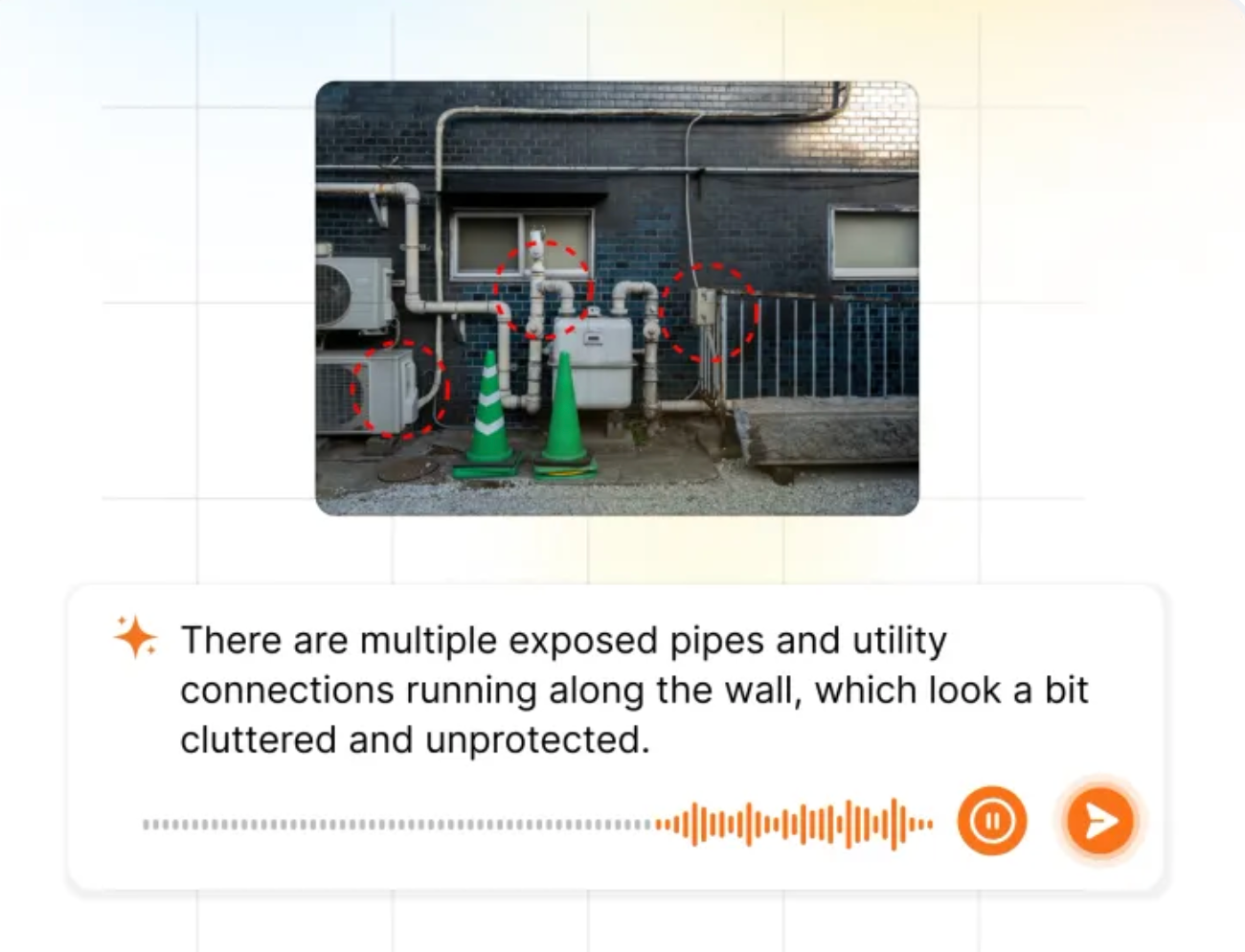
Inspectly360 is an inspection platform that uses on-device AI to review photos captured during audits. The system can flag cracks, corrosion, missing PPE, blocked exits, and other visible issues, then suggest the category, severity, and relevant form fields for the inspector to confirm.
For 5S audits, its clearest distinction is reducing manual entry. Inspectors can photograph a finding or speak an observation, while AI helps document the issue and prepare the inspection record.
Key features
- AI-Generated daily briefings: The platform can summarize overdue inspections, problem sites, and areas that need attention. Managers can also use natural-language queries for inspection data.
- Recurring-issue detection: A finding repeating across multiple audits within a set window can be flagged and converted into a kaizen item automatically.
- Role-based audit cadences: Set different audit frequencies for operators, supervisors, and managers, in line with layered process audit structures.
Pros
- AI runs on the device without requiring an internet connection
- Photo-to-form suggestions reduce manual data entry
- Supports hands-free observation capture through voice input
Cons
- AI findings still require confirmation from the inspector
- Limited language support for voice transcription
Why we picked this
Inspectly360's AI layer is a genuinely different approach to catching issues during a 5S audit, applying automated photo analysis on top of the standard scorecard rather than relying solely on the auditor.
Pricing
Offers two pricing tiers: Growth and Enterprise, with a custom quote based on team size, usage, and required features.
9. Tervene - Best for lean daily management
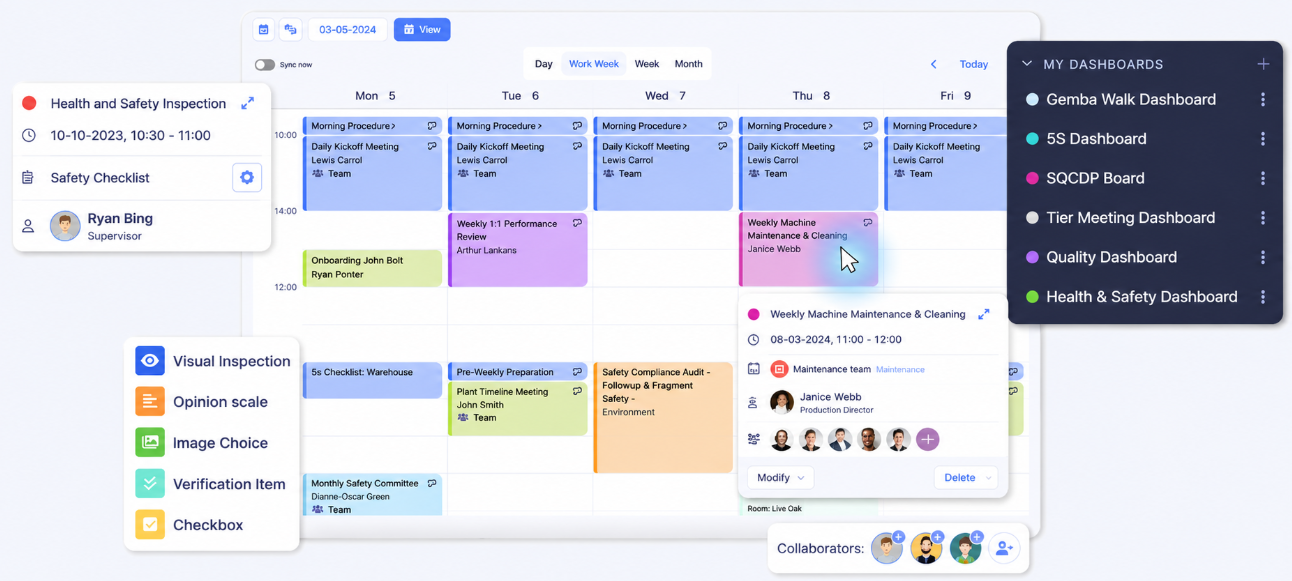
Tervene is a connected-leader platform for manufacturing and industrial teams. It is built around Leader Standard Work, helping supervisors and managers organize recurring routines, management reviews, floor walks, and follow-up activities in one system.
It also supports tiered meetings across management levels. Teams can review performance, escalate issues, and keep daily leadership activities aligned.
Key features
- Layer-Specific Scheduling: Set different audit frequencies for operators, supervisors, managers, and plant leaders.
- Adaptive Audit Scheduling: Manage 10 to 200 weekly audits across shifts and work calendars, with schedules updating for leave, new users, and checklist changes.
- Two-Level Escalation: Escalate overdue audits or actions from the responsible supervisor to the next management level.
Pros
- Scheduling for appointments and recurring activities
- Daily recordings compared against targets
- Real-time process and workflow tracking
Cons
- Performance can slow when handling large datasets or complex projects
- Weak Office 365 compatibility
Why we picked this
Tervene made the list for its emphasis on daily management practices such as leader routines, tiered meetings, and shift handovers, with 5S and safety audits built in as part of that structure.
Pricing
Custom quote
10. Quentic - Best for EHS and certification audits
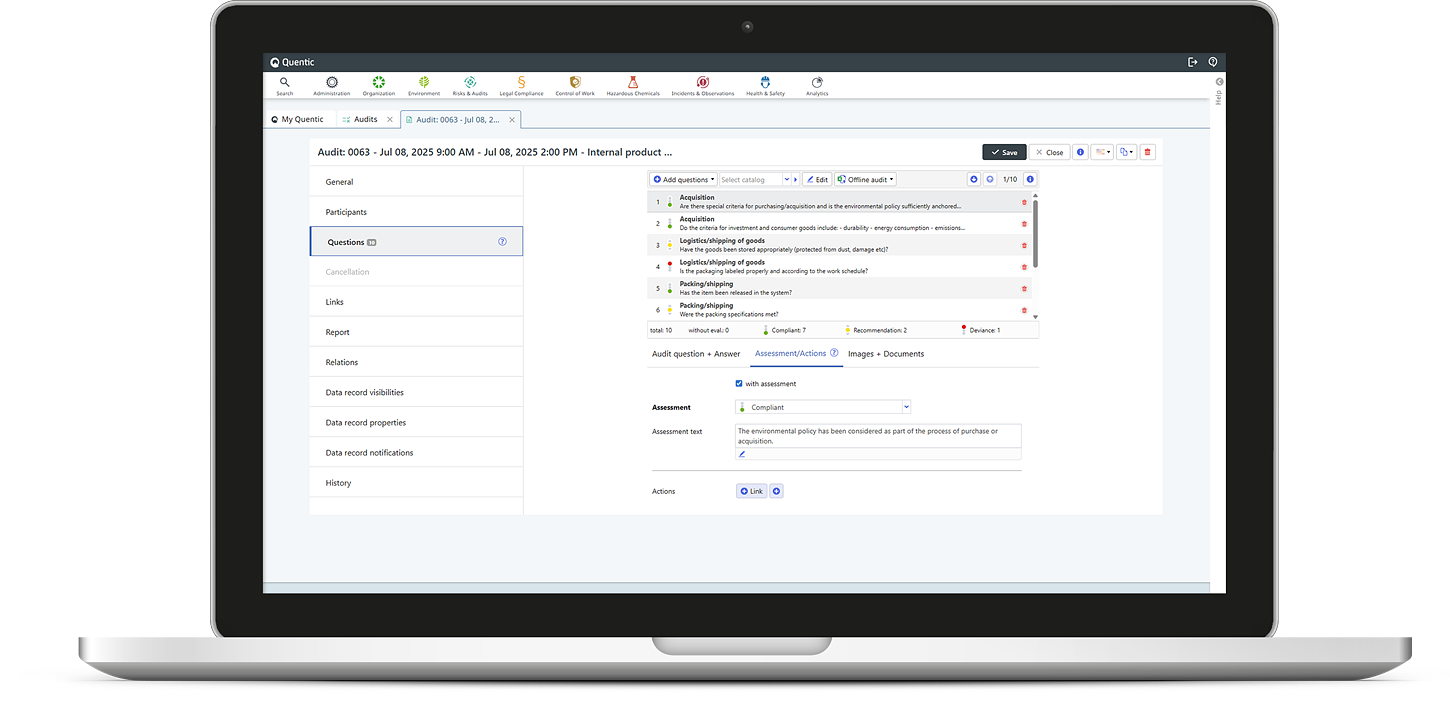
Quentic is an EHS and ESG management platform with a dedicated Risks & Audits module. It’s designed for internal and external audits tied to standards such as ISO 9001, ISO 14001, ISO 45001, and ISO 50001.
For manufacturers, 5S can sit within a wider audit and certification program. Teams can plan audit calendars, involve internal or external participants, use predefined question catalogues, and generate formal reports after each assessment.
Key features
- Modular EHS platform: Select and combine modules for audits, risk assessments, incidents, chemical management, and legal compliance as needed.
- Multi-country compliance tracking: Manage audit and certification processes across sites and countries under a shared framework.
- External auditor directory: Filter a database of external auditors to find specialists for areas such as energy, environmental, or management-system audits.
Pros
- Supports several major ISO management-system standards
- Coordinates internal teams and external auditors
- Generates standardized certification-ready reports
Cons
- 5S is one possible audit use case rather than a dedicated program
- The broader EHS and ESG scope may exceed the needs of a basic 5S team
Why we picked this
Quentic's depth on multi-country ISO certification and EHS compliance makes it a fit for enterprises where 5S is one part of a much larger regulatory and sustainability program, not a standalone need.
Pricing
Available upon request
Free trial
No self-service trial is publicly listed. A personalized demo is available.
How to choose 5S audit checklist software for your manufacturing plant
Don't choose 5S audit software by counting features on a pricing page. A successful 5S audit depends on what happens after the checklist closes, so start with the points where your current program actually breaks down:
1. Check if findings stay open
A completed audit has limited value when failed items get copied into an email, added to a manual board, or mentioned at the next shift meeting and then forgotten. During a demo, record a blocked walkway and check whether the system can assign an owner, set a due date, collect completion evidence, and show the action as open, overdue, resolved, or verified.
2. Test access on the floor
Personal logins and limited licenses cut down who can actually use the tool. Test it on a shared tablet and confirm a QR code opens the correct audit without digging through a form library.
3. Score against clear criteria
Inconsistent scores usually come from vague criteria, not bad math. One auditor passes a partly organized shadow board; another fails it because two tools are outside their marked spots. Look for configurable scorecards, weighted scoring, and required fields that make the standard explicit instead of left to judgment.
4. Look past the average score
A plant can hold a respectable score while the same oil leak sits open for months. Ask for dashboards that separate completion rate, failed criteria, recurring findings, open actions, overdue work, and time to closure, not just one number.
5. Require controlled standardization across sites
Cross-site reporting is misleading when one plant uses weighted questions, another uses simple pass/fail, and a third quietly dropped its hardest criteria. The scores look comparable, but they're measuring different things.
6. Check the actual data handoff
Don't accept "Power BI or CMMS integration" as a line item without seeing it work. Pick a real example, an oil leak, a missing label, and confirm which system receives the record, which fields transfer, and where closure gets tracked.
Make your 5S audit program easier to sustain
Sustain is the hardest S, and it is the one most tools quietly ignore. Sort, Set in Order, Shine, and Standardize get a work area organized. Keeping it that way, audit after audit, is a different problem, and it is usually where a strong 5S launch starts to slip.
This is where Weever and its Radar™ feature add a layer most audit tools don't: it watches for a score sliding between reviews or the same criterion failing repeatedly, and surfaces it before it becomes the new normal instead of after.
Book a demo to see how Weever helps plants sustain 5S between audits, shifts, and sites.
Frequently Asked Questions (FAQ)
1. What's the difference between a 5S audit and a layered process audit (LPA)?
A 5S audit scores workplace organization specifically, Sort, Set in Order, Shine, Standardize, and Sustain. An LPA is broader, checking multiple process and quality standards at different organizational levels, on a set frequency required by standards like CQI-8.
2. Does it work offline on the shop floor?
Some platforms support offline audit completion with automatic sync once the device reconnects, which matters most in facilities with weak or inconsistent Wi-Fi. Weever's 5S audits work this way: an auditor can complete a scheduled walk without a signal, and the record syncs the moment the device reconnects.
3. Can 5S audit software replace a physical 5S board?
For most plants, yes. A digital dashboard shows the same scores and open items a physical board would, updated automatically instead of by hand, and visible to more than one person at a time.
4. Does 5S scoring need to be weighted?
Not always, but it helps. Weighted scoring means a safety or quality failure counts more than a minor organizational issue, so the final score better reflects actual risk.

.webp)

Spend Less Time on Admin. More Time Improving Operations.
See how Weever automates data entry, reporting, and action items so you can focus on improvement not admin.