
Digitizing Standard Work: 10 Best Manufacturing Work Instruction Software
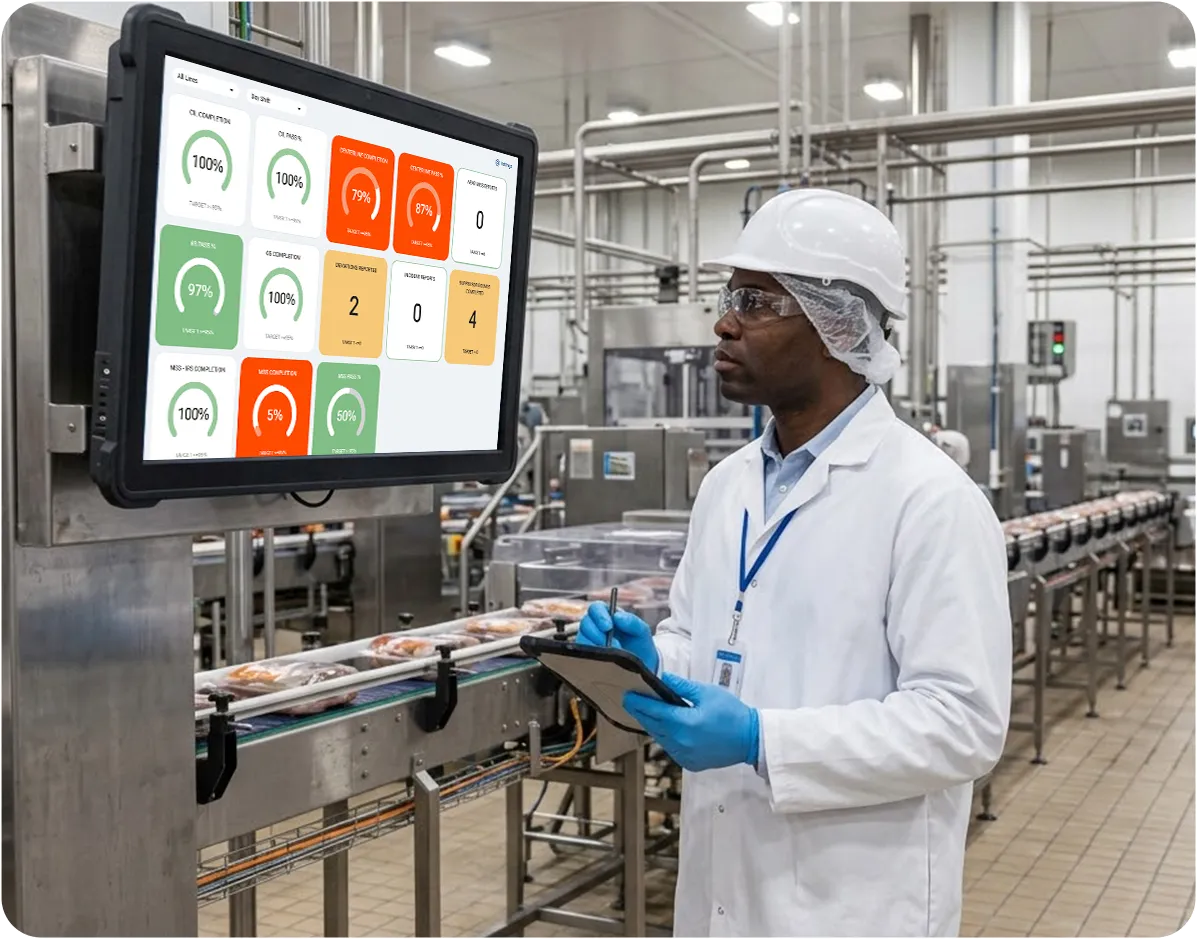
Table of contents

Share:


Quick Summary
Work instruction software replaces paper SOPs, one-point lessons (OPLs), and centerline standards with guided digital workflows that operators can follow on the shop floor. The right pick depends on whether you need action tracking, audit checklists, or production-data integration built in. Here are our top three picks:
| # | Platform | Best for |
|---|---|---|
| 1 | Weever | Best for CPG process manufacturing plants managing standard work across multiple sites |
| 2 | SafetyCulture | Teams that want general audit checklists |
| 3 | Poka | Standards built and shared via TWI-style lessons |
Why does manufacturing need work instruction software in 2026?
Manufacturers spend thousands of hours creating standard operating procedures. But all that work comes to nothing if those standards aren’t followed consistently on the shop floor.
The challenge is that as production changes, instructions become outdated, operators develop workarounds, and supervisors lose visibility into whether processes are being followed correctly. That failure to follow due process leads to more defects, rework, downtime, and audit findings.
That’s where digital work instruction software comes in. A 2026 field study published in the Journal of Manufacturing Technology Management found digital work instructions cut task completion time by 16–20%, reduced errors by 46–60%, and lowered help requests by 69–83% compared to paper, with directionally similar gains reported across other manufacturing studies.
This article compares the best work instruction software for manufacturing in 2026 to help you find the right platform for your team.
Why listen to us?
The Weever leadership comes from a manufacturing background. We didn't study floor operations from a distance. We’ve been a part of them, living through the exact challenges this list is about: getting operators to actually follow a standard, every shift, not just glance at it. Today, Weever runs live at plants including Walmart, Royal Canin, Mars Snacking, and Monin. Operators, supervisors, and plant managers tell us where instructions get skipped or filled out on autopilot. That feedback, plus our experiences, gives us the exact know-how of what works on a factory floor and what doesn’t.


.avif)
What is Work Instruction Software?
Work instruction software is a digital tool that guides operators through a task step- by- step, replacing paper forms and binders taped to machines.
Manufacturers use it to digitize standard work across the floor, including SOPs, one-point lessons, centerline standards, quality checks, changeover procedures, sanitation and cleaning steps, safety requirements, and more.
Work instruction platforms vary in scope. Some focus on delivering digital guidance, while others also include action tracking, audit management, production data, and workflow automation. The best manufacturing platforms deliver these on shared, shop-floor devices, with QR-code access, no per-person login required, so the instruction holds up across shifts, languages, and sites.
How work instructions drive manufacturing results
Here's how well-defined work instructions change what happens on the floor:
- Faster Onboarding: A new operator follows guided, visual steps instead of reading pages of text, so they're productive on a new line or task in just a few days.
- Fewer Errors: Built-in checks and required photos catch mistakes at the step where they happen, before they turn into scrap, rework, or a customer complaint.
- Shift-to-shift Consistency: Every crew works from the same live version of the standard, so there's no gap between what the day shift does and what the night shift does.
- Audit-readiness: Every completed instruction is logged automatically, so proving what was done, when, and by whom takes minutes instead of digging through binders.
- Faster Follow-up (where platforms support it): When a step fails or gets flagged, it can become an owned, tracked action with a deadline. However, not every instruction tool tracks that action through to verified closure, confirming it was fixed rather than just logged. Weever is one of the few exceptions.
10 best work instruction software for manufacturing compared
| # | Platform | Best for | Starting price | Key differentiator | Free trial |
|---|---|---|---|---|---|
| 1 | Weever | Best for process manufacturing plants managing standard work across the shop floor | Custom, site-wide pricing | One platform for 5S, AM, safety, sanitation, and quality | Available via demo request |
| 2 | SafetyCulture | Teams that need general audit checklists | Free (up to 10 users); $24/user/month paid | Massive template library across safety and quality | 30-day trial on paid plans |
| 3 | Poka | Standards built and shared via TWI-style lessons | Available on request | Auto-translation, multimedia-heavy lessons | Not publicly listed |
| 4 | RZ Software (Redzone) | Work instructions with shift communication and lean tools | Custom (enterprise) | Shift-based OEE scoring, digital huddles, and handoff notes | Not publicly listed |
| 5 | Augmentir | AI-personalized guidance by worker skill level | Custom (enterprise) | AI/AR-driven, adapts instructions to the operator | None publicly listed |
| 6 | Intellect | Regulated manufacturers needing a full QMS | $26,000/year (Core plan) | Deep FDA/ISO/GxP compliance tooling | Available on request |
| 7 | Dozuki | SOP authoring and standards training | Available on request | Reduces onboarding and changeover time | No free trial; free templates only |
| 8 | Parsable | Remote expert collaboration inside instructions | Not published (est. $80–$300+/user/month) | Real-time collaboration built into the instruction | None; 30-min Jump Start Session + demo |
| 9 | L2L | Skills-based training tied to work instructions | Custom, quoted | Live skills matrix connected to operator training and qualification tracking | Not publicly listed |
| 10 | VKS | Visual work instructions and faster operator training | Available on request | Interactive annotations and mass updates across instruction templates | 30-day trial + 60-day on-site pilot |
1. Weever - Best for multi-site CPG process manufacturing plants
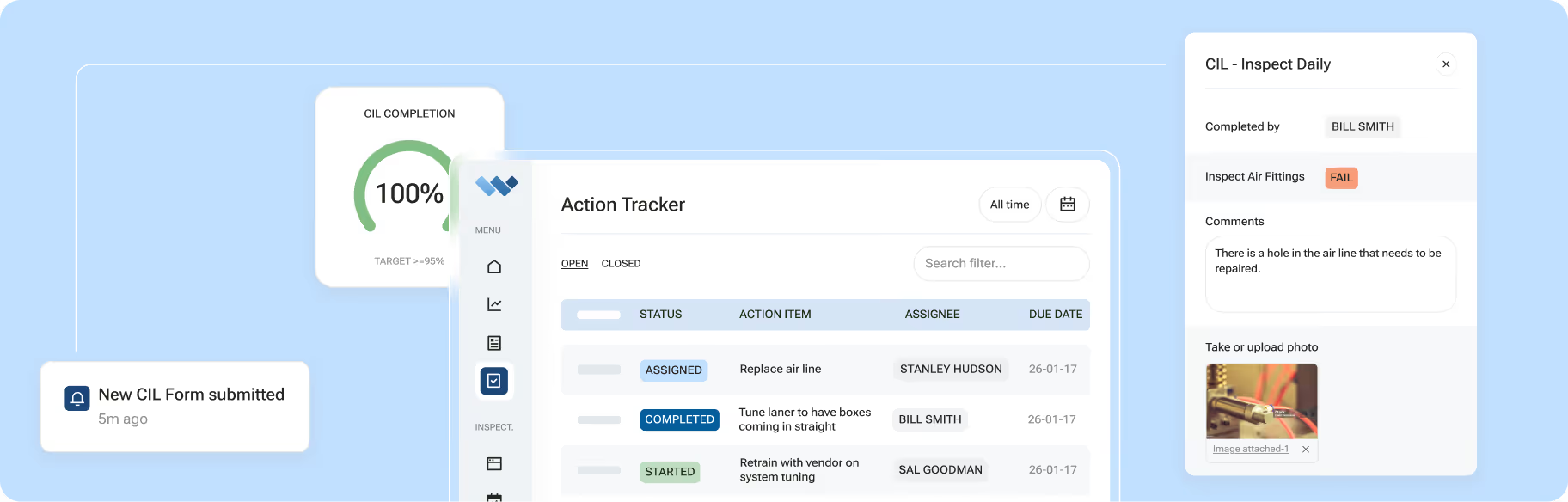
Weever is a connected frontline operations platform for process manufacturing plants. It delivers work instructions across autonomous maintenance, quality checks, sanitation (SSOPs), safety, and 5S programs, converting SOPs, OPLs, and centerline standards into guided digital workflows.
Operators follow each step on shared tablets, phones, or workstation devices. Along the way, they record measurements, add evidence, sign off on tasks, and report abnormalities. Basic checks are in place to flag an entry the moment something looks wrong.
However, Weever is more than just a work instruction delivery platform. It also manages what happens after operators complete a check or report an issue through its core Capture, Act, and Analyze model:

- Capture: Operators complete scheduled checks, enter measurements, add photos or videos, sign off on tasks, and report abnormalities
- Act: Failed checks and flagged defects trigger alerts, follow-up fields, deviation workflows, or an action item with an owner and due date.
- Analyze: Completion records, non-conformances, overdue actions, and operational trends flow into real-time dashboards by line, shift, site, or region
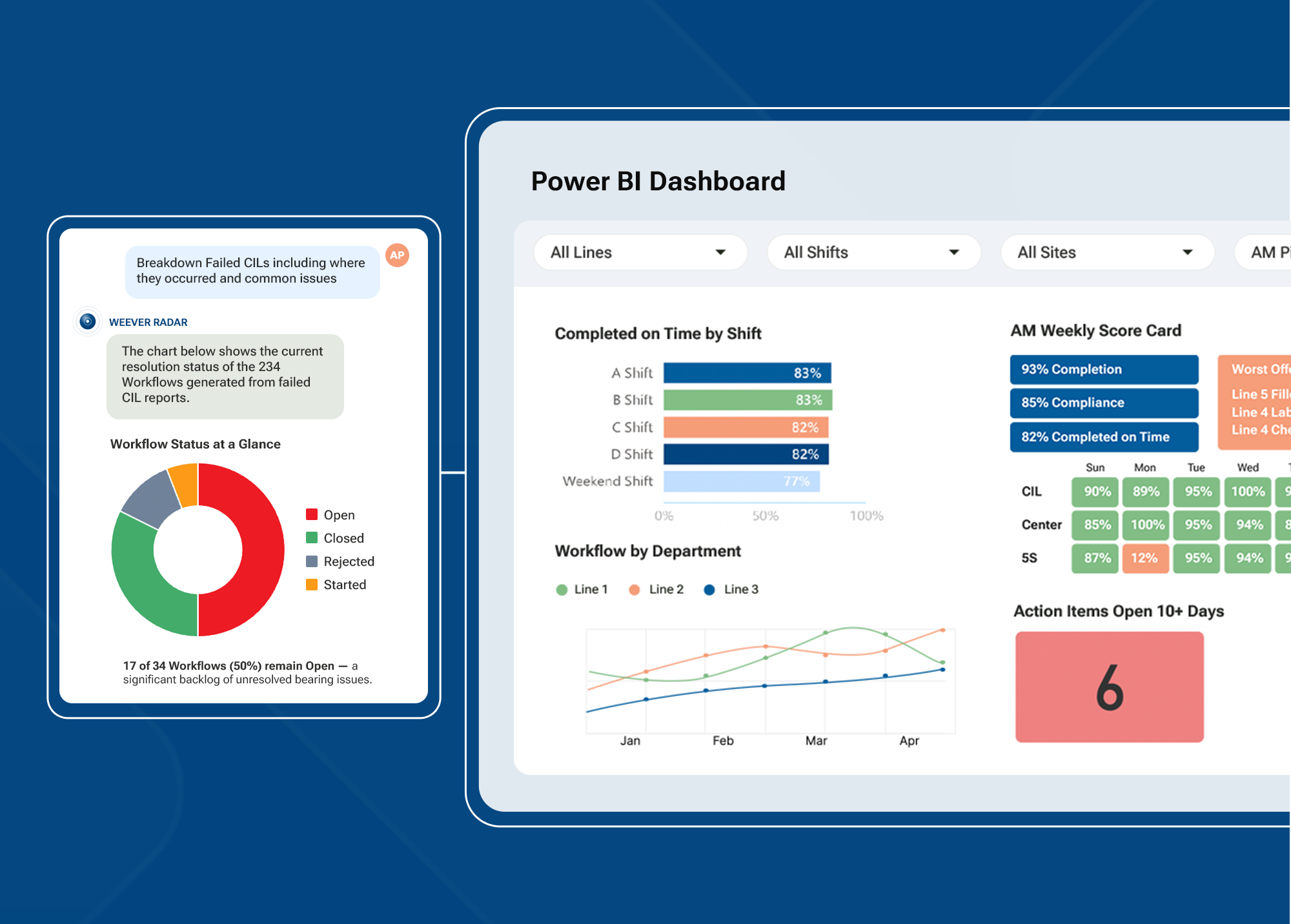
This Capture, Act, and Analyze model comes especially useful in food and beverage plants, where instructions involve sanitation SSOPs, line clearances, allergen changeovers, temperature or pH checks, and quality inspections.
The platform scales across sites, giving supervisors local visibility while plant and corporate leaders get cross-facility comparisons
While Weever doesn't ship a pre-built "allergen lockout" feature, plants can build one using the available tools. Conditional logic reveals a required cleaning checklist when an operator selects an allergen changeover. Required fields keep the operator from skipping steps. A supervisor sign-off closes out the record before the line restarts.
The same configurability applies to mandatory data constraints. Acceptable-value ranges can block a temperature or pH entry that falls outside the safe range. The reading gets flagged for review instead of passing through unnoticed.
This pattern repeats for non-conformance triggers. A defective batch seal, for example, can automatically notify the quality assurance team the moment it's flagged.
Key features
- Interactive Digital Workflows: Convert SOPs, OPLs, centerline standards, inspections, and checklists into guided workflows with embedded photos, videos, and visual instructions.
- Loop-Back Alerts: Notify the person who reported an issue once it is resolved, so operators can see that their input led to action.
- Frontline QR-Code Access: Let operators open the correct workflow from shared tablets, phones, or workstation devices by scanning a QR code.
- Conditional Logic and Data Controls: Use required fields, acceptable-value ranges, supervisor approvals, and follow-up steps to control how operators move through a workflow.
- Automatic Action Items: Created the moment a step fails or an issue is flagged, with no manual entry required.
- Weever Radar™: An optional AI layer that identifies patterns across observations, checks, and sign-offs, helping teams spot issues before they lead to downtime, quality holds, or audit findings.
- Site, Line, and Shift Views: Review data at the line, shift, site, or corporate level, giving each team the level of visibility it needs.
- Enterprise Integrations: Connect Weever with ERP, CMMS, Power BI, SSO, and other business systems.
- A.D.A.P.T. Onboarding: Follow a structured implementation process covering Assess, Digitize, Align, Prepare, and Tune, with hands-on support throughout rollout.
Pros
- Instructions connect directly to action tracking and analytics, not just viewing
- Multilingual support and offline-friendly design make the platform practical for distributed frontline teams
- One platform covers every major frontline program instead of a single point solution
- Multimedia guidance makes procedures easier to follow on the floor
- Photos, videos, signatures, and timestamps create a clear audit trail
- Revision control helps keep teams on the latest approved procedure
Cons
- Broader scope than a team that only wants a standalone instruction viewer
Why we picked this
We built Weever, so our placement on this list is naturally biased. But look past that, and Weever has a lot to offer as a work instruction tool and beyond, starting with configurability. Manufacturing plants can adapt workflows to their own operational requirements without relying on custom development.
Furthermore, conditional logic, validation controls, approvals, and automatic actions make it especially useful when failed checks require immediate follow-up. Weever also mirrors how teams already fill out paper checklists, so adoption tends to be fast with no retraining.
What customers are saying
- Monin, a global flavoring syrup manufacturer, saved 3–4 hours a day on data management and reporting, expanding to every North American facility within 5 months.
- Royal Canin, the pet food manufacturer, reached a 95% close rate on nearly 3,000 logged abnormalities, saving over 7,000 hours a year.
“Weever removed barriers, making it easy for associates to report issues, and the data’s accuracy gave everyone confidence in the process,” says Sergei Pinchuk, Supply Excellence Manager at Royal Canin.
- Adient, an automotive seating manufacturer, saw its 5S scores rise from 85% to 97%, with open issues dropping from 60+ a month to fewer than 5.
Pricing
Custom, site-wide pricing with unlimited users per site.
Free trial
Available via demo request.
Book a demo to see how Weever works for your floor.
2. SafetyCulture
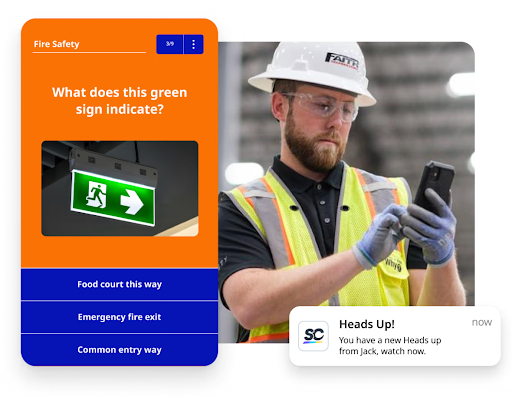
SafetyCulture (formerly iAuditor) is an audit-app platform with a large library of pre-built templates, including work instruction checklists.
Its strength is thousands of templates across safety, quality, and general inspections. Where it's thinner is depth, as work instructions here function as one checklist type among many, rather than being tied natively into a broader maintenance, sanitation, or 5S action-tracking system the way Weever's are.
Key features
- Template Library: Access thousands of pre-built checklists and forms covering safety, quality, and general inspections, so setup starts from a template instead of a blank page.
- QR Code Issue Flagging: Flag a problem on the floor, document it with photos and video, and share the report with the team immediately.
- Custom Report Layouts: Customize and brand inspection reports, choosing what content and structure to show for different audiences or use cases
Pros
- Offers a free version for teams up to 10 users
- Very large template library for fast setup
- Well-established, widely reviewed platform
Cons
- Updating existing inspection templates or report layouts can be complex
- Less native connection between an instruction and a broader program like AM or sanitation
Why we picked this
SafetyCulture is a reasonable fit if audits are your main need and instructions are secondary. Manufacturers running dedicated programs like AM, MSS, or 5S find the action-tracking layer thinner than a platform built around those programs from the start.
Pricing
Free for teams of up to 10 users. The Premium plan starts from $24/user/month billed annually ($29/month billed monthly).
Free trial
30-day free trial on paid plans.
3. Poka
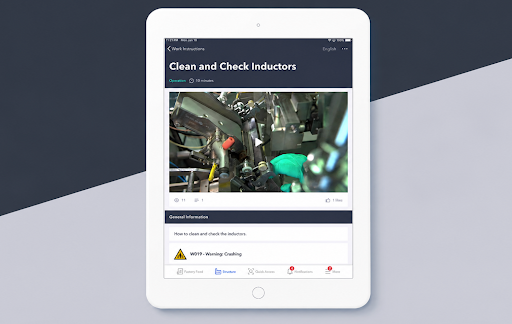
Poka is a connected worker platform built around Training Within Industry (TWI)-style lessons that function as Poka's version of work instructions, complementing standard operating procedures. Over a thousand companies use its lesson format to build and share standards across teams, with multimedia support and built-in auto-translation.
Poka handles the authoring and sharing side well. Where it's lighter is on follow-through; assigning and escalating a failed step as an owned action across a broader program isn't the platform's core strength.
Key features
- Multimedia Lessons: Build standards using video, images, and annotations, so instructions show the task instead of just describing it.
- Auto-Translation: Lessons adapt across languages automatically, reducing the manual work of maintaining separate versions for multilingual crews.
- QR Code Access: Operators scan a code at the workstation to pull up the relevant lesson, without a personal login.
Pros
- Strong multimedia and auto-translation for multilingual crews
- TWI-based lesson format is well-suited to skills training
- Established connected worker platform with broad manufacturing use
Cons
- Integrating into a broader manufacturing environment is harder when other systems are already the primary data source
- Action tracking is less central than in a platform built around it
Why we picked this
Poka is a strong choice for manufacturers whose main need is building and translating training-style lessons across a multilingual floor.
Pricing
Subscription-based pricing available on request.
Free trial
Not publicly listed.
4. RZ Software (Redzone)
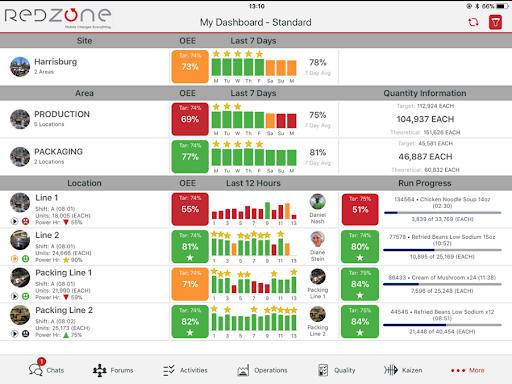
Redzone combines digital work instructions with production management, shift communication, and workforce collaboration tools. Its built-in lean tools give teams structured ways to review recurring production problems, while shift-based scoring keeps performance discussions tied to each crew.
Key features
- Digital Huddles and Lean Tools: Built-in templates for daily huddles, Pareto charts, and 5 Whys structure how teams work through recurring problems
- Shift-Based OEE Scoring: Line performance is scored and reset by shift, giving each crew a comparable target instead of one running daily number
- Shift Handoff Notes: Crews can log notes and context at the end of a shift so the next team starts with a clear picture of what happened
Pros
- Keeps production, communication, and work instructions in one platform
- Production dashboards provide line and shift performance at a glance
- Mobile-first design built for shop-floor use
Cons
- Initial infrastructure setup can be time-consuming to get right
- Data customization for compliance-specific needs adds extra effort
Why we picked this
Redzone is a strong choice for manufacturers who need to combine digital work instructions with workforce training and lean problem-solving tools.
Pricing
Custom pricing depends on the number of sites, production lines, users, and modules you need.
Free trial
Not publicly listed.
5. Augmentir
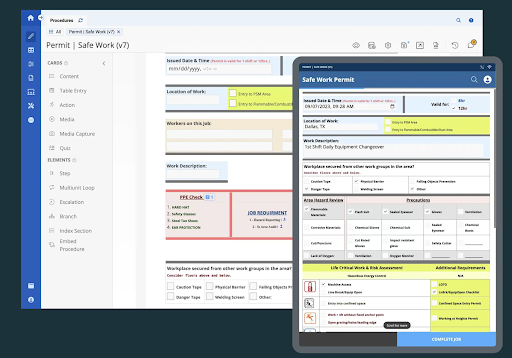
Augmentir is an AI-powered connected worker platform that adapts digital work instructions to an individual worker's proficiency, recency, and certifications. It supports AR-enabled smart glasses in addition to phones and tablets, and layers in remote expert support.
It also includes an Industrial AI Agent Studio for building and deploying custom no-code AI agents across frontline manufacturing workflows.
Key features
- AI-Personalized Guidance: Instructions adapt automatically based on a worker's proficiency, recency, and certifications, rather than delivering the same standard to everyone.
- Remote Expert Support: Live video and AR annotation let an expert guide a worker through a problem from anywhere.
- AR and Wearable Support: Instructions can be delivered through smart glasses in addition to phones and tablets, keeping hands free during the task.
Pros
- Adapts guidance based on operator proficiency and certifications
- Supports AR-enabled devices and remote expert assistance
- Includes tools for building custom industrial AI agents
Cons
- Some users feel the UI and overall design could be more polished
- Reported slowdowns on very large or complex process tasks
Why we picked this
Augmentir is a strong fit for manufacturers that need adaptive instructions, AR support, and AI tools for workers with different skill levels.
Pricing
Not published; enterprise sales process.
Free trial
None publicly listed.
6. Intellect
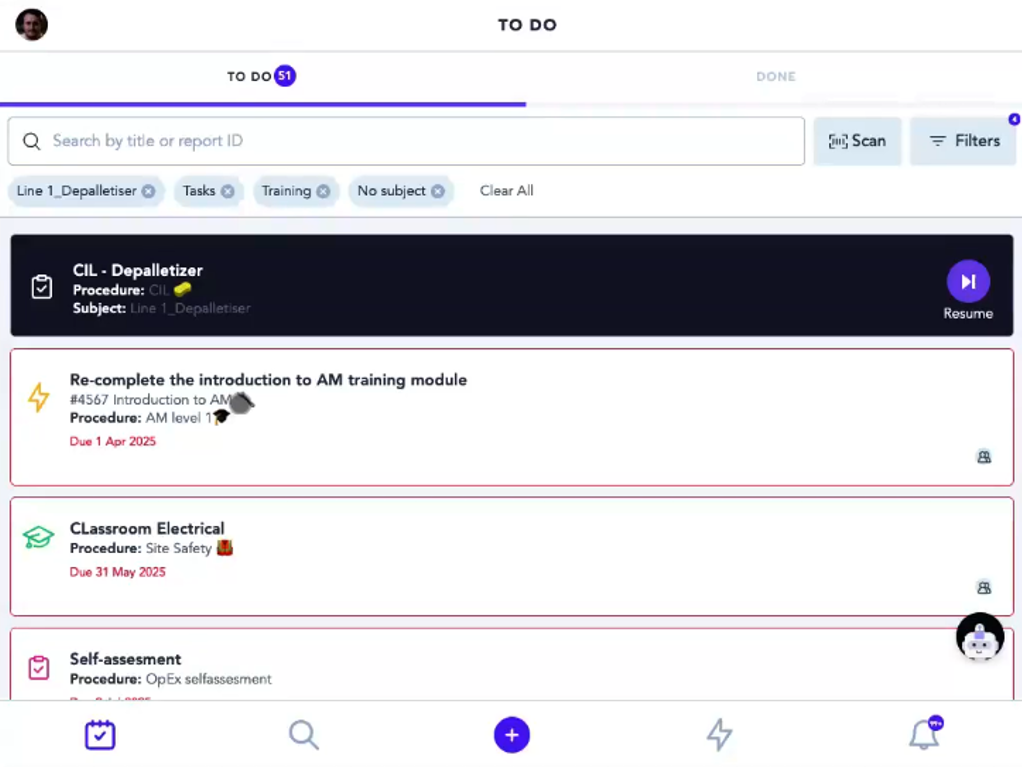
Intellect is an AI-powered quality management system built for FDA, ISO, and GxP compliance, with work instructions as one of 25+ pre-built applications alongside document control, CAPA, and audit management. It's a good fit for pharmaceuticals, medical devices, and other heavily regulated manufacturers.
Key features
- 25+ Pre-Built Applications: CAPA, document control, audits, and employee training all run alongside work instructions in one suite.
- Connected Compliance Records: Document versions, training completions, CAPAs, and audit findings all reference each other automatically, so a logged nonconformance traces back to the procedure version involved and who was trained on it.
- Deep Compliance Tooling: Built-in support for FDA 21 CFR Part 11 and GxP requirements keeps regulated environments audit-ready.
Pros
- Strong regulatory and compliance depth for FDA/ISO/GxP environments
- Broad application suite beyond just work instructions
- Ties document control, training records, and CAPA together natively
Cons
- Requires extensive configuration before the platform is fully ready to use
- User licensing and support fees can climb quickly if opened to the full floor
Why we picked this
Intellect's ISO certification and coverage across aerospace, automotive, medical device, and pharma make it a reasonable shortlist candidate for manufacturers with multiple regulatory frameworks.
Pricing
- Core: Starting at $26,000/year
- Operational Control: Starting at $32,000/year
- Enterprise Transformation: Starting at $47,000/year
- Tailor Your Intellect Platform: Custom pricing
Free trial
Available on request.
7. Dozuki
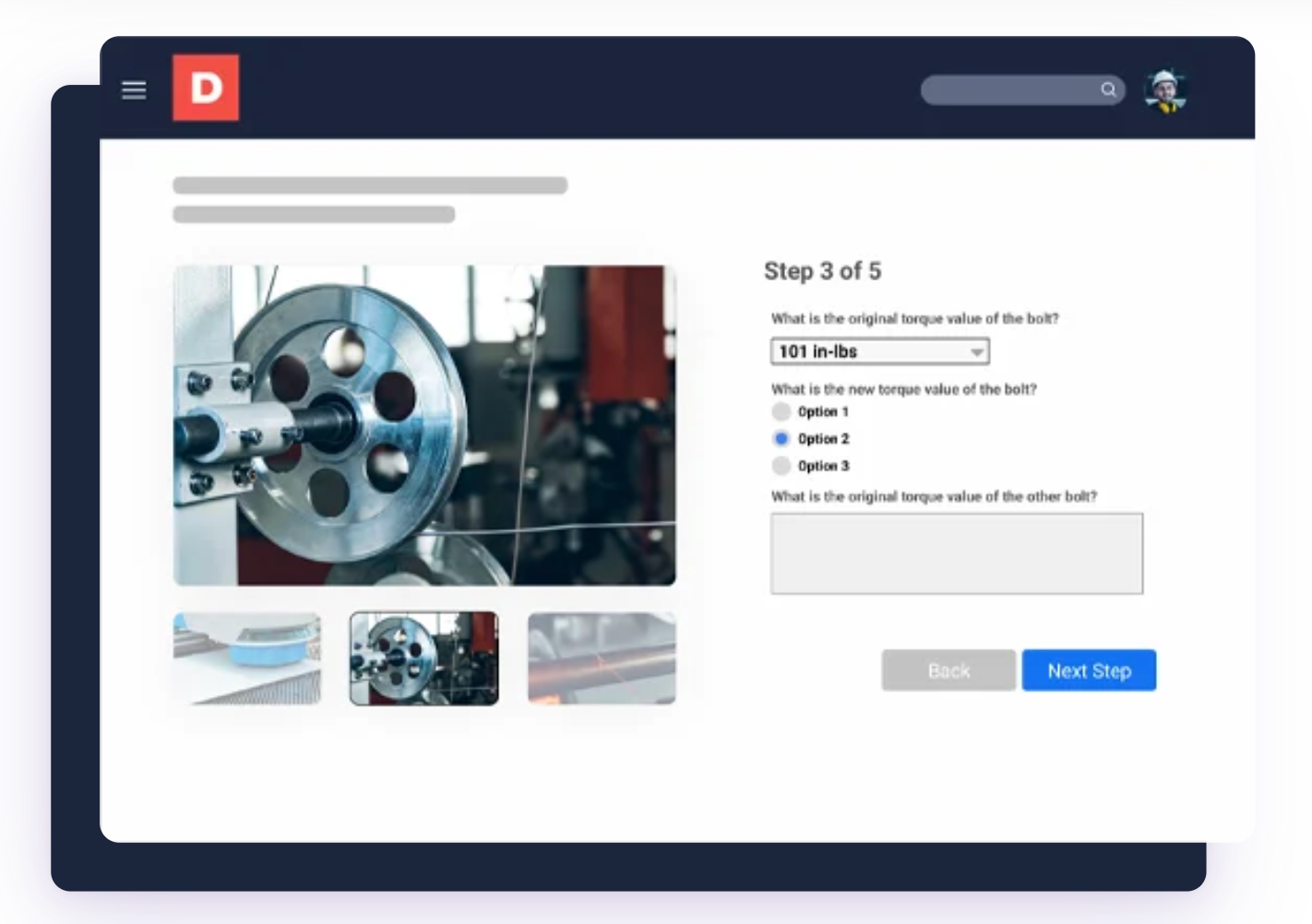
Dozuki is a manufacturing-specific work instruction platform popular in heavy equipment and pharma/biotech. It's built around reducing changeover times, onboarding time, and labor costs through standardized, well-authored instructions.
It's a focused tool for authoring and training. It's lighter on action-tracking and cross-program analytics. Dozuki is built to get the instruction right and get people trained on it, rather than to be the system that tracks everything that happens after.
Key features
- Digital Document Control: Manage SOPs, work instructions, and one-point lessons with centralized version history and approval workflows.
- In-Line Data Capture: Quality checks are built into the instruction itself, capturing data as the task happens rather than afterwards.
- Standards Training: Training is tied directly to each SOP, so learning and execution live in the same place.
Pros
- Manufacturing-specific with strong traction in heavy equipment and pharma
- Free templates available in PDF, PowerPoint, and Excel formats
- Strong document authoring and standards training tools
Cons
- Reporting is limited in scope and depth
- Lighter on cross-program action tracking than a broader platform
Why we picked this
Dozuki's strongest track record is in heavy equipment and pharma/biotech industries where changeover and onboarding time are measured closely.
Pricing
Available upon request.
Free trial
No free trial for the platform itself; free templates are available separately in PDF, PowerPoint, and Excel formats.
8. Parsable
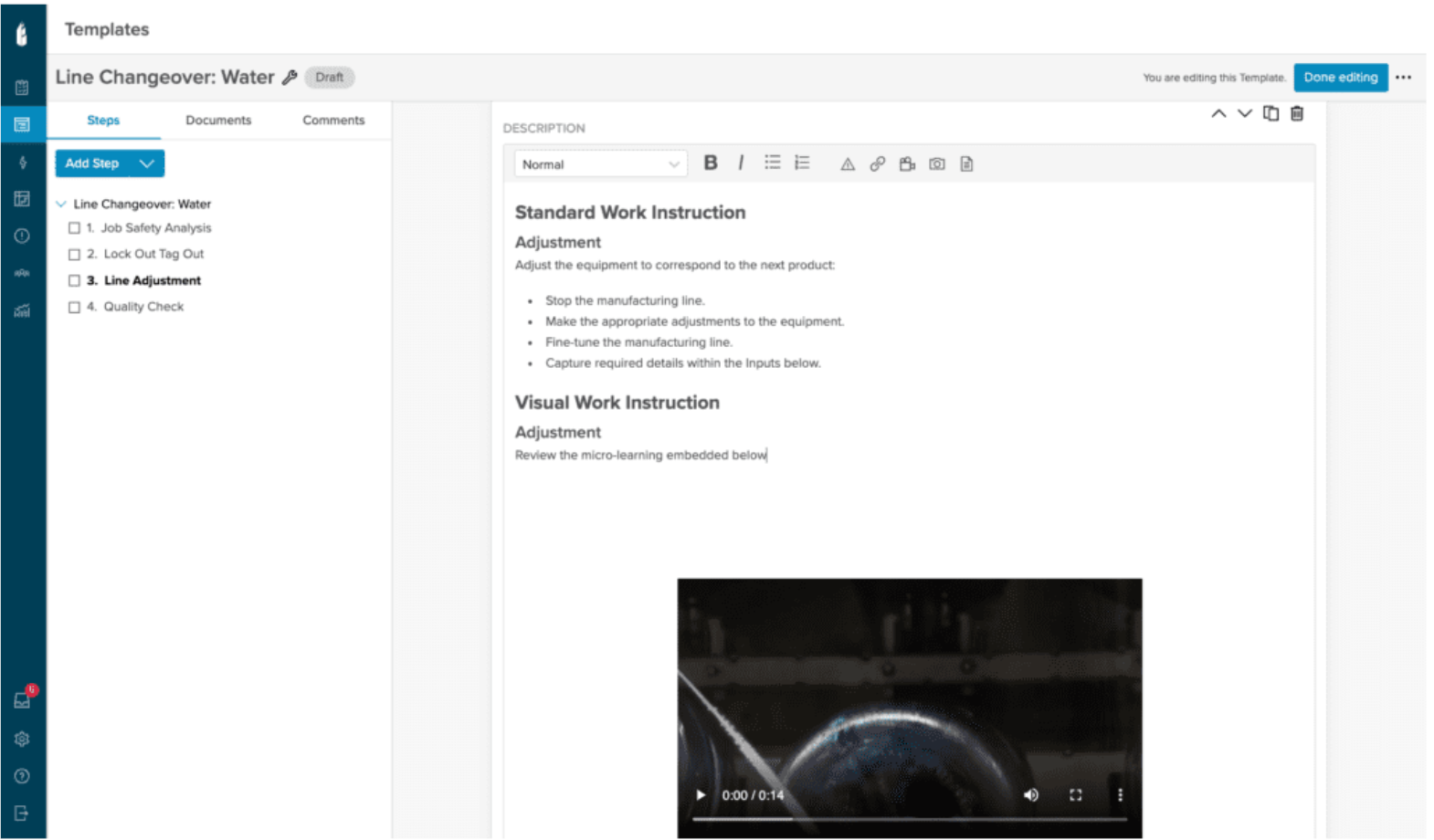
Parsable's Connected Worker platform digitizes paper-based forms, checklists, and SOPs through a no-code web admin portal, producing digital work instructions and one-point lessons. It's built for large industrial organizations, supporting real-time collaboration between frontline workers and remote experts inside the mobile app itself.
The solution is often positioned as one of the stronger options for digitizing complex SOPs with conditional logic and compliance traceability.
Key features
- IoT & Machine Connections: Pull data directly from ERP, MES, CMMS, and IoT-enabled equipment into the instruction itself.
- Real-Time Expert Collaboration: Frontline workers connect with local or remote experts directly inside the app to resolve issues faster.
- In-App Guidance: Provide procedural and training materials within the workflow to support efficient task completion.
Pros
- Strong real-time collaboration between frontline workers and remote experts
- Broad language support across 17+ languages for global operations
- Uses AI analytics to identify trends and anomalies
Cons
- Scheduling capabilities are on the lighter side
- Enterprise-focused setup, with a more complex initial configuration for larger templates
Why we picked this
Parsable is a common name in enterprise industrial settings specifically for its emphasis on remote expert collaboration built into the instruction itself.
Pricing
Not published
Free trial
Parsable has no free trial or free plan, but offers a 30-minute Jump Start Session and a custom demo.
9. Leading 2 Lean (L2L)
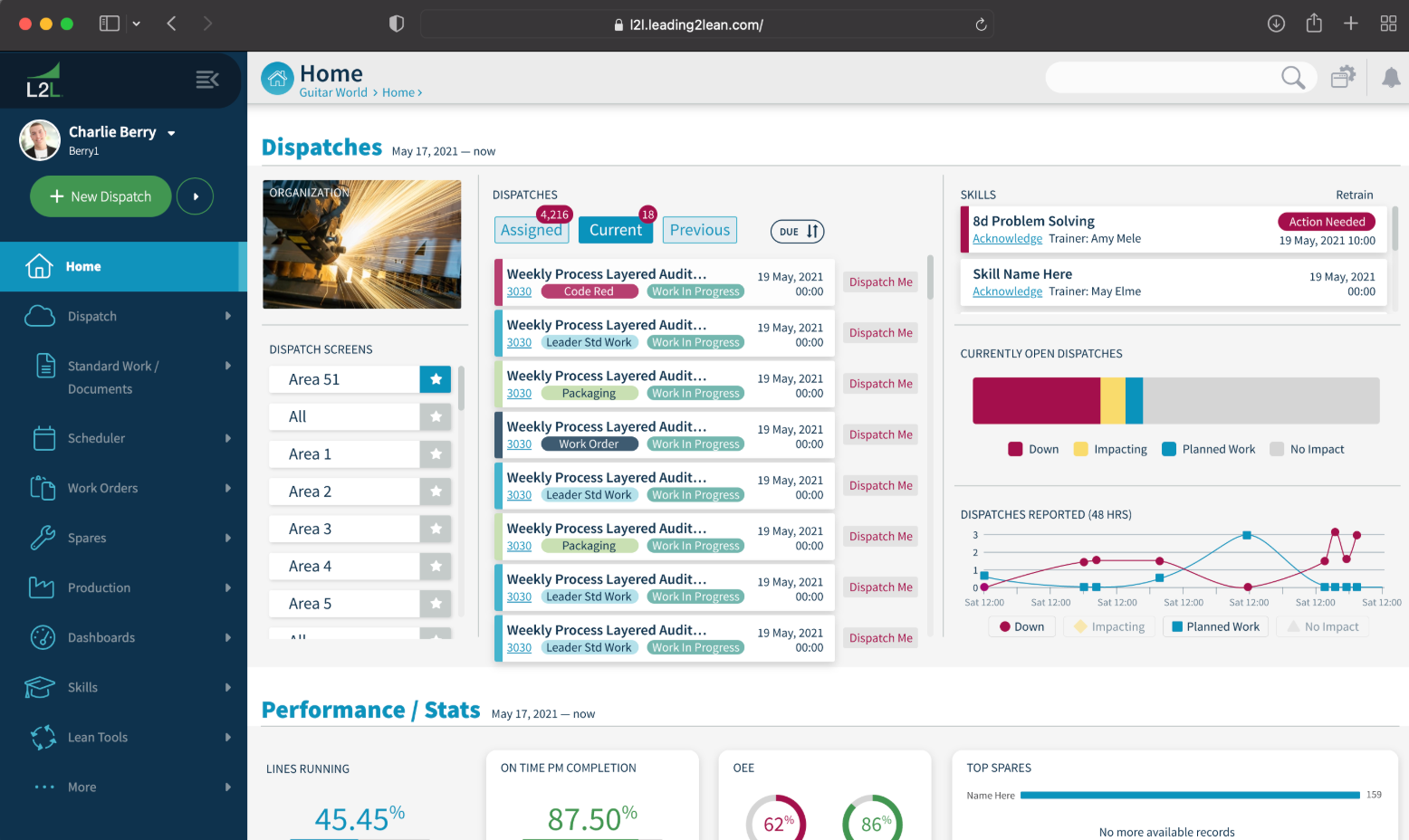
L2L's Connected Workforce Platform folds digital work instructions in as one module alongside production, maintenance, and quality tools. Its authoring tool is the same drag-and-drop system formerly known as SwipeGuide.
The company brings dispatch, maintenance, production, and no-code app building (L2L Studio) under one roof. Instructions sit as one piece of that larger system, with pricing quoted case by case.
Key features
- Maintenance Dispatch Integration: Work orders and maintenance tickets link directly to the relevant instruction.
- Training Assignments: Assign instruction-based learning by role, machine, or required skill.
- Live Skills Matrix: Track worker competence on specific machines and processes, tied directly to training and instructions.
Pros
- L2L Execution AI surfaces root causes and recommends next actions
- Reported fast time-to-value, with measurable impact in as little as 16 weeks
- Live skills matrix ties training directly to instruction completion
Cons
- Work instructions and checklists offer limited support for adding text or images to specific fields
- Limited video and media capacity makes it harder to build long-form training modules
Why we picked this
L2L is a strong fit if you want work instructions that also support employee training, skills tracking, and faster onboarding.
Pricing
Custom, quoted based on business needs.
Free trial
Not publicly listed
10. VKS (Visual Knowledge Share)
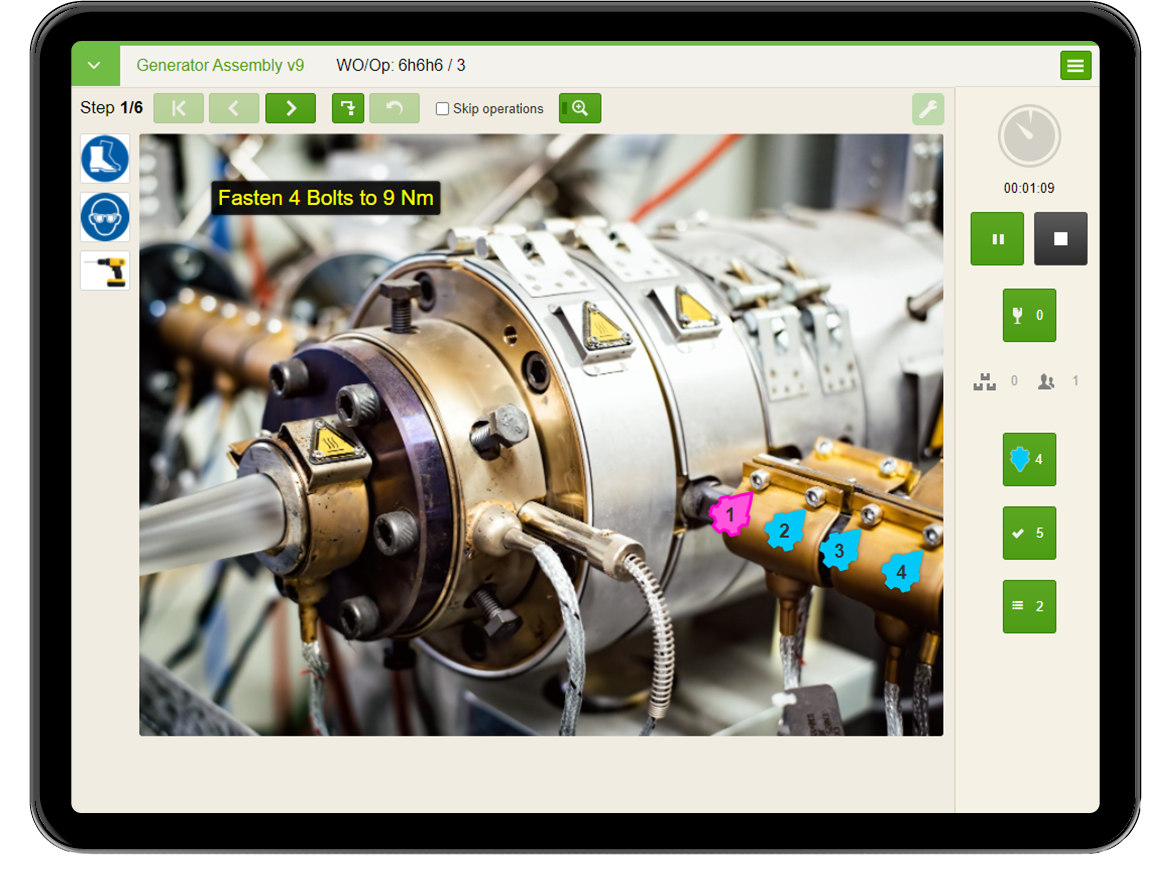
VKS is a digital work instruction platform that helps manufacturers centralize operational knowledge and guide operators. It supports shop-floor data collection through annotations, signatures, and IoT connections, helping improve instruction adherence and productivity.
Like several other instruction-first tools on this list, its core strength is the instruction and the data capture around it, rather than being the system of record for action tracking.
Key features
- Interactive Annotations: Update templates with visual markups, and push mass updates across instructions at once.
- Guided Visual Instructions: Build step-by-step procedures with images, videos, and visual cues for operators.
- Template Mass Updates: Apply approved changes across multiple instructions without editing each one separately.
Pros
- Shortens operator training time through visual instructions
- Long free trial window: 30 days online plus a 60-day on-site pilot
- Built specifically for manufacturing environments
Cons
- Platform can be complex to adapt to specific business needs
- Editor limits creative control, prioritizing standardized styling over flexibility
Why we picked this
Its extended trial window, 30 days online plus a 60-day on-site pilot, gives manufacturers an unusually long runway to test fit before buying.
Pricing
Available upon request.
Free trial
30-day free online trial plus a 60-day on-site pilot
How to choose the right work instruction software for manufacturing
The following factors help distinguish platforms that improve shop-floor execution from those that primarily digitize existing documents:
1. Configurable without a development team
Your team should be able to create and update standards without submitting an IT request or relying on a developer. This keeps instructions current as processes, equipment, and requirements change.
2. Action tracking, not only instruction delivery
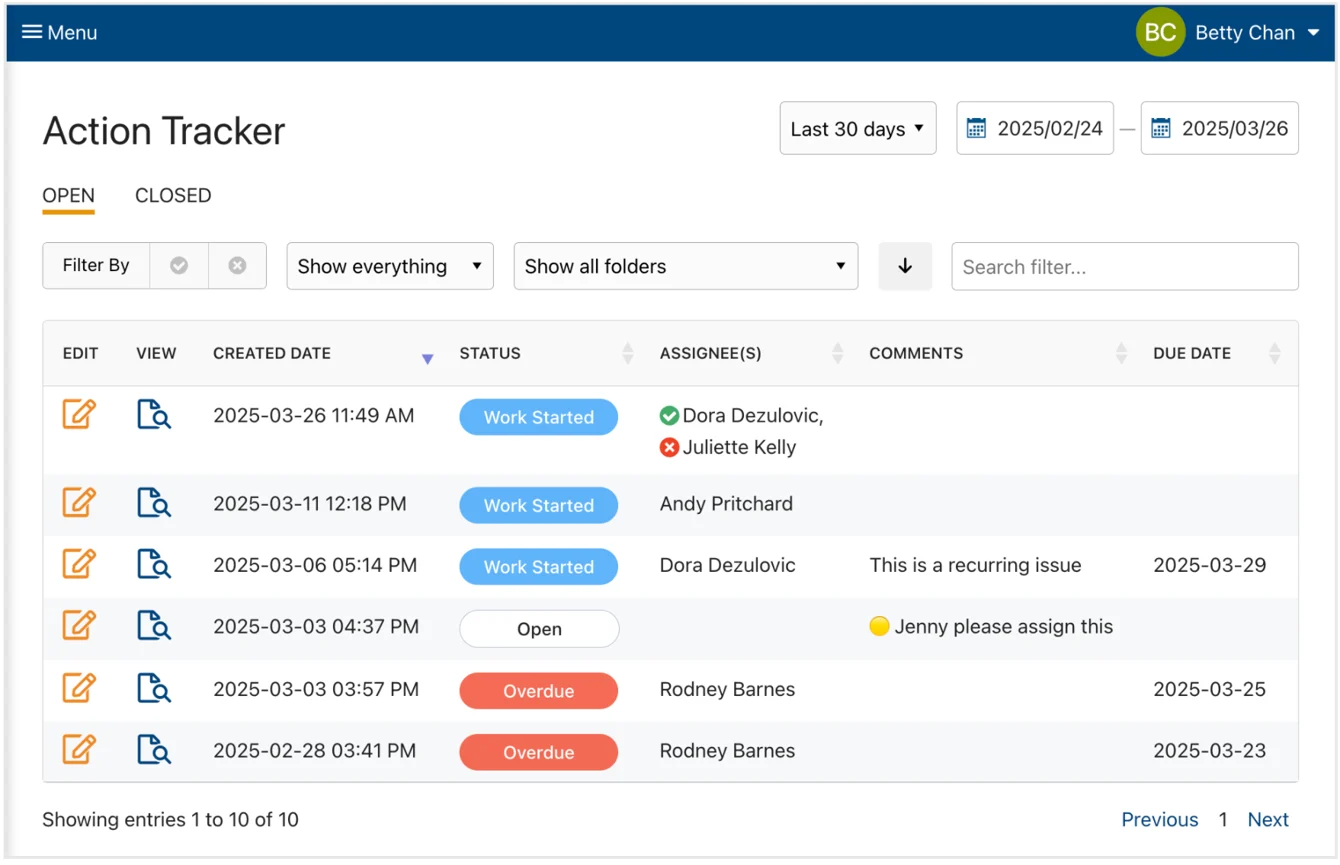
Most platforms support instruction authoring and delivery. Only a few turn a failed step or flagged defect into a tracked action. Check whether the platform can assign an owner, set a due date, send reminders, escalate overdue work, and confirm closure without relying on another system. This is one of the clearest differences between basic work instruction tools and platforms that support closed-loop execution.
3. Built-in evidence capture
Photos, videos, signatures, timestamps, and required fields should be captured within the instruction itself rather than through a separate process. This provides clear evidence that the work was completed and reduces incomplete or inaccurate records.
4. Frontline accessibility
Operators need QR-code access through shared tablets or workstation devices rather than individual accounts. Also consider browser-based access, offline functionality, simple navigation, and multilingual support. These capabilities become especially important when operators share devices, work in areas with limited connectivity, or speak different languages.
5. Integration with existing systems
Decide whether you want work instructions to sit within a broader QMS, OEE, maintenance, or connected worker platform, or operate as a focused tool that connects with your existing systems. Look for reliable integrations with your ERP, CMMS, MES, BI, and SSO setup so instruction data stays connected to the rest of the operation.
6. Pricing model and rollout size
Compare per-user, per-site, and unlimited-user pricing based on how broadly you plan to deploy the platform. Per-user pricing works for limited pilots or smaller teams, but costs rise as access expands across the floor. Site-wide or unlimited-user pricing is often more practical for larger rollouts, although vendors do not always publish pricing upfront.
7. Compliance requirements
Manufacturers in pharmaceuticals, medical devices, and other regulated industries need FDA 21 CFR Part 11 support, GxP controls, audit trails, version control, and electronic signatures. For regulated operations, these compliance requirements should carry more weight than general ease of use or entry-level pricing.
8. Trials and pilots
Use a free trial, pilot, or guided proof of concept to test the platform with real operators, instructions, and workflows before committing. A tool that performs well in a controlled sales demonstration can work differently on a busy production floor, so practical testing is an important part of the selection process.
Find the right work instruction software for your floor
A digital instruction is better than a laminated one taped to a machine. But the instruction itself was never really the hard part; knowing what happened when someone skipped a step is. Most platforms on this list get the instruction right. Few of them close the loop when something goes wrong.
Book a demo to see how Weever connects work instructions to tracked, closed-loop action across every program on your floor.
Frequently asked questions
1. How much does work instruction software cost for a manufacturer?
Pricing varies widely across this list, from free tiers for small teams to enterprise contracts in the tens of thousands per year. Site-wide platforms often price per site rather than per user, while QMS-style platforms tend to run five- and six-figure annual contracts.
2. How long does it take to implement?
Timelines depend on scope. A single-line pilot with a focused instruction tool can go live in weeks. A platform folded into a broader QMS or connected workforce system, with integrations to ERP or SAP, typically takes longer to configure and roll out.
3. Is work instruction software the same as an MES?
No. A manufacturing execution system (MES) manages production scheduling, tracking, and data across the plant. Work instruction software focuses specifically on guiding an operator through a task. Some platforms overlap by combining both, but they solve different problems.
4. Does it require constant Wi-Fi on the shop floor?
Not always. Some platforms are built to work offline and sync data once connectivity is restored, which matters in older facilities or areas with weak signal. This varies by vendor, so it's worth confirming during evaluation.

.webp)

Spend Less Time on Admin. More Time Improving Operations.
See how Weever automates data entry, reporting, and action items so you can focus on improvement not admin.