
How to Digitize Paper Forms in Manufacturing to Reduce Admin Work and Labor Costs
Table of contents

Share:


If you're looking at how to digitize paper forms in your manufacturing plant, we bet you're probably tired of wasting time and budget on the same issues — audit findings that keep coming back, corrective actions that never close, and quality or safety issues that surface too late to prevent them.
But what most facilities don't realize is that the approach you take to digitization determines whether you can actually solve these problems.
Done right, you get real-time visibility into what's happening on the floor, automatic follow-up on every issue, and a significant reduction in the documentation gaps and missed corrective actions that manual processes create.
Done wrong, you invest months in a rollout that doesn't fit how your plant actually operates, which creates more workarounds than the paper process you were trying to replace.
That's why we want to make sure you get it right the first time. This guide walks you through digitizing your paper forms without disrupting your operations, so you come out the other side with less admin work, lower labor costs, and programs that actually move the needle on safety, quality, and continuous improvement.
Which paper forms should your manufacturing plant digitize?
There are likely many forms in your organization that you could digitize. But for this article, we’re focused on the ones your frontline uses every shift to document all the work you’re doing: Master Sanitation Schedule logs, 5S audit sheets, AM/CIL inspection forms, BBSO observation cards, quality inspection and deviation records, shift handoff records, corrective action logs, and more.
When digitized correctly, these forms will have the greatest impact in reducing admin work and labor costs across your facility. But success depends on choosing an approach that does three things:
- Reliably captures information at the point of work
- Enables you to take action, automatically delivering the right information to the right people, in a way that replicates how your team operates
- Produces a complete picture of what’s happening across your programs in real time, so you can spot issues sooner and improve faster
Getting all three right is what separates a digitization project that actually solves the paper problem from one that doesn't.
How to digitize paper forms without disrupting manufacturing operations
The most common mistake we see when manufacturing plants try to switch from paper to digital is choosing a tool that doesn’t work for the floor.
In our experience, most digitization tools that claim to work for manufacturing don't actually work for the people on the floor. That's because they use generic templates and locked workflows that can't accommodate the unique structure of your programs. When a tool doesn't fit the way you and your team operate, it forces everyone to either rebuild processes around the software or find workarounds just to get things done.
That's where the real problems start. When digital forms lack the necessary fields, for example, operators can't document the required information. So they'll either skip the step, record the information somewhere else, or go back to the paper forms they used before. In no time, there are two systems running side by side, making the overall workload heavier, and the data arguably less accurate because it's now scattered across multiple digital and paper formats.
We don't think this makes any sense. That's why the steps below demonstrate a better approach: digitizing the processes your teams already follow rather than redesigning them to fit rigid templates and workflows. When everyone is doing the same work they've always done, just without the paper, adoption happens naturally without disrupting operations, and the problems that prompted the switch actually start to disappear.
5 Steps
How to digitize paper forms without disrupting manufacturing operations
Identify the program you want to focus on
Map how your current paper-based program runs
Digitize your paper forms
Remove the friction around accessing and completing digital forms
Build automatic follow-up into your workflow
Step 1: Identify the program you want to focus on
While the temptation might be to digitize all of your forms at once, we advise against this. Too much change in a short period of time will only increase the potential for failure. Instead, start with one program that lets you prove the model, build internal confidence, and create a replicable approach for the next one. To do this, we recommend beginning with a program that generates significant admin and labor costs. Here’s how to assess this:
- Admin Burden Programs that require the most manual effort after paper forms are submitted — collecting sheets, re-entering data into spreadsheets, tracking down missing information, and following up on action items that should have an owner.
- Labor Cost Programs where that admin burden falls on your most expensive people. A CI Manager spending two hours a day reconciling AM inspection data, or a sanitation supervisor chasing corrective actions by email. This is a significant and recurring cost that a digital workflow could eliminate.
Step 2: Map how your current paper-based program runs
Once you’ve identified a starting program, map exactly how it runs on paper. The goal is to understand it well enough to replicate it digitally, not to change it. Trying to redesign and digitize simultaneously will only complicate the process and stall the rollout before it delivers any value.
The mapping should cover the full workflow, not just the forms. Here’s what that might look like for each program:
- MSS: Understand which tasks get assigned to which crews, at which frequencies, across which zones, and what happens when a task fails or is missed. Who gets notified? Who assigns the follow-up?
- 5S: Identify how audits are scheduled, how scores are calculated, and how findings are currently assigned, reviewed, and tracked to closure.
- AM: Know the inspection sequence tied to specific equipment, who reviews completion, and who in maintenance is notified when a check fails, or a defect is found.
- BBSO: Learn how observations are currently submitted, how at-risk findings get routed to the right supervisor, and how corrective actions are currently assigned and tracked.
The answers to those questions will allow you to replicate the workflows in your digital system. When you can build the right notifications, assignments, and follow-up steps into an automated tool, you’ll be able to eliminate the manual coordination that paper-based processes require.
Step 3: Digitize your paper forms
With your program mapped, build your digital forms to match it exactly, using the same field names, task descriptions, and terminology your teams already recognize. Also, make sure to include the elements that make digital forms more reliable than their paper equivalent:
- Required fields so operators can’t skip steps
- Dropdowns instead of free-text entries that become illegible or inconsistent
- Photo and video capture so operators can attach evidence at the point of work
- Automatic timestamps and user IDs, so you don’t need to rely on someone to write them in
These elements will ensure your digital forms capture clean, structured data from the start, rather than inheriting the same challenges as paper forms.
Step 4: Remove the friction around accessing and completing digital forms
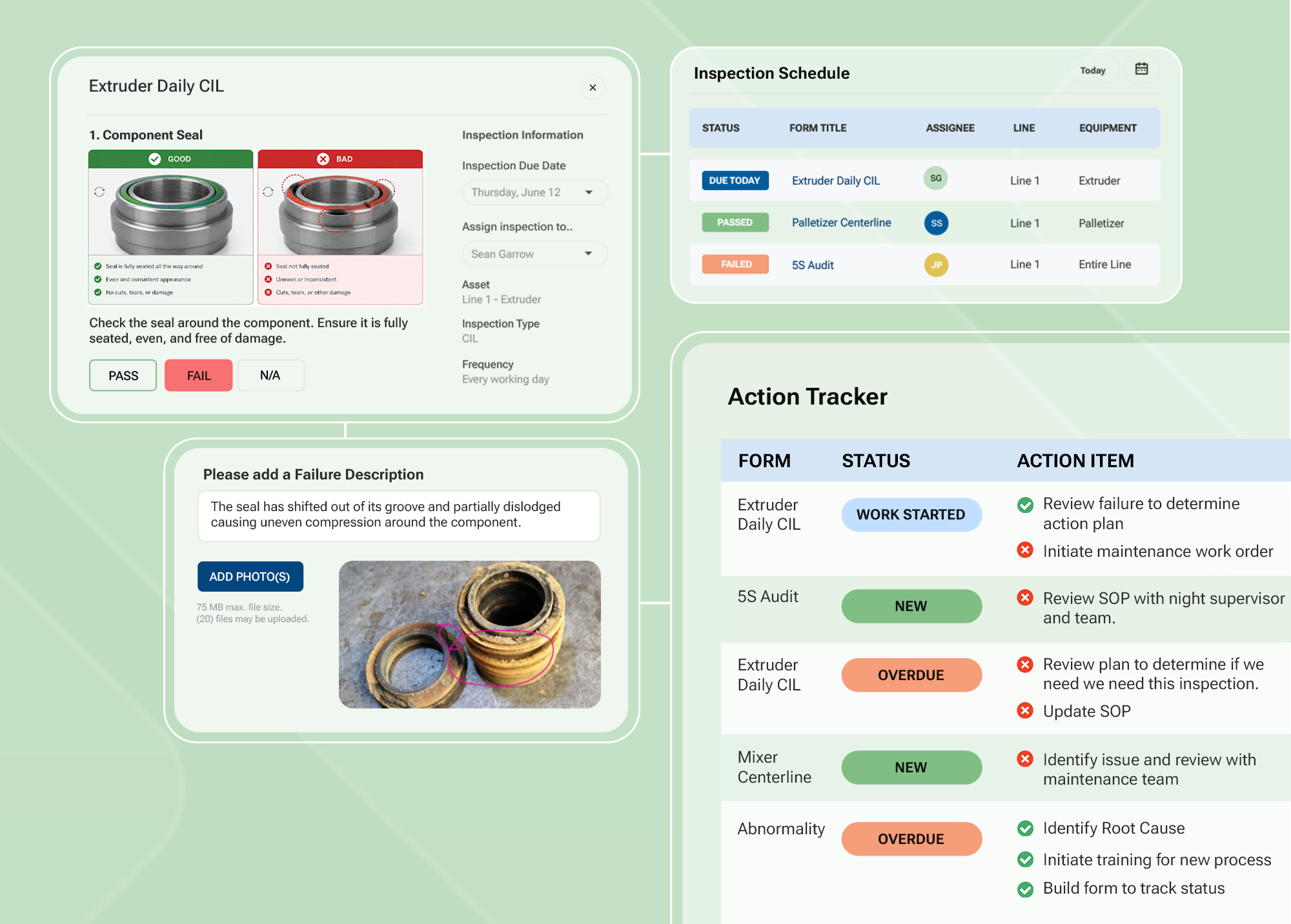
If operators have to remember a login or track down a device before they can complete a form, that friction will cause them to find workarounds. Digital forms also need to be accessible at the point of work and easy for anyone to fill out. From there, make sure to take advantage of digital form capabilities that simplify input, including:
- Adding conditional logic to make data entry more intuitive by showing operators only the fields relevant to what they’re doing at that moment.
- Embedding visual instructions directly in the form to reduce the need for supervisor explanation and support operators who are new to a task.
- Use multilingual support and voice-to-text input to ensure language barriers don’t prevent participation, particularly for third-party crews or non-English-speaking workers.
The easier the form is to access and complete, the more consistently teams will use it, and the more reliable the data it will produce.
Step 5: Build automatic follow-up into your workflow
Once you’ve set up your digital forms, configure your workflow to:
- Automatically create corrective actions with a named owner and a due date
- Notify the right supervisor without anyone having to send an email
- Track issues to completion
- Escalate any overdue items
Your routing logic from Step 2 is already documented. You just need to build it into the system so it happens automatically.
Once your digital forms are running properly and you can see the impact in reduced admin time, corrective action closure rates, and completion data you can trust, use the same process to expand to the next program. This approach will ensure you can digitize your forms systematically to maximize adoption and success.
What digitizing your paper forms saves in admin time and labor costs
Most manufacturing leaders we've talked to have never added up what paper actually costs them. But without this information, it's easy to underestimate how much digitizing your forms will save, and hard to build a case for change.
The biggest challenge to calculating these costs is that they don't appear as a single line item. In our experience working with mid-size manufacturing plants, paper supplies alone run around $60,000 a year — roughly 200,000 sheets once printing, controlled storage, and proper disposal are included. But the higher costs are the ones buried in salaries and working hours that paper-based systems create at every stage of your process. Here's where those costs actually live.
The hidden cost of paper
What digitizing your forms saves in admin time and labor costs
Admin overhead
14 hrs
per week, per sanitation manager — on scheduling, managing, and reporting forms
Re-entry errors
40%
of calibration records contain errors in paper-based two-step processes
Follow-up coordination
933 hrs
per year lost to manual follow-up — 23 full working weeks at $32K–$56K in labor
Audit prep
40 hrs
lost per audit cycle pulling binders, reconciling spreadsheets, and chasing corrective actions
One manufacturer absorbed $200,000/year in product holds tied to paper documentation gaps. After digitizing with Weever, that number dropped to zero. Sources: Weever Sanitation Gap Report, 2026; Quality Magazine; ScienceDirect.
Admin overhead before and after every shift
The paper form admin burden starts before operators even pick up a pencil. Someone has to print and distribute forms ahead of every shift, ensure packets are complete, and make sure the right forms are at the right location. After they're submitted, someone has to collect them, check them for completeness, and store them in a way that makes them retrievable for audits.
In sanitation alone, managers spend an average of 9.2 hours per week on scheduling and managing forms and another 4.75 hours on reporting, totaling nearly 14 hours per week [Weever Sanitation Gap Report, 2026]. These are low-value tasks that a digital system could handle automatically.
Version control adds another layer of administrative burden (and risk) that most plants don't factor in. When a field changes or a spec is updated, operators using outdated forms continue to capture data against the wrong standard. By the time someone notices, the records are already non-compliant, which is exactly the kind of documentation gap that surfaces as an audit finding.
Data re-entry errors and the skilled labor they consume
Every paper form that gets submitted creates a second job: someone has to check it for legibility, re-enter the data into a spreadsheet or system, and reconcile any gaps or errors they find along the way. That work falls to your most skilled people — CI Managers, quality leads, and sanitation supervisors — and it happens every shift.
Re-entering data also introduces issues that create more work downstream. In a two-step paper-based calibration process, where operators write data down in the field, and someone else re-enters it manually into a system, 40% of calibration records can contain errors [https://www.qualitymag.com/articles/96853-manual-data-entry-and-its-effects-on-quality]. Finding and fixing those errors takes time that your skilled people should be spending on the floor. And when issues are missed, this creates compliance exposure that often surfaces during audits or investigations.
The financial consequences can be significant. One manufacturer we worked with absorbed $200,000 a year in product holds tied to exactly these kinds of documentation gaps before moving off paper. After digitizing, that number dropped to zero. In food manufacturing specifically, those gaps can escalate further. When plants can't quickly identify outbreak sources, they face overly broad recalls that can impose median costs of $3.0M to $72.7M per producer [https://www.sciencedirect.com/science/article/pii/S0362028X2500002X].
Weeks spent on manual follow-up coordination
Paper forms have no way to tell anyone that something needs to happen next. When an operator flags a failed check or a safety hazard, follow-up actions depend entirely on whether the right person reads the form and remembers to take action.
In a plant running MSS, BBSO, 5S, and AM, operators complete hundreds (or even thousands) of forms every month. In fact, a single 5S program can generate more than 60 open issues per month that need to be assigned, tracked, and closed. Multiply that across every program, and the hours add up quickly.
Sanitation managers alone lose an average of 933 hours per year to this kind of coordination work [Weever Sanitation Gap Report, 2026]. That's roughly 23 full working weeks spent on admin instead of the job they were hired to do. At a fully-loaded labor rate of $35 to $60 per hour, that's $32,000 to $56,000 per year spent on administrative tasks. CI Managers, safety coordinators, and quality leads carry the same burden across their programs.
Hours lost to report-building and audit prep
Between pulling binders, reconciling spreadsheets, and chasing corrective actions that may or may not have been closed, audit prep typically consumes two to five days per cycle. That means teams can lose up to 40 hours per audit cycle to prep alone, which could be spent on driving improvement, instead of assembling paperwork. And that doesn't account for the additional hours spent fixing audit findings that should have been resolved months earlier.
For most plants, this cycle repeats multiple times a year across multiple programs, consuming hundreds of hours of skilled labor and incurring associated costs that never appear as a single line item.
5 key benefits
5 key benefits
What actually changes once your digital forms are up and running
Admin work shifts from managing records to managing exceptions
Managers move from chasing paperwork to floor oversight and improvement work.
3–4 hrs saved per day on data management — MoninReal-time visibility lets you act before it's too late
See which tasks are complete, overdue, or failed — the moment they're recorded.
46% improvement in sanitation compliance — Mars Snacking, WacoCorrective actions close instead of disappearing
The system assigns and tracks every action through to closure automatically.
60 → 5 open issues per month, audit scores 85%→97% — AdientReport-building and audit prep become a fraction of the work
Reports build themselves. The audit trail is live the moment work is recorded.
7,000+ hrs saved annually, 95% corrective action closure — Royal CaninPrograms scale without proportional admin growth
Roll the same program across every line, shift, and site — admin overhead stays flat.
Once you digitize your paper forms, the changes show up across every part of how your programs run, from how operators complete their checks to how you report to leadership. Here are five main benefits:
1) Admin work shifts from managing records to managing exceptions
As we’ve established, in a paper-based program, you and your team spend a significant portion of your day on the admin that paper creates — chasing incomplete or illegible records, re-entering data into spreadsheets, following up on corrective actions that weren’t assigned, and manually assembling reports from data scattered across binders and spreadsheets.
Once forms are digital, you eliminate most of that work. For managers, time shifts to more value-driven tasks, including floor oversight, coaching, and improvement work. For operators, it removes the guesswork. The guidance is there when they need it, so they can complete their checks correctly without relying on memory or hunting down a supervisor.
Monin, a flavored syrup manufacturer we worked with, saved 3 to 4 hours per day on manual data management and reporting after digitizing across their programs.
2) Data provides real-time visibility that allows you to act before it’s too late
On paper, you often don’t find out an issue occurred until after the fact, when the window to act may have already closed. But with digital forms, you can see in real time which tasks your team has completed, which haven't been started, which are overdue, where something failed, and which corrective actions are still open. This visibility allows you to work more proactively.
Mars Snacking's Waco facility saw a 46% improvement in sanitation task completion and compliance rates after we helped them digitize their processes, with missed checks dropping from 7 to 2 per period.
3) Corrective actions close instead of disappearing
On paper, a failed sanitation check, a flagged safety hazard, or an open 5S finding all have the same problem: follow-up depends entirely on someone remembering to act. With digital forms, the system automatically creates a corrective action, assigns it to the right owner, and tracks it through to closure.
Adient, an automotive parts manufacturer we worked with, reduced open issues from more than 60 per month to fewer than 5 after digitizing its 5S program, with audit scores climbing from 85% to 97% across the plant. Similarly, Baywater, our pipeline services client, achieved a 92% corrective action completion rate, a metric they had never had visibility into before.
4) Report-building and audit prep become a fraction of the work
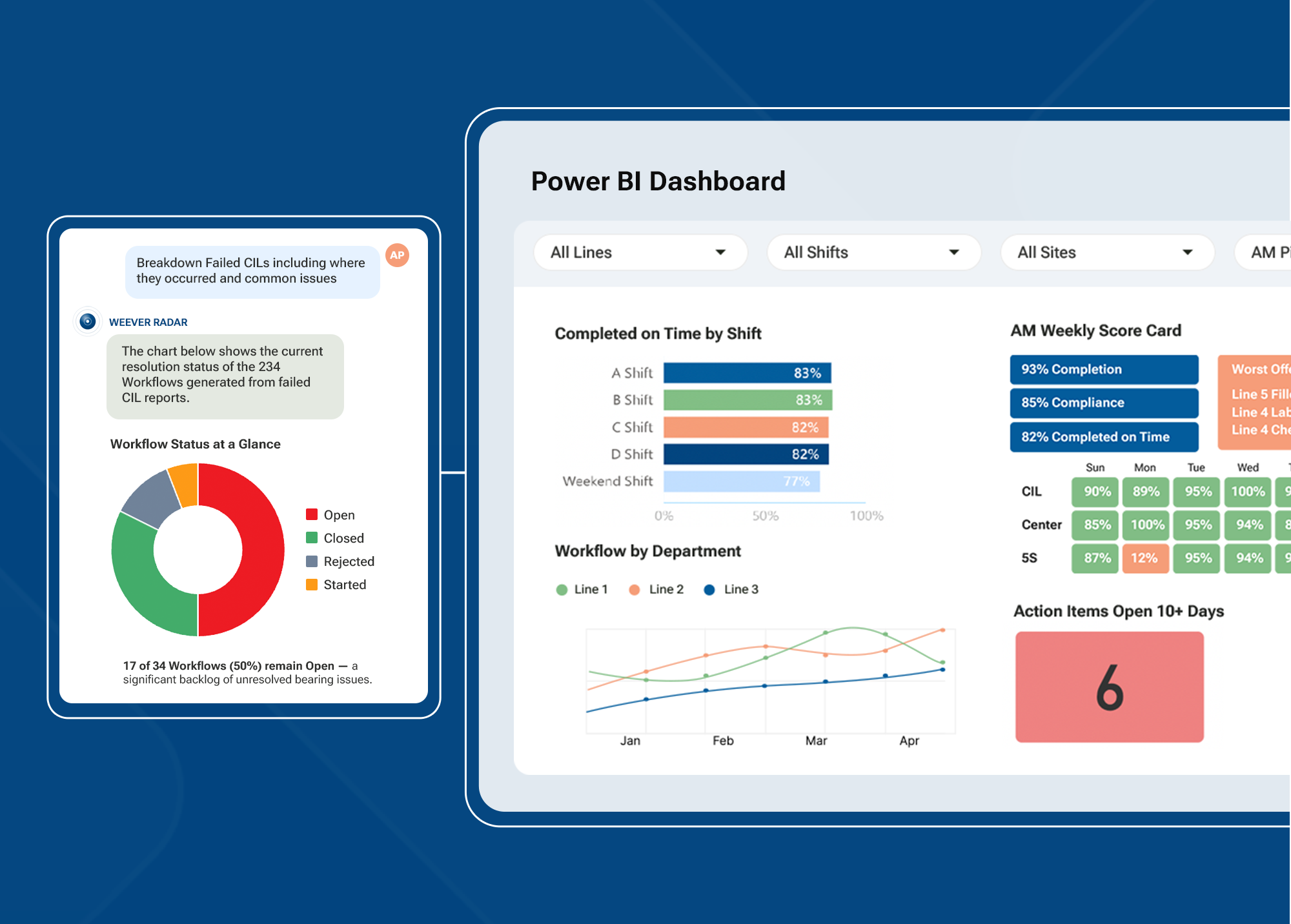
Instead of manually compiling data from binders and spreadsheets, your reports build themselves as work happens. Live dashboards show completion rates, open issues, and deviations by area, line, shift, and site the moment teams record information, giving everyone from floor supervisors to plant leadership the same up-to-date picture.
When you need to go deeper, paperless form submissions generate structured reports that are automatically filterable and exportable by date, location, or program. Audit prep that used to take days now takes hours because the audit trail builds itself in real time.
Our pet food manufacturing client, Royal Canin, saved more than 7,000 hours annually after digitizing, achieving a 95% corrective action closure rate across more than 6,000 monthly submissions.
5) Programs scale without proportional admin growth
With paper, every new line, shift, or site adds more forms to print, more binders to manage, and more variation in how the same program runs across the business. At some point, keeping the paper process running becomes someone’s entire job.
Digital workflows allow you to roll out the same program across every line, shift, and site without rebuilding it from scratch each time, and the admin overhead stays flat as the operation grows. Besides this, leadership gains something paper can’t provide: a consistent view of how programs are running across all locations at all times.
After working with us, Mars Fort Smith achieved 100% completion of sanitation tasks across all tasks managed through our digital platform. Our client, Martin SC, also saved more than $70,000 annually after digitizing.
What to look for in a digital forms software solution
To ensure the digital forms software you choose will work for everyone in your plant — from executives to operators — we recommend evaluating how well it achieves three main capabilities:
- Capturing the right data
- Allowing you to act on issues as they happen
- Enabling you to analyze what’s happening in real time

Capture the right data, right on the floor
Digital data capture must be as easy as possible for every operator on the floor, regardless of their role, native language, or device. This requires:
Shared device access and QR code form launch
Any operator should be able to scan a QR code at the machine or workstation and open the correct form instantly on a shared device, without a personal login or an app. If the tool requires individual accounts or assigned devices, the access friction it creates will only cause team members to find workarounds.
Required fields, validation rules, and conditional logic
The tool should allow you to set required fields so operators can’t move past a step without completing it, create validation rules that catch out-of-range entries before a form is submitted, and apply conditional logic that shows operators only the fields relevant to their specific situation. Without these capabilities, digital forms will capture data the same way paper does — inconsistently and with the same gaps.
Photo, video, and e-signature capture
Visual evidence capture is what makes a completed check verifiable. Photo and video capture at the point of work creates a record that can withstand audit scrutiny. E-signatures lock records at the point of verification and support FDA and GFSI compliance requirements.
Multilingual support and visual instructions
If operators can’t read the form in their language, participation will drop, and errors will increase. Your tool should enable multilingual support and embedded visual instructions to ensure every worker on the floor can complete forms correctly without supervisor intervention.
Act on every issue
When you and your team identify issues, the information needs to flow to the right people automatically, without depending on anyone to make it happen. Specifically, this means your digital forms tool needs to provide:
Corrective action tracking, notifications, and escalations
Your digital tool should automatically create a corrective action with a named owner and a due date. It should also send a notification to the right supervisor. Make sure this capability lives in the same tool your operators use to complete forms. If corrective actions have to be managed elsewhere, you're back to chasing information across systems. Also, ensure items that go overdue will escalate automatically, so nothing sits unresolved.
Analyze what’s happening in real time
Capturing data is only valuable if you can see it, retrieve it, and use it. To analyze data properly, the tool you choose needs to offer:
Searchable records and audit trails
You should be able to automatically generate a complete, timestamped record for every form completed on the floor, linked to the specific user, area, and task, and retrievable in seconds by date, shift, line, or location. If finding a specific record still requires navigating multiple folders, exporting data to a spreadsheet, or manually piecing together information from multiple sources, you won’t be able to identify potential risks, proactively address issues, or determine how to close existing gaps.
Reporting by line, shift, area, and site
Look for a tool that automatically generates reports from data captured by operators, without anyone having to build them manually. It should deliver different views for different roles: operators need to know what’s due and what’s behind on their shift, supervisors need to see completion status and open issues across their area in real time, CI Managers need plant-level performance summaries they can act on, and regional leaders need cross-site visibility to benchmark locations and identify where programs are working and where they need attention.
Integration options
Most manufacturing plants already have enterprise systems — SAP, a CMMS, OEE tools — but those systems weren’t designed to capture what happens at the operator level on the floor. The right digital forms tool fills that gap without creating a separate data silo. Look for a tool that connects via API and webhooks so data captured on the floor flows directly into the systems your teams already rely on for reporting, maintenance planning, and compliance.
Why manufacturers choose Weever to help them go paperless
Digitizing your paper forms shouldn't mean months of configuration, process redesign, or change management. That’s why we built Weever, our connected worker platform that helps manufacturing leaders ditch the paper without disrupting how their teams work. Here's what makes our software different from every other tool that claims to meet the criteria above.

Built on the floor
Weever wasn't built in a software lab. Our founder spent more than 25 years in manufacturing as a millwright, in sales, and inside every type of plant you can name. Every feature in Weever exists because a plant needed it, including how forms are built, accessed, and acted on the floor. That's why the platform works the way your teams actually operate.
Designed for every level of your operation
When you digitize your paper forms in Weever, the data they capture works for everyone. Frontline operators get simple forms they can complete without slowing down. Supervisors get clear visibility into what's open and what needs attention. Plant and regional leaders get real-time performance data across every line, shift, and site. Everyone has what they need in one system, without anyone having to pull it together manually.
Live in weeks, not months
Weever can help you get your first paper-based program up and running in 4 to 5 weeks. Our implementation team builds your first process, so all you need to do is review it, give feedback, and go. We handle setup and configuration, and because Weever mirrors the processes your team already follows, there's very little to learn. Your champion and power users get up to speed in a short training session, and operators pick up what they need directly on the floor. IT involvement is minimal — there's no app to download, no user lists to manage, and no extra infrastructure to set up. Once you're live, a dedicated team stays with you through every program and site you add next.
Ready to digitize your paper forms?
Ask us to build one of your paper forms in Weever so you can see exactly how it works for your plant.

.webp)

Spend Less Time on Admin. More Time Improving Operations.
See how Weever automates data entry, reporting, and action items so you can focus on improvement not admin.