
8 Best Connected Worker Platforms for Manufacturing in 2026 [Reviewed & Compared]

Table of contents

Share:


Quick summary
A Connected Worker Platform digitizes the checks, forms, training, and data your frontline captures every shift. Weever is the best connected worker software for multi-site process manufacturing plants that want to run inspections, safety, sanitation, quality, and autonomous maintenance programs on one platform. Every operator gets access, and there's no per-seat cost. SafetyCulture is built for smaller teams or single sites. It uses per-seat pricing and runs inspections across manufacturing and other industries. Meanwhile, Poka is a good fit for plants where operator training is the main issue.
Here are our top 3 picks:
What Manufacturing Plants Are Losing on the Floor
According to a Manufacturing Leadership Council survey, 70% of manufacturers still enter their data manually. Another 68% still rely on spreadsheets to analyze it.
If you run a plant, none of this is news. Your team fills out paper checks, and someone re-keys them into Excel a shift later. By the time anyone reviews the numbers, whatever the data was warning about has usually already happened. A Connected Worker Platform for manufacturing is built to close that gap.
Paperwork isn't the only thing plants lose this way, though. Experienced operators retire and take undocumented know-how with them, while machines keep generating data that never reaches the people who could act on it. The Connected Worker Platform category covers all three: frontline data, operator knowledge, and machine data. Most tools are strong in one or two, not all three, which is why picking the right one matters. In this blog, we'll compare the 8 best Connected Worker Platforms for manufacturing plants.
Why listen to us
We've rolled Weever out across safety, sanitation, quality, and maintenance programs. That spans single-site F&B operations and multi-site global CPG manufacturers alike. And it's given us a close look at what makes a program stick, and what makes teams quietly stop using a tool after the pilot.

The results follow a pattern. Royal Canin went from 300+ unresolved abnormalities to a 95% close rate and 6,000+ monthly submissions in under a year. Monin cut 3-4 hours a day off data entry and reporting. Mars Fort Smith hit an 89% resolution rate after replacing paper calendars and scattered SharePoint folders. Different plants, different starting problems, same outcome once the data had somewhere to go.
What is a Connected Worker Platform for manufacturing?
Weever is a connected worker platform for food manufacturers, CPG, pharma, and other process manufacturing plants. It runs structured floor programs for safety, sanitation, quality, and maintenance on a single system instead of scattered spreadsheets and paper.
Connected is the operative word here, and it covers four specific relationships:
- Connected to each other: Operators, supervisors, and managers share the same real-time view of a task or defect. Nobody finds out about it a shift later.
- Connected to the equipment: A defect logged by an operator lines up with the asset's maintenance history or a SAP work order. It doesn't sit as a disconnected note in a separate system.
- Connected to the systems that already run the plant: ERP, MES, and CMMS systems already hold plant data. A Connected Worker Platform doesn't replace them - it feeds them the frontline context they can't capture on their own.
- Connected across time: New hires and experienced operators aren't working off the same knowledge. A connected worker platform captures what an experienced worker knows, through training content, SOPs, or a skills matrix, so it doesn't leave when they do.
Underneath Connected Worker software for manufacturing are a few core building blocks: digital data capture, action tracking, knowledge management, and reporting. No single platform, including Weever, does all of these jobs equally well. That's the whole point of creating this comparison listicle.
What does a Connected Worker Platform include?
A Connected Worker Platform can include a wide range of capabilities. No platform covers all of them:
- Digital forms and checklists with conditional logic and mandatory fields
- E-signatures and timestamped audit trails
- Photo, video, and sketch capture, plus red-tagging for defective equipment
- Multilingual forms and shift handover logs
- Corrective action workflows with owners, due dates, and closure tracking
- Real-time dashboards with roll-ups by line, shift, area, and site
- Multi-site management with central templates and site-level configuration
- Integrations into ERP, MES, CMMS, SAP, and Microsoft Dynamics, or direct machine and PLC connectivity for real-time equipment data
- Digital work instructions, SOPs, and peer-to-peer knowledge capture
- A skills matrix to track who's trained on what
- AI features like predictive insights or a chat assistant
- Regulatory support for standards like FDA, HACCP, SQF, 21 CFR Part 11, or AS9100
Most platforms specialize in one or the other. That’s exactly why the right fit for your company totally depends on the programs you typically run.
8 best Connected Worker Platforms for manufacturing in 2026
Before getting into the details of each platform, here’s a table that will give you a side-by-side look at all eight tools.
1. Weever
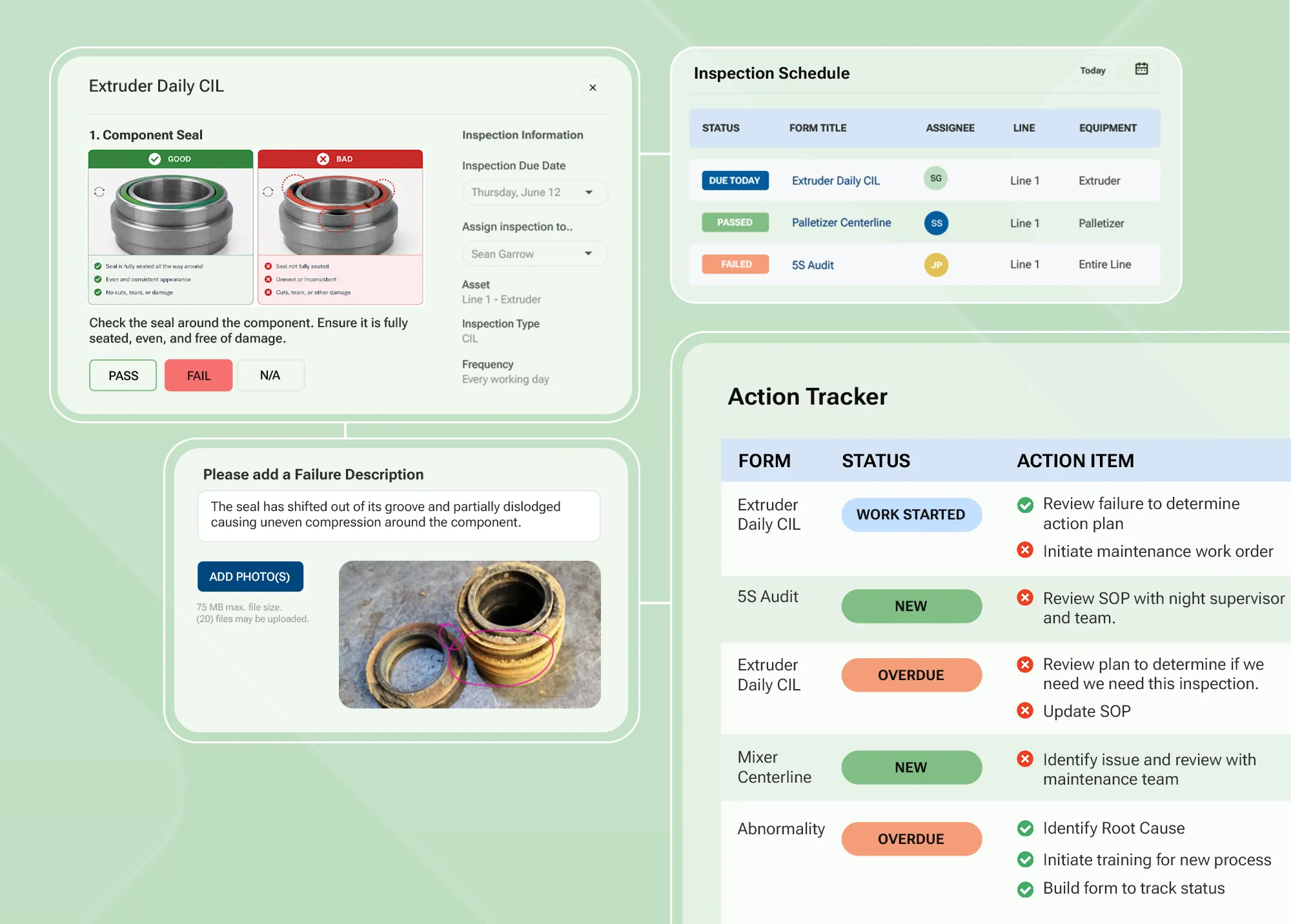
Weever is a Connected Worker Platform that runs structured floor programs for safety, sanitation, quality, and maintenance on a single system instead of scattered spreadsheets and paper.
The platform supports your pre-existing programs right out of the box. It can intuitively handle safety and BBSO, quality checks, master sanitation schedules, 5S/6S, autonomous maintenance, and production tracking. Every form on Weever is modelled on the paper checklists your team already knows, so there's no retraining or redesign to get started.
Getting started is one thing. Paying for it as you grow is another, and that's where Weever breaks from most tools on this list. The platform is priced per site, not per user. That matters more as you scale. If you're running one site with 15 people, you'll barely notice the difference, but if you're running several plants with hundreds of operators, per-seat pricing means paying for every one of them. With Weever, adding a new site or shift doesn't require a new negotiation.
Additionally, every check on Weever feeds into the same loop, keeping everything connected. A failed check or flagged issue automatically becomes an action item with an owner and a due date, and it stays open until someone closes it, not until someone remembers to check a binder.
Weever also offers AI capabilities. Instead of digging through dashboards to find what's wrong, you can ask Weever AI directly, and it turns your frontline data into answers and recommendations.
Book a demo to see how Weever connects your checklists and actions with decision and continuous process improvement.
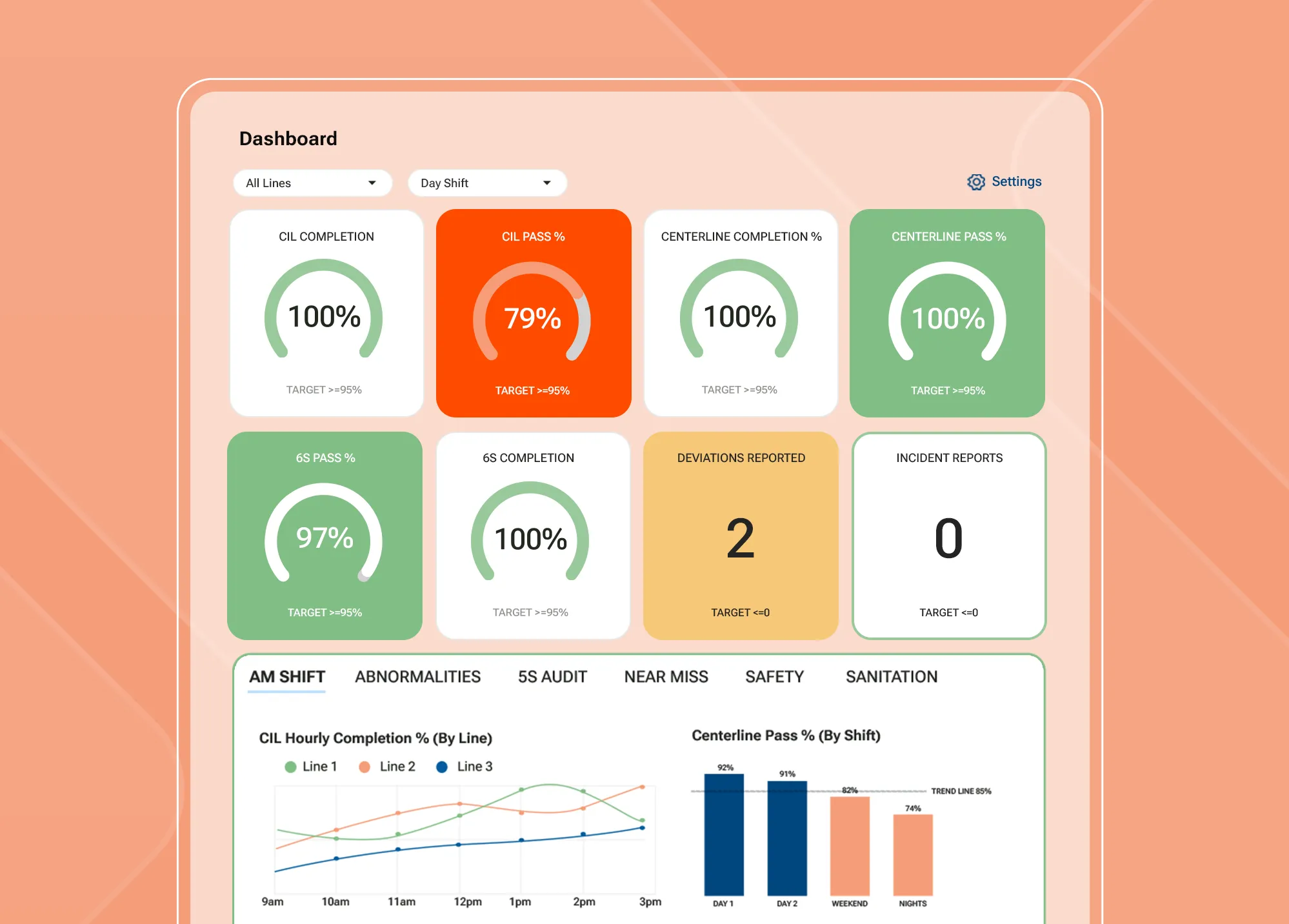
Key features
- Configurable digital forms: Your existing checklists, logs, and inspections become digital forms with conditional logic, mandatory fields, thresholds, and supervisor sign-off, configured to match how the plant already works.
- Multilingual, multi-site rollout: Forms and instructions run in multiple languages across sites. It also has central templates and site-level configuration for standardized scoring and reporting.
- Scheduling and QR code access: Tasks are scheduled by area, shift, or frequency. QR codes at the line open the right form on a shared device, no app install, no per-person login.
- Action Tracking Workflow Automation: Failed checks and flagged issues automatically become owned, due-dated action items.
- Weever Radar (AI): Ask Radar directly instead of digging through dashboards. It turns frontline data into answers, insights, and recommendations.
- Evidence capture and audit trails: Photos, video, sketches, and e-signatures attach directly to a task. Records are timestamped and audit-ready, and Weever is attested compliant with FDA 21 CFR Part 11 and EU Annex 11.
- Shift handover logs: Outgoing and incoming shifts share the same record of what happened, what's still open, and what needs attention next.
- Real-time dashboards and open data: Completion rates, open actions, and risk trends by line, shift, and site, with data exports via OData, Excel, and MCP, and integrations into SAP, MES, and CMMS.
Pros
- Low learning curve for operators
- Removes the manual step of re-keying paper forms into Excel before the data is usable
- Data connects into systems you already run: SAP, MES, CMMS, and BI tools like Power BI
- Change forms and workflows on the fly with no dev skills
- Every submission is timestamped and tied to a person, building the audit trail and accountability your team needs
Cons
- No native sensor or IoT connectivity to pull machine data directly off equipment. While this can often be closed through Weever's integrations, the platform itself doesn't collect it firsthand.
Pricing
Weever pricing depends on your site count, the programs you want to run, and the configuration you need. No hidden costs or per-seat licenses. Start with one program and add the rest later without renegotiating. Book a demo today!
2. SafetyCulture
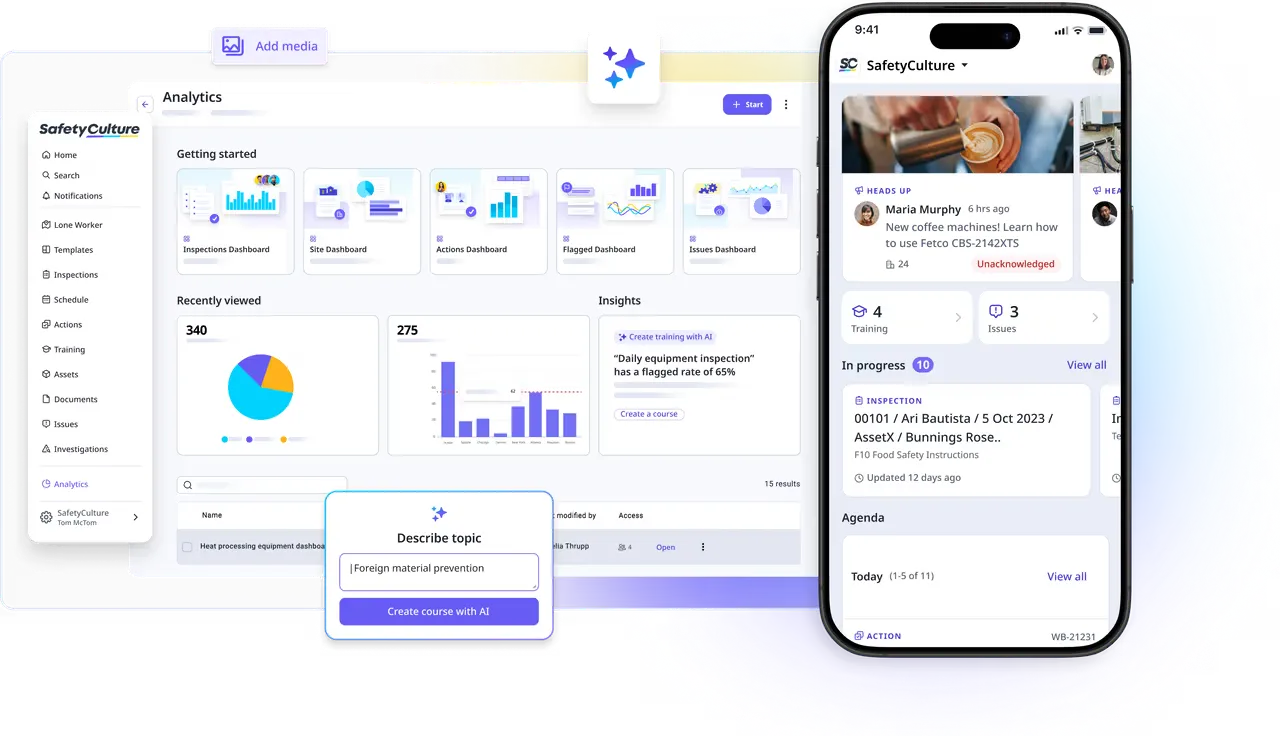
SafetyCulture (formerly iAuditor) is a workplace operations platform used across manufacturing, construction, retail, hospitality, logistics, and mining. It’s primarily inspection, audit, and checklist software, but it also includes training, task management, and asset management features. You get a library of 10,000+ templates, making it easier to get started on the platform.
The tradeoff with SafetyCulture? Since it’s designed as a general worker platform, it might be too broad for businesses that need a platform focused on manufacturing programs.
Key features
- Inspections and audits: Access mobile-first checklists that your team can run on any device, with photo capture and offline access for areas of the plant where the signal drops.
- Template library: 10,000 customizable checklists and course templates, so you won’t have to build every form from a blank page.
- Built-in AI: AI capabilities included in every plan help you create checklists and training, answer questions from your documents, and translate content into 15 languages.
- Training and courses: Convert your SOPs into courses, then deliver and track completion in the same platform your team already uses for inspections.
Pros
- Easy to adapt to and use for frontline teams
- Free plan available to test the platform before committing to a paid plan
- Very large template library of around 10,000+ templates that saves you setup time
- Works offline, which is useful for plants in remote or low-signal areas
Cons
- Per-seat pricing on the Premium plan can get expensive for larger teams of operators
- Customization is limited, so advanced workflows or specific reporting needs can be hard to configure without workarounds
Pricing
SafetyCulture comes with a free plan for teams of up to 10 users. It gives you 5 active inspection templates and basic analytics.
The Premium plan, designed for teams of around 11-100 members, is $24 per seat per month when billed annually, or $29 per seat per month when billed monthly. Enterprise pricing is custom, with an option for site-based pricing. Contact their sales team for exact pricing figures.
3. Poka
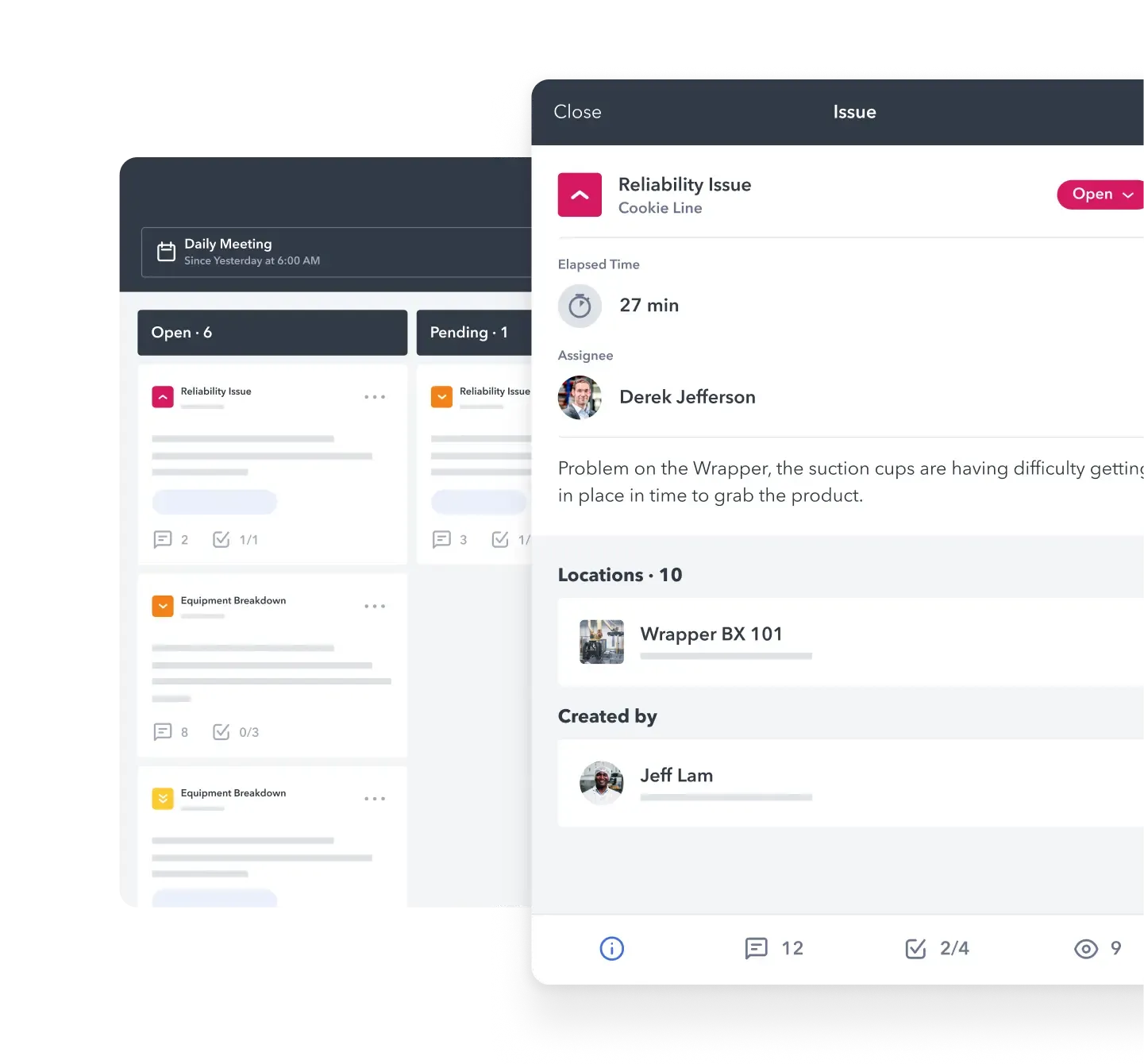
Poka is a Connected Worker Platform that focuses specifically on manufacturing. The platform specializes in learning and development, including digital work instructions, skills management, and factory floor training. It also covers daily management, including forms, checklists, issue management, and tiered meetings.
Poka is a good platform to consider if the biggest challenge you’re facing right now is training your operators and capturing knowledge.
Key features
- Digital work instructions and troubleshooting: Build step-by-step instructions with video and images. Your operators can then refer to them at the line when they get stuck on something.
- Skills management: Poka’s skills matrix tracks who is trained on what, making it easier to see gaps before you schedule someone on a line they aren’t certified for.
- Forms and issue management: Digital forms and checklists for daily checks, along with issue tracking so problems are logged and followed up on instead of being mentioned in passing.
- Frontline knowledge capture: Your operators can record short videos and share tips or fixes with the rest of the plant.
Pros
- Made with the manufacturing industry in mind and not a general-purpose tool
- Users report that Poka’s interface is intuitive and easy to use, especially in high-volume environments
- Create work instructions within the tool without any blockers whatsoever
- Good for knowledge sharing and communication between shifts and teams
Cons
- The platform can be difficult to navigate, especially for new users
- Some users face integration issues when connecting Poka with existing systems and workflows
- Feature limitations in large-scale operations, along with slow feature updates
Pricing
Poka doesn't publish its pricing publicly. You can contact the support team by filling out the form on the pricing page with your personal and company details.
4. L2L
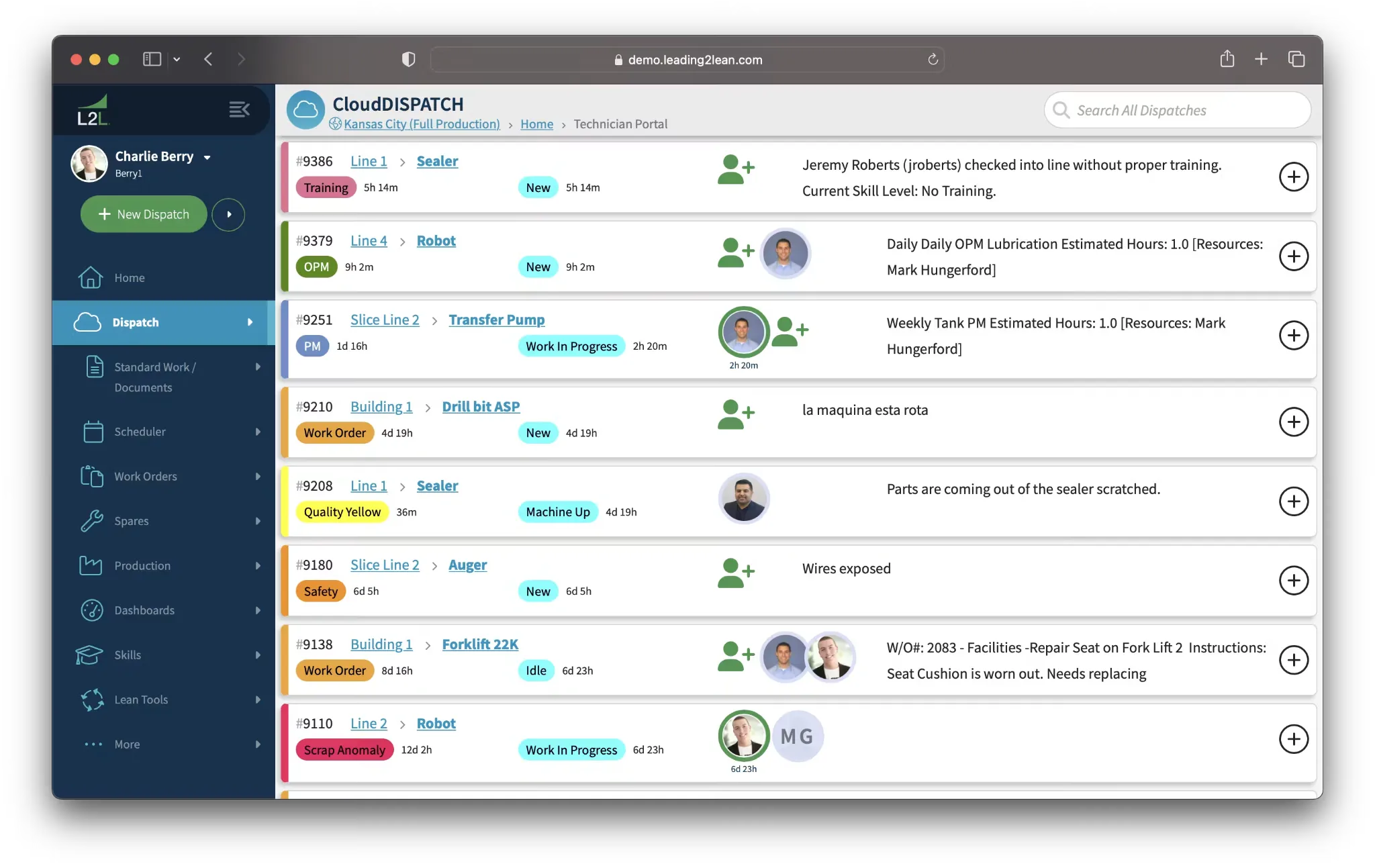
L2L is a connected manufacturing operations platform, with a different focus from the rest of this list. Rather than checklists or training, it prioritizes highlighting downtime and disruptions on the line. The platform captures every stoppage, dispatches the right person to fix it, and tracks how long the response took.
If your main problems are unplanned downtime and slow maintenance response times, L2L might be your best option.
Key features
- Dispatch and work order management: Dispatch tasks to specific people, set urgency levels, and track how long each job took to close out.
- Preventive maintenance: Schedule inspections and repairs to reduce the likelihood of equipment failures. This is one of the features L2L users rate most highly.
- Shop floor execution: Get real-time visibility into what's happening on every line and every shift, including disruptions and fixes.
- Digital checklists and audits: L2L’s standard work and digital audits ensure tasks get done consistently, regardless of who’s on shift
Pros
- Downtime, dispatch, and work orders are all in one flow, with no need to re-enter anything
- Basic processes like creating, closing, and opening work orders are fast and simple to do
- Real-time status updates connect back to specific production areas
- Reminders help you make sure you don’t forget recurring tasks
Cons
- Several users report the setup is complicated and the initial learning curve is high, with one user also highlighting daily login issues
- Certain features can be difficult to find or navigate to on the platform
- It's built around maintenance and downtime, so it's not as good of a fit as Weever if you're mainly running sanitation, quality, or 5S programs
Pricing
L2L doesn't have publicly available pricing on its website. You can reach out to their sales team for a custom quote using the contact form.
5. Parsable
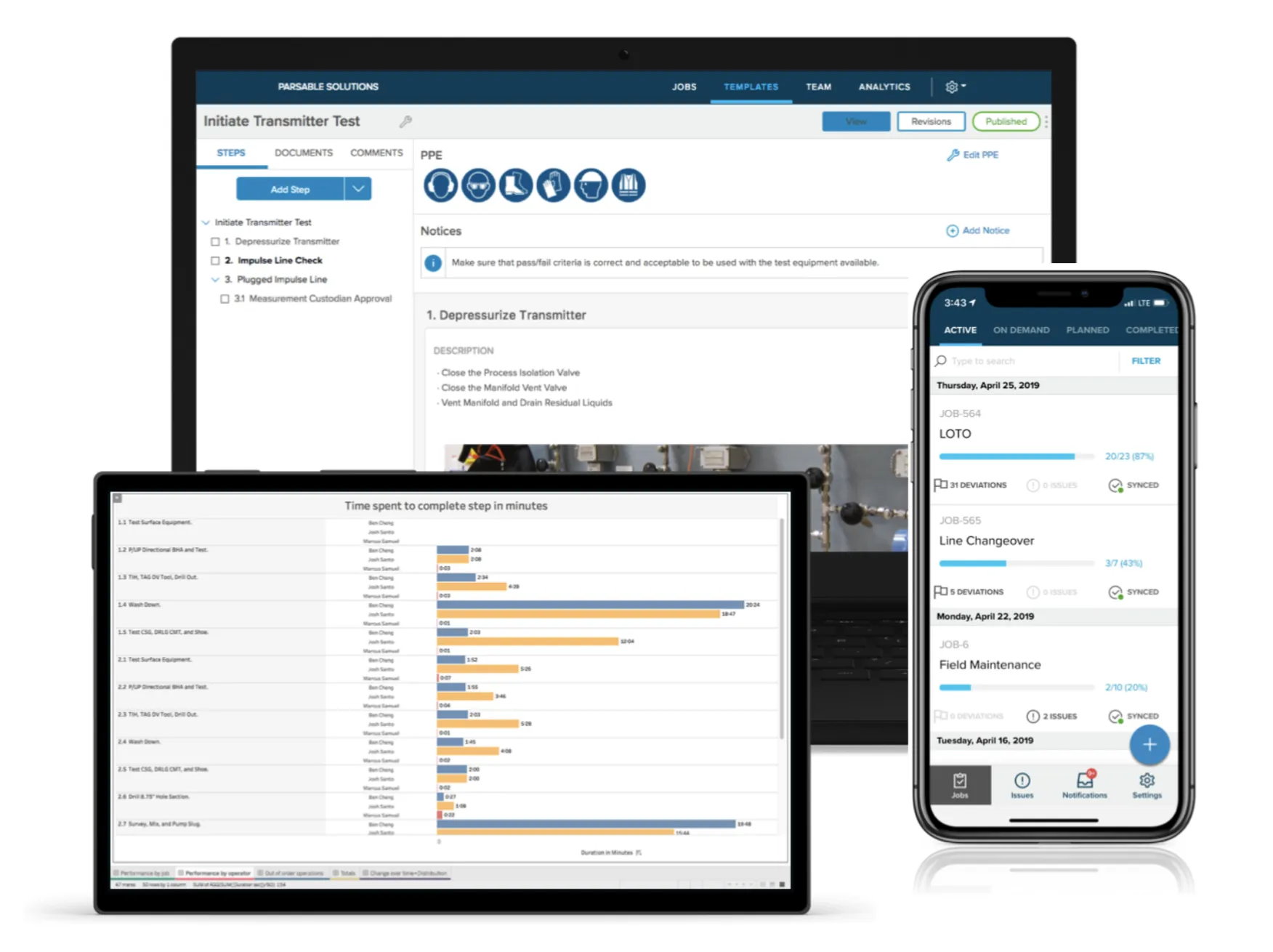
Parsable, now part of CAI Software following its acquisition in 2024, is all about digital work instructions and structured frontline execution. It takes paper SOPs, converts them into step-by-step digital procedures, and then records the data as operators work through them.
It covers manufacturing and heavier industries like oil and gas, with use cases spanning maintenance, production, quality, safety, and ESG.
Key features
- Digital work instructions: Create, update, and distribute step-by-step SOPs across sites, with photos, video, and files attached to individual job steps.
- Audits and inspections: Automate the processing and tracking of routine audits, inspections, and checklists that your frontline runs.
- Workflow and collaboration: Your teams can post questions, report issues, or share expertise using the messaging feature. Every message is related to a specific assignment, with the option to tag workers directly in comments.
- Real-time integrations: Connect Parsable with other systems you use to improve work executions.
Pros
- The software interface is highly intuitive, especially when building or modifying checklists
- Create and attach photos, video, and SOP files to individual job steps easily
- Users find the collaboration feature helpful, highlighting the comment fields and the ability to tag a specific person or group
- Good API set for when you want to connect to other systems
Cons
- Parsable’s scheduling system is less advanced than other competitors, with no calendar view to see jobs in advance
- Several users say that configuring conditional steps feels awkward and confusing
- Time tracking against allocated versus actual time is not as detailed as it should be for production lines
Pricing
Parsable doesn't have public pricing. You must schedule a demo or contact their sales team to get a custom quote tailored to your requirements.
6. Augmentir
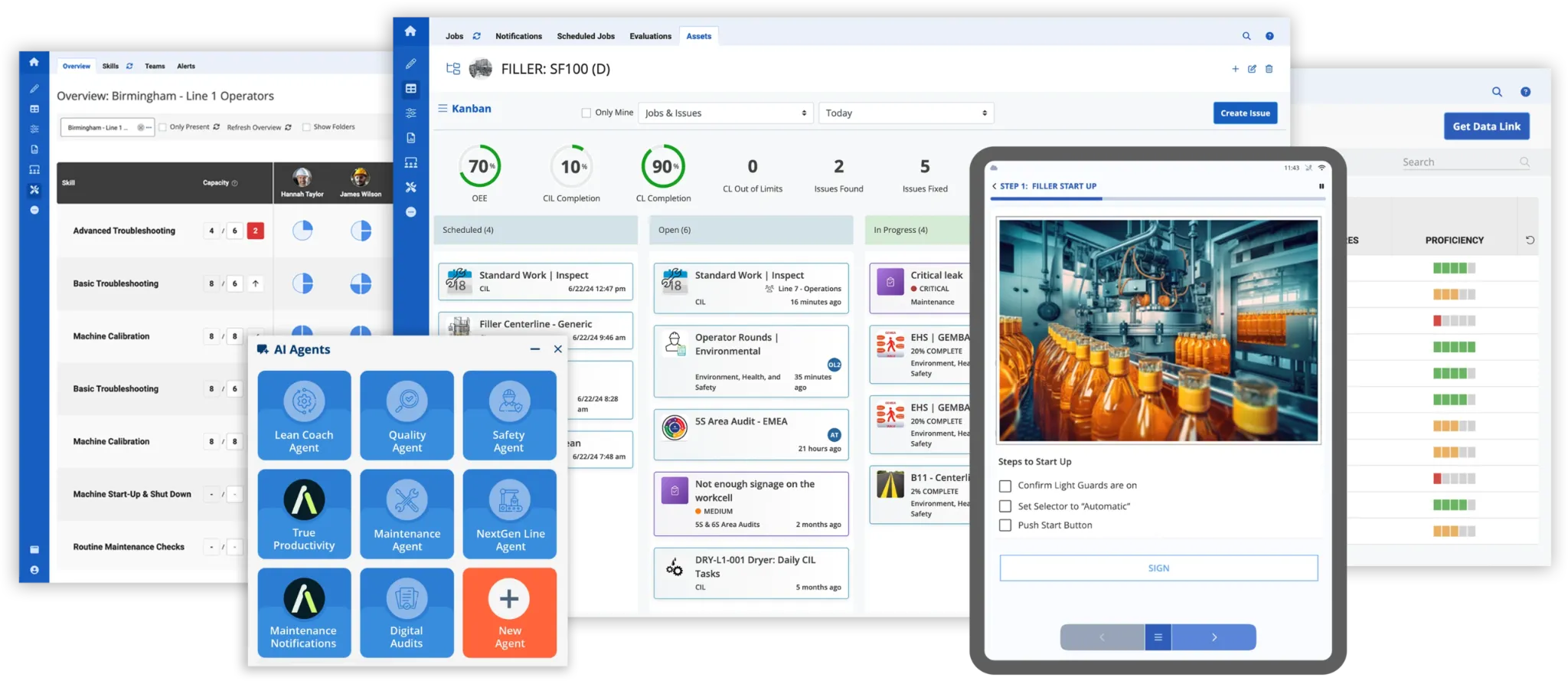
Augmentir is an AI-first Connected Worker Platform. It leads with its AI layer but also includes necessary features like digital work instructions, skills management, issue tracking, and asset management.
It gives you a generative AI assistant, Augie, that helps operators and managers solve problems much faster. Augmentir also lets you build custom AI industrial agents without writing any code.
Key features
- Augie generative AI assistant: The Gen AI assistant compiles your existing content from Excel, Word, PDFs, images, or videos. It then generates digital forms, checklists, and work instructions for you from your own data.
- Custom AI agents: Augmentir’s AI Agent Studio helps you create and launch your own custom AI agents related to training, skills, safety, quality, operations, and maintenance without writing a single line of code
- Digital work instructions: Access no-code authoring tools and a workflow builder to digitize frontline work, such as 5S audits, layered process audits, and safe work permits.
- Skills and training management: Digitize the full skills lifecycle to identify gaps in the skills matrix and discover who needs reskilling within your team.
Pros
- Augmentir is highly customizable, with strong functionality
- Support team is highly responsive with actual solutions and not generic replies
- Easily take and document photos
- Broad industry coverage with a wide set of use cases in one platform
Cons
- User interface is not as intuitive as competitor platforms
- Platform is missing some advanced features according to some users
- Single sign-on and ERP/CRM connectors are add-ons and not included in the base subscription
Pricing
Augmentir has subscription-based pricing. The base subscription includes:
- Workflow authoring
- Skills management
- Remote collaboration
- AI analytics
- API access
- Guided onboarding
- And a customer success team
For exact pricing details, you’ll need to contact Augmentir’s sales team for a custom quote.
7. Tulip
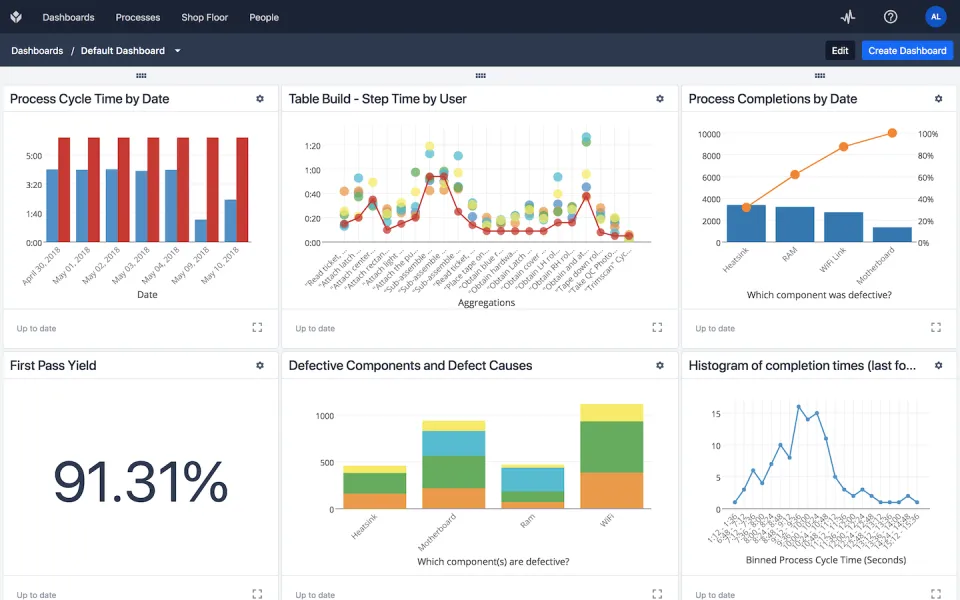
Unlike other Connected Worker Platforms on this list, Tulip offers a no-code, drag-and-drop app builder and a connectivity layer that pulls in data from your machines, sensors, and devices. That combination is where Tulip is strongest. If your operator input and machine data currently live in two separate places, Tulip is built to bring them into one app.
The tradeoff is that there's no MSS module or 5S audit program waiting for you to configure. Someone on your team has to build one first, using either the app library as a starting point or a blank canvas, and then maintain it as your process changes. Tulip is a good fit if you have the internal capacity for that and a process no off-the-shelf platform matches. It's a harder sell if you need your sanitation schedule live by the end of the month.
Key features
- No-code app builder: The drag-and-drop no-code app builder turns SOPs, photos, diagrams, and videos into connected apps. It also has a library of ready-made solutions that you can start with.
- Machine and sensor connectivity: There are hundreds of pre-built connectors and drivers for CNC machines, PLCs, sensors, devices, ERPs, WMSs, and older equipment. Machine data lands in the same app as operator input, so you can see what the line was doing at the moment a check was logged.
- Compliance features: Access eSignatures for 21 CFR Part 11, auditable record history for GxP and AS9100, validation packs, and a full history record for audit readiness.
- Native AI and analytics: Tulip’s AI auto-translates instructions, extracts insights, and provides trained chats. You also get dashboards for tracking production data.
Pros
- Building and deploying solutions is quick and easy
- Intuitive user interface for building apps, even for complex use cases
- Strong community backing with university courses and a knowledge hub for learning the platform
Cons
- Some Tulip users say that the Tulip Tables could be more robust with larger datasets
- Since it’s totally cloud-based, it makes it harder to figure out where a connection or latency problem is coming from
- Requires more internal effort than a platform that has ready-to-go programs since you have to build the apps yourself
Pricing
Tulip has four pricing plans, all of which require at least 10 interfaces.
- Essentials: $100 per interface per month, billed annually
- Professional: $250 per interface per month, billed annually
- Enterprise: Custom pricing, contact sales to get a quote
- Regulated Industries: Custom pricing, contact sales to get a quote
Things like machine monitoring, computer vision, premium support, and professional services are separate add-ons, which will cost you extra.
8. Redzone
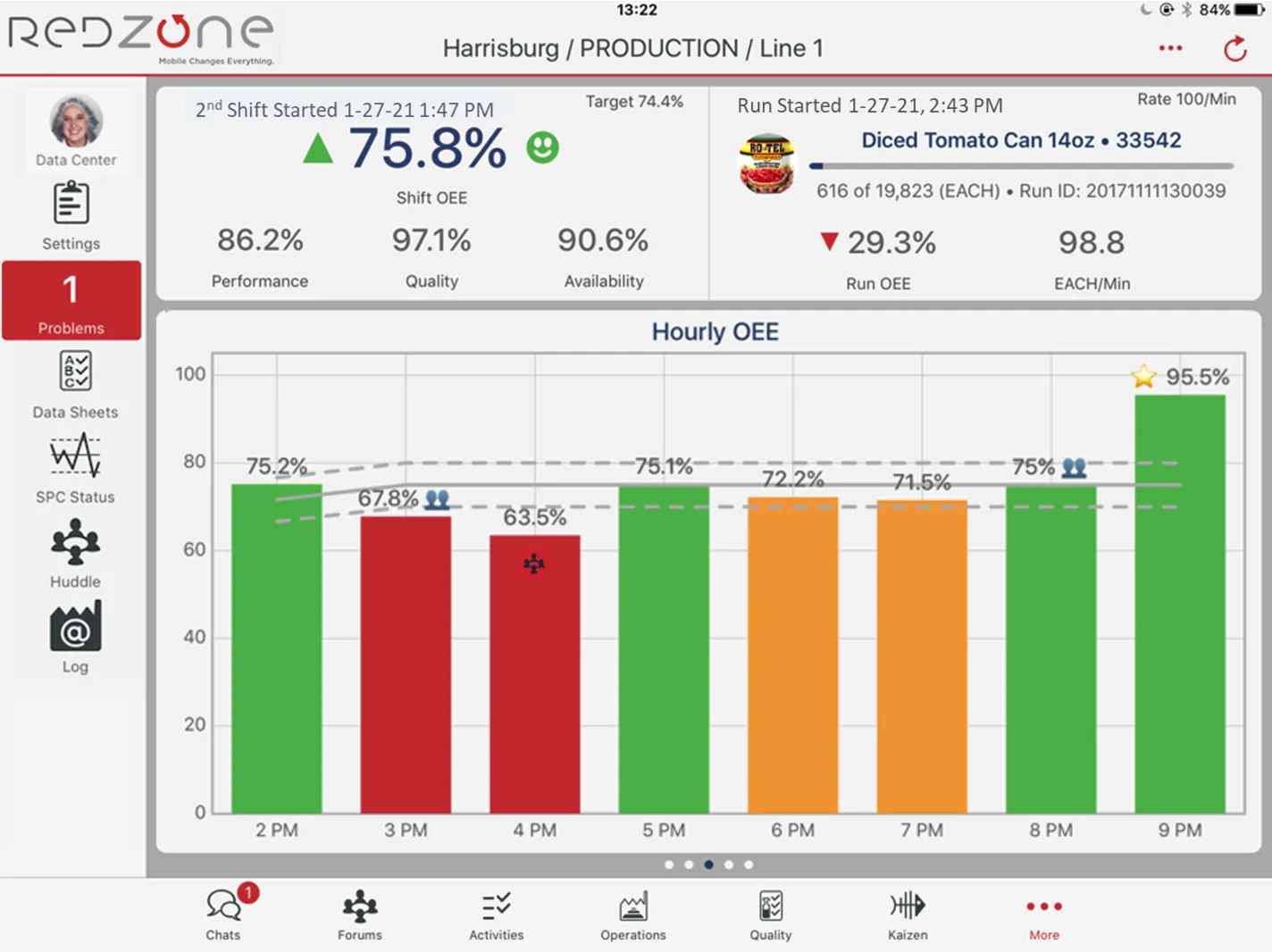
Redzone (RZ Software) is now part of QAD after the acquisition in 2023. It’s for frontline manufacturing teams, and the software focuses on productivity and engagement rather than just digitizing paperwork. There are four Redzone products: Productivity, Compliance, Reliability, and Learning.
It’s primarily a Connected Worker Platform that provides real-time production data and encourages crew members to actively participate rather than simply record readings.
Key features
- Real-time production data: Get live plant floor data, allowing your teams to see losses as they happen. They can then act on them during the shift instead of finding out the next morning.
- ChampionAI: Redzone’s AI layer provides agents that can flag issues early, surface patterns, and predict downtime before it happens.
- Compliance and quality management: Digital audits, inspections, and product quality checks happen in real time. It also includes paperless documentation, which is tracked by shift, line, and SKU.
- Learning management: Gain access to an LMS for onboarding and training purposes.
Pros
- Platform interface allows you to make changes to the software quickly, be it configuring datasheets or changing events
- Access real-time production data from your mobile devices
- Eliminates manual quality and operator checks
- Implementation team provides good training along with any onboarding support you need
Cons
- Users report difficulties while configuring triggers
- Once a sign-off is complete, you can only void checks rather than delete or cancel records
- No option to copy production checks over to quality checks or the other way around
Pricing
Redzone has custom pricing. The price you pay depends on the size of your factory and how you plan to deploy it. You'll have to contact their sales team or request a demo to get a quote.
How to choose a Connected Worker Platform for manufacturing
A few things worth checking before you commit to a Connected Worker Platform:
- Test it on your worst form, not your cleanest. Send the vendor a 40-line sanitation log with a conditional allergen-changeover section. Watch how they handle it in the demo. Most tools look fine on a simple five-question checklist.
- Know what happens after a check fails. Does it become an owned, due-dated action item? Or does it just sit on a dashboard until someone notices eventually?
- Check how it connects to your equipment, not just your forms. If downtime or machine-level data is your bigger problem, look for direct equipment or PLC connectivity. Don't settle for a system that only logs what an operator typed.
- Ask how it captures knowledge, not just data. If tribal knowledge and operator turnover worry you more than paperwork, prioritize skills tracking and training over forms alone.
- Count who actually needs access. Per-seat pricing works fine for a small team. Past around 100 people on a site, site-wide pricing usually costs less.
- Ask what you own after go-live. Some vendors hand you a login and a help center. Others stay involved through configuration and rollout. Decide which one you're buying.
- Match the tool to the program you actually run, not the one with the most features. If your real problem is 5S or sanitation, a platform built around downtime response isn't the right fit, and vice versa.
The right platform fits how your plant already runs. It connects what's currently disconnected and is actually used after the pilot.
Go with a platform that is aligned with how your plant already runs
Eight platforms, one category, and no single tool covers all the jobs. Some connect workers. Some connect to the equipment they run. Some others connect to the systems already holding your plant's data. A few connect the knowledge that would otherwise walk out the door with an experienced operator. Where each one is strong tells you more than any feature list alone.
If you're running a process manufacturing plant, especially in food and beverage, CPG, or pharma, Weever is built around exactly this. It runs your safety, sanitation, quality, and autonomous maintenance programs on one system. It's priced per site instead of per seat, so every operator gets access without a fight over licenses.
Book a demo with Weever and see how it connects your checklists and actions, not just digitizes them. No commitment required.

.webp)

Spend Less Time on Admin. More Time Improving Operations.
See how Weever automates data entry, reporting, and action items so you can focus on improvement not admin.