
-%20smaller.webp)
.webp)
Explore More Blogs

ArcelorMittal Poland deploys WCM methodology
Bożena Gajdzik, in his white paper, does an excellent job in outlining the processes used by ArcelorMittal Poland to deploy Total Productive Maintenance and WCM within their factory.
I have taken the liberty of outlining the "coles notes" in the bullets below. This paper is worth a read if you are interested in World Class Manufacturing (WCM), Total Productive Maintenance (TPM), Autonomous Maintenance (AM) and Professional Maintenance (PM).
World Class Manufacturing (WCM)
The goal of the World Class Manufacturing (WCM) methodology is to use the best available work practices in order the achieve the best efficiency on an operational level.
- WCM is based on the assumption that if you banish all waste you will create wealth.
- Achievement of WCM standards requires the implementation of a set of coordinated activities in the areas of:
- quality improvement
- work safety
- work organization
- enterprise management
- cooperation with surrounding
- services
- rational resources management
- development of employees
- management of costs
Total Productive Maintenance (TPM)
The goal of Total Productive Maintenance (TPM) is to reduce breakdowns and increase the efficiency of the production line through the full support of the total workforce, including top management and staff.
- Autonomous Maintenance (AM) and Professional Maintenance (PM) are both operational pillars of WCM and part of TPM.
Autonomous Maintenance (AM)
Autonomous Maintenance (AM) as a pillar of WCM deals with the increased of efficiency of production line through the actions of devices operators (each worker is responsible for the device with which they are working). This frees up maintenance staff time to be spent on Professional Maintenance activities.
- Operators use AM processes to eliminate anomalies connected to machines, such as minor failures, abnormal working of device, minor errors, etc.
- Anomalies are captured, recorded and categorized.
- Machines, Assemblies and Components (All known as “Devices”) on a line are prioritized based on how critical they are to the production process. AA = most critical, A,B, and C classifications mean less critical.
- Devices are also categorized based on their to influence on potential losses resulting from quality failures.
- Losses are categorized into groups depending on what they affect, i.e. Equipment, Humans, Resources, Materials, or Media (i.e. water).
- KPIs are assigned to each loss so that they can be measured over time.
- Goals are established for the KPIs, usually a % increase/decrease year-over-year.
Professional Maintenance (PM)
Professional Maintenance (PM) is focused on the actions of specialized maintenance services which deal with structural approaches to eliminate machine breakdowns.
- Professional Maintenance is very closely associated to Preventive Maintenance because a major goal of PM is to establish a schedule of inspections and repairs designed to prevent machine breakdowns.
- The maintenance team roles within the PM context are as follows:
- Technical Maintenance Activities
- Manage costs associated with maintenance
- Train and help operators with AM
- Create and adapt AM and PM schedules
- The Kaizen philosophy is deployed to devise solutions and implementation plans.
- Quick Kaizens are short projects where a problem, root cause and action plan is established relatively quickly.
- Kobetsu Kaizen requires the creation of a group on continuous improvement and is implemented in 10 steps.
- Early Equipment Management, which is also a WCM Pillar, is more concerned with the development of new technologies and improvements that reduce maintenance requirements.

How to Engage Operators in Total Productive Maintenance and Autonomous Maintenance
This approach uses the skills of all employees and seeks to incorporate maintenance into the everyday performance of a facility. And this means everyone, from management and engineers to operators and maintenance technicians.
If everyone is involved in maintenance, the benefits can include:
- Fewer breakdowns and less downtime
- A safer workplace
- Better overall performance
- A more focused operation
The key to TPM is getting operators more involved in maintenance operations. The goal of operator-oriented maintenance is outlined in World Class Manufacturing (WMC) within the Autonomous Maintenance Pillar.
According to conventional maintenance programs, a machine can run until it breaks or reaches its maintenance date. The maintenance department is then responsible for handling/fixing it. In contrast, autonomous maintenance allows machine operators to carry out directly simple maintenance works (lubrication, bolt tightening, cleaning and inspection) to prevent breakdowns and react faster if a certain failure has been detected.
Autonomous maintenance (AM) is performed by the operators and not by dedicated maintenance technicians. It is a crucial component of the Total Productive Maintenance (TPM). The core idea of autonomous maintenance is to provide the operators with more responsibility and allow them to carry out preventive maintenance tasks.
Here are some great ways to get operators more engaged in your maintenance activities.
1) Schedules and Assignments
If you do not assign it, it is not going to happen. This has never been so true as on the manufacturing shop floor. If you want to get operators to do something, especially if it is outside of their usual role, you need to assign it. Scheduling a quick CIL (Clean, Inspect, Lubricate) job is easy with Weever Inspections - simply create the form and then assign it to a machine and/or an operator.

2) Keep it easy and efficient
Operators will resist jobs that require a lot of work. But simple tasks that are easy (and fun) can be a nice break from the monotony. We have worked hard to ensure our forms are the most efficient and productive to use, so that they can get the inspection completed quickly and get back to work. This includes everything from integrated image capture with sketch capability, to voice-to-text, automated calculations, signatures and conditional logic.
3) Embrace Education
Sometimes called "step 0", the education level is about imparting basic knowledge of machine components and functions. In order to perform properly the most important task - machine cleaning, operators should fully understand the objectives of autonomous maintenance and be even able to deliver improvements in equipment reliability.

How to Build a Time-Based Maintenance (TBM) Program in Manufacturing to Cut Unplanned Downtime
If you're running a plant, you already know the pattern. A machine runs fine for months, then fails on a Tuesday afternoon, mid-shift, with no warning anyone caught in time. The line stops, a technician gets pulled off whatever they were doing, and the postmortem always ends the same way: "we should have caught that."
Time-based maintenance (TBM) is the most basic tool for avoiding that scenario, and it's still one of the most underused. Done well, it catches wear and drift before they become breakdowns. Done poorly (a spreadsheet nobody updates, a schedule nobody's assigned to) it becomes a compliance exercise that gets pencil-whipped the same way paper CIL checks do.
Here's what TBM actually is, how it fits alongside preventive and predictive maintenance, and five ways to run a program that holds up on a real plant floor instead of just on paper.
What is Time-Based Maintenance (TBM)?
Time-based maintenance is maintenance performed on a fixed schedule, weekly, monthly, seasonally, rather than in reaction to a failure or a real-time sensor reading. Because it's planned in advance, TBM is a form of preventive maintenance: you're servicing or inspecting equipment on a calendar, not waiting for it to tell you something's wrong.
A simple, familiar example: servicing an air conditioning unit every spring before summer demand hits it hard. The unit isn't failing yet. You're maintaining it because history tells you that's when it needs attention.
TBM works best for components and assemblies that wear down in a fairly predictable way, belts, filters, seals, lubrication points, where time (or run-hours) is a reasonable proxy for wear. It works less well for equipment whose failure patterns are erratic or load-dependent, which is where predictive maintenance (PdM), using sensor data and condition monitoring, tends to take over.
How TBM fits into a broader maintenance strategy
Most plants run some blend of three approaches, and none of them is meant to stand alone:
Reactive maintenance happens after something breaks. It's unplanned, expensive, and unavoidable in a plant with zero preventive program, since some rate of failure will always slip past. Reactive repairs typically cost 3 to 5 times more per event than planned maintenance, once you count expedited parts, overtime labor, and lost production (McKinsey & Company).
Time-based (preventive) maintenance is the layer that catches predictable wear before it becomes a breakdown. This is where TBM sits, alongside routine CILs (Clean, Inspect, Lubricate) and Centerline checks, verifying that machine settings like pressure, temperature, and RPM stay within their optimal range.
Predictive maintenance (PdM) uses condition data, vibration, temperature trends, run-hours, failure history, to predict when a specific asset will actually need attention, rather than servicing it on a fixed calendar regardless of its real condition.
McKinsey research on plants that shift from reactive to proactive maintenance strategies found downtime can drop 30 to 50%, with machine life extended 20 to 40% (McKinsey & Company, "Predictive maintenance: Moving beyond reactive and scheduled maintenance"). TBM is usually the first rung on that ladder: it's the easiest proactive strategy to start, and the inspection history it generates is what eventually makes predictive maintenance possible.

5 ways to optimize your Time-Based Maintenance program
1. Start with inspections, not full maintenance events
A full maintenance activity, tear-down, part replacement, deep clean, takes real time and pulls a technician off other planned work. An inspection is a fraction of that effort, and most of the time, it's all you need to confirm the asset is fine.
Build your TBM schedule around inspections first. If an inspection passes, you've confirmed the asset is healthy without spending the labor hours a full maintenance event would have cost. If it fails, you now have a specific, actionable reason to schedule the deeper work, instead of doing it blind on a calendar.
2. Stagger what you inspect, and when
Not every part or assembly needs the same attention on the same day. Trying to inspect everything at once creates a bottleneck once a month and silence the rest of the time, which is exactly the pattern that leads to rushed, superficial checks.
Spread your TBM schedule so different components are inspected on their own cadence, tied to how quickly they actually wear. This also gives you flexibility: if one inspection surfaces an issue, you can prioritize the follow-up work immediately instead of waiting for the next scheduled batch.
3. Assign every task to a named technician
An unassigned schedule is a wish list. If a TBM task doesn't have a specific technician's name on it, with a due date, it competes with everything else on someone's plate and loses. This is one of the most common reasons preventive programs quietly collapse: the schedule exists, but nobody actually owns each task.
Assigning tasks explicitly, and making completion visible to a supervisor, closes that gap. With Weever, every inspection is assigned directly to a technician, so there's a clear record of who's responsible and whether it actually got done, not just whether it was supposed to.
4. Automate what happens when an inspection fails
A failed inspection is only useful if something happens next. If a failed check just sits in a binder or a shared spreadsheet until someone happens to notice it, you've lost the entire point of catching the issue early.
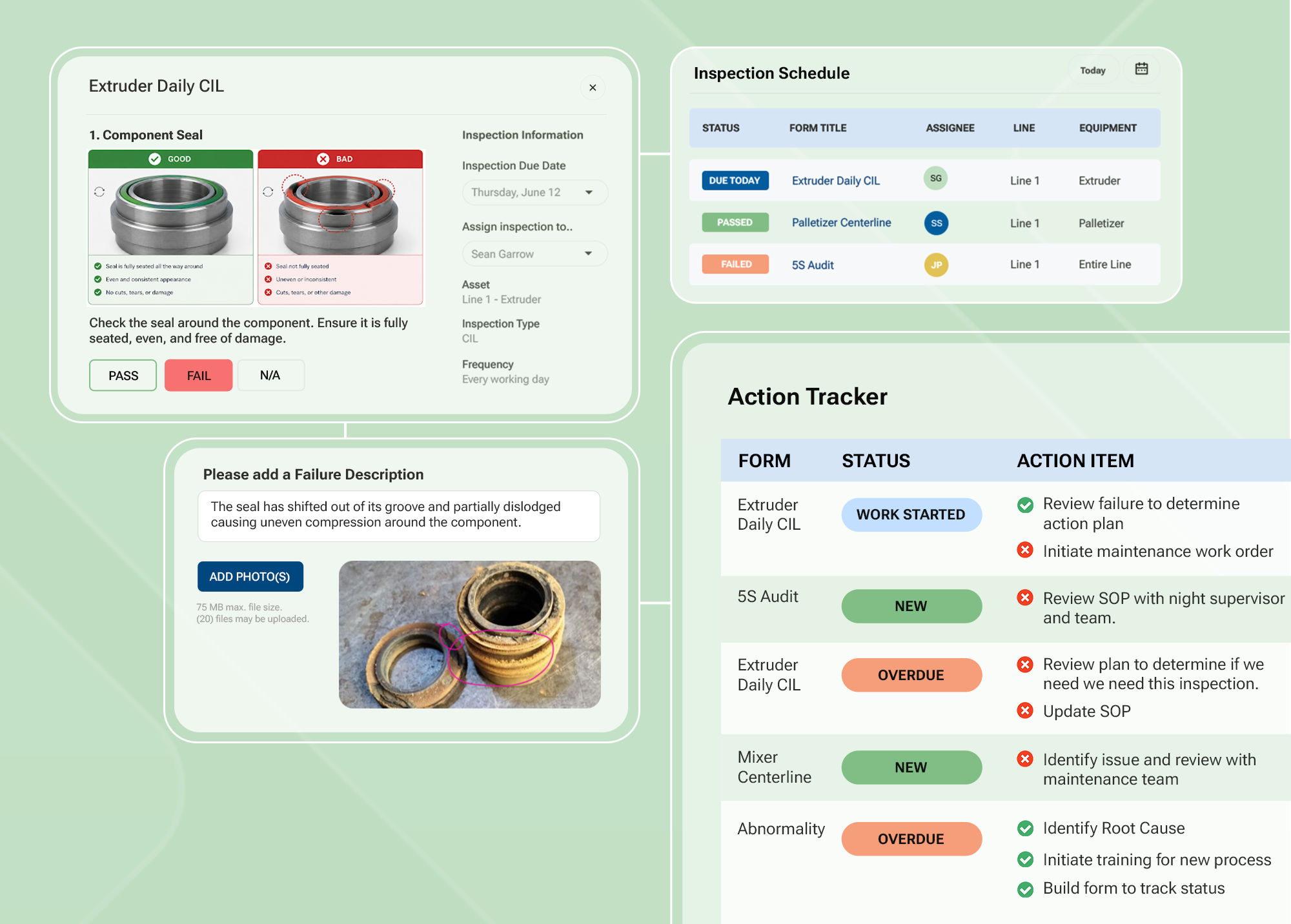
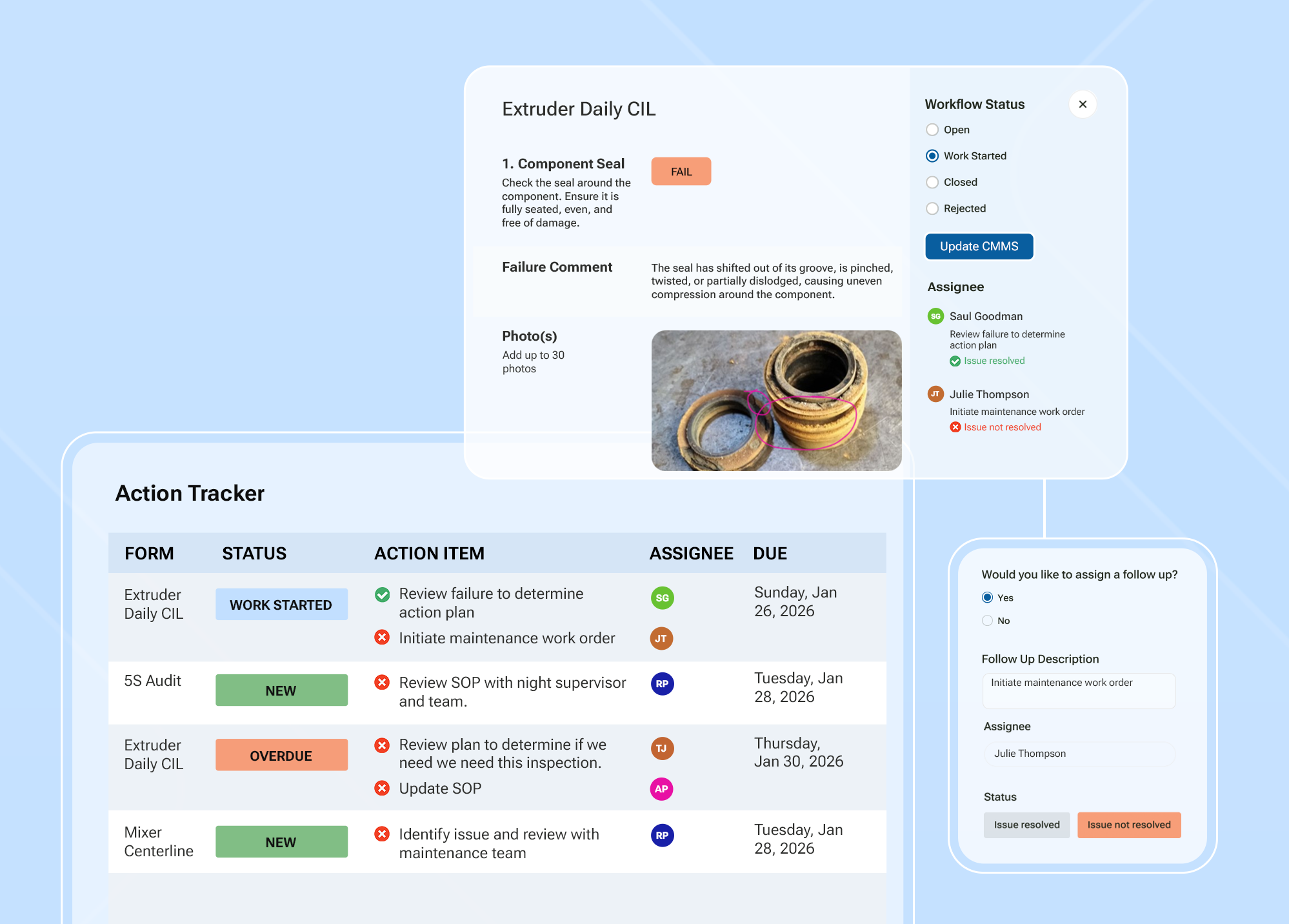
Automate the escalation: a failed inspection should immediately trigger a corrective action, route to the right technician or supervisor, and stay visible until it's closed. This is the same logic Weever uses for abnormality management in Autonomous Maintenance programs: catch the deviation, route it fast, close the loop, and track it so recurring issues get flagged instead of repeatedly re-discovered.
5. Use your TBM data to graduate toward predictive maintenance
Every completed inspection is a data point. Run enough of them over enough time, and clear patterns start to show up: which assemblies wear faster than expected, which lines see repeat failures on the same component, which technicians are catching issues before they escalate.
That history is exactly what predictive maintenance is built on. You don't need to start with sensors and vibration analysis. A well-run TBM program, tracked consistently over months, gives you the failure history to start predicting when specific parts and assemblies will need attention, before you invest in more advanced condition-monitoring tools.
A TBM schedule tells you when to look. A year of TBM data tells you what you're actually going to find.
Best practices for keeping a TBM program reliable
A schedule on day one is easy. Keeping it accurate, followed, and useful a year later is where most paper-based programs quietly fail.
- Keep the schedule visible to more than one person. If only one planner knows what's due when, the program depends entirely on that person's memory. Make the schedule visible to supervisors and technicians alike, so gaps get caught before they become missed inspections.
- Review and adjust the cadence, don't just set it once. Equipment usage changes, lines get reconfigured, run rates go up. A schedule built two years ago against different production volumes may no longer match how hard the equipment is actually working. Revisit cadences on a regular basis, not just when something breaks.
- Track completion data you can trust, not just completion rates. A 100% completion rate means nothing if inspections are being pencil-whipped in thirty seconds. Photos, timestamps, and required fields on each inspection make the record verifiable, not just filled in.
- Close the loop on every failed inspection. A corrective action that never gets marked resolved is worse than no record at all, because it creates false confidence that something is being tracked. Every failure should have a visible status until it's actually closed.
- Feed TBM history into your broader reliability strategy. Don't let inspection data live in a filing cabinet or a standalone spreadsheet. The real value of TBM compounds when that history feeds root cause analysis, breakdown analysis, and eventually predictive maintenance planning.
Why manufacturers run TBM on Weever
Paper and spreadsheets can launch a TBM schedule. They can't sustain one once you're running it across multiple lines, shifts, and technicians, which is where completion data quietly stops being trustworthy.
- Assignments that actually get done. Every inspection in Weever is assigned to a specific technician with a due date, so nothing depends on someone remembering a spreadsheet.
- Failures that don't sit in a binder. A failed inspection automatically triggers the next step, corrective action, escalation, or a work order, so issues get resolved instead of rediscovered next quarter.
- Reporting that turns history into foresight. Weever generates the reporting that shows you patterns across inspections over time, so you can start predicting breakdowns before they happen instead of just documenting them after.
Manufacturers like Monin and Ajinomoto have used this same digitize-first approach to move maintenance programs off paper and into a system technicians actually trust, and use. Want to see how Weever assigns, tracks, and escalates TBM inspections on your own lines?
Book a demo and we'll show you.

Why ERPs are not Maintenance Management Software
Enterprise Resource Planning (ERP) software is great at what it does. Unfortunately, that does not include being an intuitive data capture and workflow tool for your staff.
Some of our customers use SAP, Oracle or Netsuite, to manage their business costs, inventory, purchasing, etc. These ERPs are also supposed to be used for maintenance to automate reporting and workflows that relate to parts and machine maintenance scheduling.

Ultimately, our customers are looking to capture GOOD data and generate reports that provides insights on:
- What parts do I have in supply and what do I need to order?
- What are my Maintenance costs - including parts and labor?
- Why are the causes of machine issues and how can they be prevented?
The Data Collection Conundrum
In order for an ERP to provide these insights, it needs to feed off of data that either comes from machine sensors or from humans. If the ERP receives poor data, the resulting reports will be of poor quality and the derived insights may be misleading.
SAP, Oracle and Netsuite know this but they have done little to make their product's frontend more user friendly. ERPs are more interested in the needs of their “buyer”, which is typically IT managers, who understand software and coding, and executives, who want reams of data to be automatically processed into simple reports.
As a result, ERPs focus much more on the back end of the “data funnel” (i.e. reports and graphs) and little on the front end of data funnel (i.e. data collection).
Save time and increase on-boarding effectiveness
Our customers save time and resources by cutting onboarding time down by over 90%. With Weever Inspections, they simply hand new employees a tablet and talk them through the basics. The app does the rest.
The app provides a superior user experience through:
- A personalized “intelligence hub” that removes the clutter and highlights high-profile content
- Forms that include step-by-step instructions featuring images and videos so users get it done correctly the first time and every time
- Intuitive forms that automate mundane tasks, such as calculations.
Integrating Preventive Maintenance with an ERP system
At the end of each week, our customers simply download a spreadsheet from the Weever Apps platform and upload it to their ERP system.
The result of this process is that staff are more productive, processes are more efficient, and the ERP is loaded with better data that it can “crunch” to provide insights for senior management. Everyone wins!

5 ways to optimize your Preventative Maintenance operations overnight
Preventive Maintenance programs strive to enhance the OEE and performance of machines. But what do you use to enhance the performance of your PM program? Here are some tips for you to consider that may help you increase the efficiency and productivity of your team.
1. Create an accountable inspections schedule
If you don't schedule it and make staff accountable, it is not going to happen. It is a reality of our industry that only the things that need to happen will happen on the shop floor. Everything else is pushed off until another time.
Creating a schedule of machine inspections is the first and most important step in any preventive maintenance process because if you do not have machine inspection data you do not have a PM program.
Our customers use tablets on each line (or work area) that staff use to understand the inspections that are due today, this week and so forth. The schedule is visible to all, so if they don't happen everyone knows who is lagging behind.
2. Guide the inspections process to ensure is it completed correctly
Many maintenance managers are challenged with finding a way to ensure inspections are not "pencil whipped" by operators. If inspections are not completed correctly, the data is tainted and its hard to trust the process.
Use a form builder to add photos and even videos of the correct process so that staff can follow along. Ask them to input information as they go so that you have a better sense that the data is real and not added quickly at the end of a form.
3. Make the information gathering experience easier and more intuitive
Using a complex ERP is another way of losing the interest and engagement of your staff. Enterprise software can be great for certain operations, like crunching big data sets, but they generally are found less user friendly.
There can also be issues with providing access and on-boarding. Some of our customers use our software as an intermediary between staff and their ERP.
Our software is far easier to use and it is personalized for each user. As a result, staff jobs done quicker and complain less about the user experience.
4. Provide information to technicians to save time
Like all processes in manufacturing, little improvements to your PM operational performance can have a huge impact. An example of this is the time saved with better job routing, especially in a large facility.
By alerting maintenance teams with comprehensive information about an inspection failure or breakdown, maintenance teams can collect the parts and tools they need before running to the machine.
By understanding the status of assemblies and parts, maintenance teams can better schedule their routes around the facility. Saving 10 minutes a day can mean additional days of maintenance time per year.
5. Continuously improve through real-time insights
Managing PM operations by "gut" and "instinct" is great and comes with experience, however, it is easier to "manage up" and access resources if you have concrete evidence and insights gathered from real inspections data.
Weever provides you with Form Reports that shows insights at-a-glance, so you can stay on top of your PM program and one step ahead of the Factory Director.

5 tips on how to digitize your manufacturing operations
Digital transformation continues to be a hot topic in manufacturing and organizations are either jumping on the bandwagon or getting woefully left behind. The main goal of digitization is usually to enhance operational visibility, optimize resource efficiency and productivity and, ultimately, building better products for less money.Current CEB research and Frost & Sullivan's Global Digital Transformations study both show that 87% of senior business leaders now cite digitization as a priority for their company - and 66% fear failure to digitize will jeopardize their competitive position.The question is becoming less about "should we digitize?"and more about "how do we digitize?". In a manufacturing context, the digitization question can be magnified by complex, interdependent procedures and a "hardwired" workforce that is resistant to change.
Here are some tips that will help you overcome barriers and digitize your manufacturing operations.
1. Start Small
Digitizing your factory can be a bit overwhelming, especially when you take on too much in an effort to "boil the ocean". Start with small, high impact projects that you can use to bolster internal support for the initiative.
To get going quickly, you may want to consider a low cost, cloud-based solution that will allow you to deploy a digital solution efficiently without a huge up-front cost.To this end, our Starter solution allows you to kickstart your digitization journey while only paying for what you use. It's the perfect solution for organization who are starting out and don't want to be burdened with hefty licensing fees while they are still working out the kinks. Learn more about our Starter package here: https://weeversoftware.com/blog
2. Look for the Paper
If you do not collect data using tablets, chance are your facility is riddled with paper forms that are used to do everything from confirm quality processes are compliant to requesting vacation days and everything in between.If you want to make a big and immediate impact, take a look in your filing cabinets for what data is collected using paper forms on the factory floor.Paper forms are inherently inefficient and offer opportunities to waste, product issues and regulatory compliance challenges. Simply by digitizing your paper forms, you will dramatically accelerate your operations, reduce costs and increase visibility. Learn more about the benefits of digitization here: https://weeversoftware.com/blog
3. Get Buy-in from Line of Business Managers
Getting supervisors and managers involved early in your digitization project is important because they will be intimately involved in the development of the ultimate solution.Ask your manager in maintenance, quality, safety, production, etc., if there are any pain points or challenges with their current processes.
- Are there issues with waiting for the data to be made available?
- Are their problems with data collection including errors and omissions?
- Are the steps generally followed correctly, or are they missed?
Gather insights and alignment. Establish a base KPI that you can use to measure the ROI of the digitization project to prove your business case for expansion. Once the basic issue are overcome, you can move forward with a complete digital rollout with Weever.
4. Staff engagement is key
You could develop the best forms and workflows using the best tools in the world and it still could fail if your staff are not engaged and interested.
Many of our customers use a big, clunky ERP system that takes effort to training and on-board staff and offers too many options. Weever helps by offering a more focused, personalized and efficient user experience that make the process more enjoyable for staff. Weever also includes an integrated rewards & recognition system that helps motivate the right behavior.
5. Make it about Continuous Improvement
Digitization is essentially a big continuous improvement project so you can apply a lot of the principles you know from Lean and World Class Manufacturing to this project.For example, focus your first initiative on making it easy for staff to provide "improvement suggestions" and execute quick kaizens.Make using tablets fun and engaging for your staff and they will adopt the technology much quicker.

How do I reset my password?
This is in draft right now! Need to add numbering and screenshots, as well as the "setup" and links to other posts. - SNIf you are unable to access the app because of your password, click on the "Login" button in the top right corner of the screen, and the dialog box comes up asking you to login. Click on the "Forgot Password" link and provide the email that you used to register for the app. You should receive an email with a link to reset your password. We recommend using Chrome as your browser, not Microsoft Edge, to perform this reset. When you receive the email, either click on the link or copy it into your browser and you should be asked to enter a new password twice. Once the two match, click on "Submit" and you will be prompted to login again.If you do not receive the email, or you are unable to reset your password, please speak with your administrator. Weever Apps cannot perform password resets due to security reasons.

How Executives Around The World View Industry 4.0
The Fourth Industrial Revolution, also referred to as Industry 4.0, is the marriage of the physical world with digital technologies like analytics, artificial intelligence, cognitive technologies and the internet of things (IoT). To better understand the Fourth Industrial Revolution’s impact on business, Forbes Insights and Deloitte surveyed more than 1,600 executives in the Americas, Asia-Pacific and EMEA for “The Fourth Industrial Revolution Is Here—Are You Ready?,”asking them to share their views on four major areas: social impact, strategy, workforce and technology.
Spend Less Time on Admin. Get More Insights by Email.
Subscribe to receive practical tips, updates, and ideas to improve operations without the extra admin work.