
5 Best Quality Control Checklist Apps and Software for Manufacturing in 2026
.webp)
Table of contents

Share:


Quick summary
Quality control checklist software is a digital alternative to paper inspection sheets and audit forms used on the plant floor. To choose the right software, match it to the problem you need to solve, test how it handles failed checks, and price the full rollout rather than the pilot. Look for tools that connect failures to corrective action and have been tested on the plant floor.
The top three quality control checklist apps for manufacturing in 2026 are:
Not sure which quality checklist app fits your manufacturing plant?
A cutter starts drifting mid-shift, an operator notes it on a paper form, but no one sees it until the end of the day. By then, three hours of product may need a second look. That's the kind of problem manufacturing checklist software should help prevent. But the platforms don't all handle it the same way.
In this article, we compare five quality control checklist platforms for manufacturers in 2026. We also include where each one stands out, how they differ, and the types of quality workflows they are best suited to support.
But first…
Why listen to us?
Weever has spent years building quality control software inside real manufacturing plants, working with brands like Mars, Unilever, Monin, and Royal Canin. That hands-on work with production teams shows us what actually breaks checklist adoption on a factory floor. We've used that experience to evaluate and rank the platforms in this guide on the standards that matter to a quality manager.


What is quality control checklist software?
Quality control checklist software is a digital alternative to paper inspection sheets and audit forms used on the plant floor. Operators and quality teams use it to complete standardized checks on products, equipment, and processes at specific points in production. Checklists can include pass/fail questions, measurements, notes, and photo evidence.
Each completed check creates a timestamped record linked to a production line, shift, or piece of equipment. If something fails, the software can flag the issue, alert supervisors, and assign follow-up actions.
Common manufacturing uses include critical control point (CCP) inspections, incoming material inspections, in-process checks, final product inspections, quality hold tracking, regulatory audits (like GMP), and routine quality walkthroughs.
Why quality control checklist software matters for manufacturing
The conditions that produce a defect are never static. A cutter wears, a filler drifts, a new operator misreads a spec, a supplier lot runs slightly off. Left uncaught, any of these turns into scrap, a hold, or a recall, and the cost of finding the problem climbs at every stage it goes undetected: roughly $1 to prevent, $10 to correct in-house, and $100 once it reaches a customer. A check at the point of work is built to catch that drift while it still sits at the cheap end of that curve, not after it has already become a customer complaint.
The stakes are higher in food manufacturing than in most industries. The American Society for Quality puts the cost of poor quality (scrap, rework, complaints, write-offs) at 10 to 20 percent of sales for a typical manufacturer, and a single food recall averages close to $10 million in direct cost, with labelling errors alone responsible for roughly half of all U.S. recalls in 2024. A checklist app can't eliminate that risk by itself, but it changes how fast a plant catches a problem and how consistently it acts once it does, which is where digital checklists earn their place on the floor.
- Poor Quality Is Already Costing You — Quietly - The Cost of Poor Quality (COPQ) — scrap, rework, re-inspection, downgrades, complaints, returns, and write-offs — is one of the largest and least-visible costs in manufacturing
- Catching Defects Early Pays Exponentially: Digital checklists can flag out-of-spec values as they're entered, so small issues get caught and corrected in the moment, before they turn into holds, rework, or recalls.
- Reduce Recalls and Food Safety Risk Exposure: A joint Food Marketing Institute and Grocery Manufacturers Association study put the average direct cost of a food recall at about $10 million, covering only retrieval and disposal. The leading cause of recalls is labelling errors that could have been caught with routine quality checks.
- Turn Failures into Action: When a check fails, a platform like Weever can assign a corrective action with a clear owner and due date, making sure issues don’t get overlooked.
- Audit Readiness and Compliance Become Routine: A consistent, well-documented defect-check program, especially a digital one, turns audit prep from a fire drill into a routine export, and gives auditors the legible, time-stamped, signed evidence they now expect.
- Standardize Every Shift: Templates give operators the same inspection criteria across lines and shifts, reducing the variation that comes with different routines.
- Spot Recurring Problems: Aggregated data shows which lines, shifts, or suppliers have the most failures, helping teams tackle root causes. Weever, for instance, brings this entire loop of capture, action, and analysis into one platform built for the plant floor, so quality data drives improvement instead of sitting in a binder.
- Sharper Data and Less Operational Waste: Instead of guessing where to spend limited resources, you can see exactly which lines, shifts, products, and check types generate the most deviations, and direct improvement effort to the highest-ROI fixes.
Our top list of quality control checklist apps for manufacturing
Here is a quick glance of the platforms covered in this review:
1. Weever - Best for multi-site process manufacturers that need highly configurable quality control workflows
Weever runs quality checks as guided digital workflows built from three pieces: the forms operators fill in, the processes those forms sit inside, and the workflows that decide what happens next. Quality managers and CI leads configure all three themselves.
That means a plant doesn't redesign how it runs checks to fit the software. The checks it already runs get built into Weever as they are. This is an important design attribute. A check that fits how a line actually runs is a check operators complete properly, on time, on shift. Meanwhile, a check that fights the way the work happens is one that gets rushed, back-filled, or skipped. It is how a drifting filler goes unnoticed until three hours of product need a second look.
Teams using Weever control what gets checked, which fields appear, how forms branch, when a check is required, and what happens after each response.
The configuration goes deeper than form layout, too. A field can run a calculation on values an operator just entered, so a result is worked out on the spot rather than in someone's head. A photo can be required only on the tasks where it matters, instead of on every check.
Operators complete the checks on the line, with every submission logged by shift, line, and site. If a check fails, Weever can automatically create an assigned action with an owner, due date, and reminders, so the workflow continues without someone having to move the issue into a separate tracker.
Additionally, Weever works alongside the systems you already use. Checklist results, deviations, and corrective actions can flow into Power BI, ERP, and CMMS systems rather than forcing teams to replace them. QMS platforms can handle program-level records, while Weever captures what happens on the line during each shift.
Worth mentioning here that Weever isn't built to handle document control or supplier qualification. It focuses on the checklist, corrective action, and audit trail workflow, where the plant-floor evidence is strongest.
The platform is primarily configured for industrial-grade process manufacturing sites, including food and beverage manufacturers and CPG plants.
Key features
- Checks configured around your process: Build the checks your plant already runs, with the fields, layouts, conditional logic, and branching you decide on. A field can calculate a result from values the operator just entered, and a photo can be required only on the checks where it matters, rather than on every form.
- Evidence captured at the source: A QR code on the line opens the right checklist on a shared device. Operators attach photos or video as they complete each check, so evidence is tied to the task and timestamped rather than gathered afterwards.
- Real-time out-of-range flagging: Values outside specification are flagged as they are entered. Operators can correct a drifting filler or a failed seal check while the line is still running, not after the shift's forms are reviewed.
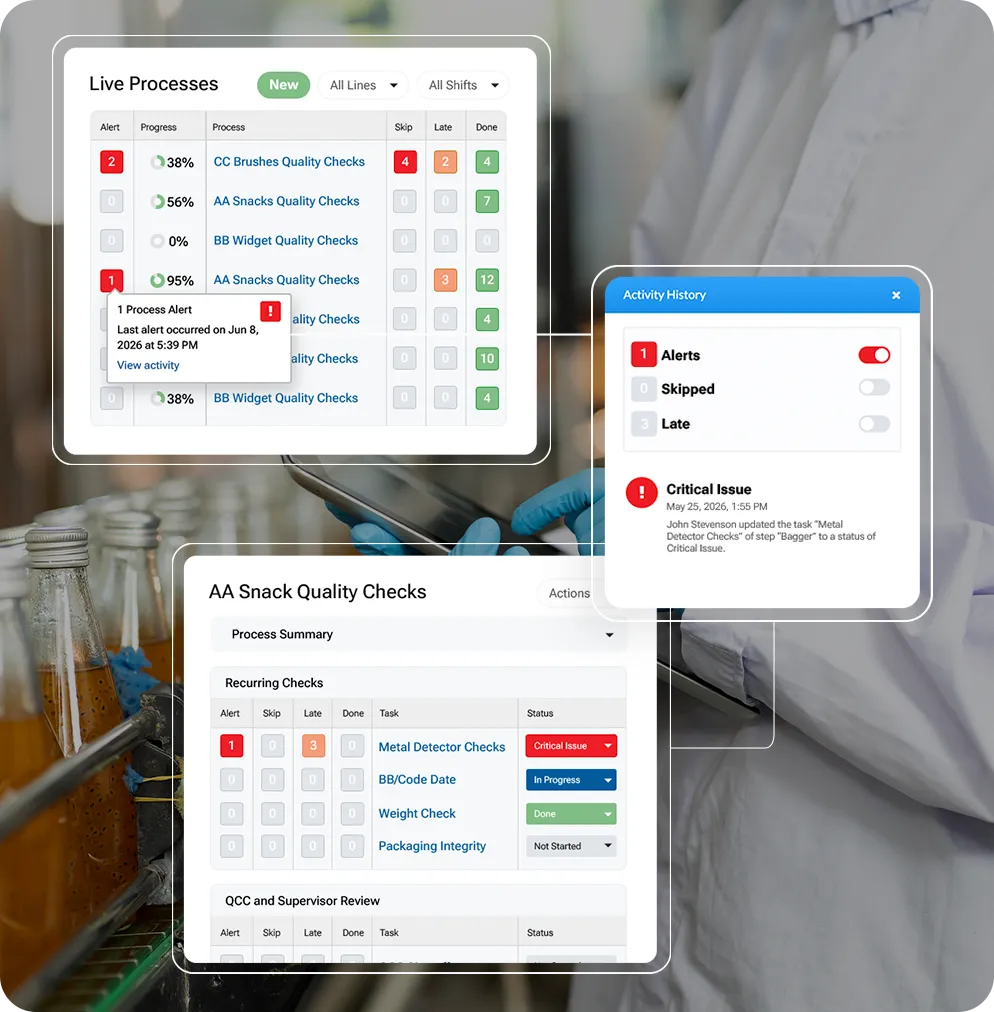
- Skipped and late checks surfaced automatically: Every process shows counts of alerts, skipped checks, late checks, and completed checks before anyone opens a task. Filter by check type across lines and shifts, so a missed fill-weight check is visible now rather than at month-end.
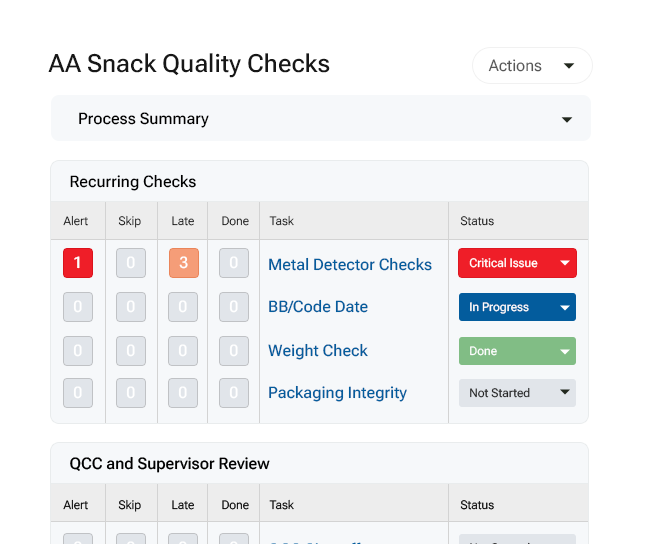
- Corrective actions that close, not just log: A failed check creates an action item automatically, with an owner, a due date, and reminders until it is closed. The person who reported the issue gets notified when it is resolved.
- FDA-compliant e-signatures with controlled correction: Signing re-authenticates the user, states what the signature means, and locks the fields it covers. Corrections require an administrator to unlock, which voids the signature and forces it to be collected again.
- Audit-ready record packages: Every entry, change, and sign-off is recorded with user and timestamp. Download a process as a single PDF with every form, the full activity history, and field-level detail, each page tagged with the process ID. Supports 21 CFR Part 11, CFIA, and EU Annex 11, and aligns with GFSI schemes including SQF and BRC.
- Built to feed your existing systems: Export by CSV, pull through a REST API or OData, or connect straight to Power BI and Tableau. Check results, deviations, and corrective actions feed the QMS, ERP, and CMMS tools you already run, rather than sitting in another system you have to log into.
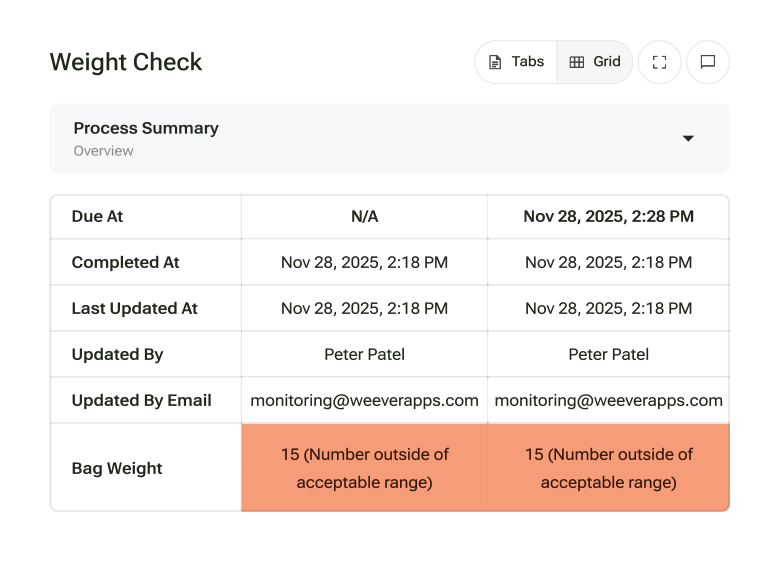
Pricing
Site-wide licensing, not per user. Every operator, shift, and language is included, with no tier to upgrade for more users or languages. Book a demo for a plan tailored to your plant.
Pros
- Highly configurable platform that process manufacturers can adapt to existing plant processes
- QR codes on shared devices pull up the right checklist instantly
- Built-in multilingual support for bilingual and third-party crews
- Weever Radar, an optional AI layer, can tell you which checks fail most often and where, without pulling the data yourself
- Fast frontline adoption, with minimal admin training needed to get started
- Real-time visibility into completion, open actions, and trends across lines, shifts, and sites
Why we picked this platform
Weever gives manufacturers more control over how frontline quality checks are configured. Teams can adapt fields, logic, workflows, and follow-up actions around their existing processes instead of forcing different plants and programs into rigid templates. Automatic corrective actions, site-wide licensing, shared-device access, and multilingual support add to that flexibility.
What customers are saying
Weever’s customer case studies showing measurable improvements in check times, reporting, and compliance follow-through.
A food manufacturer digitizing quality checks reduced check time from 5 to 7 minutes to 1 to 2 minutes, freeing 4 to 5 hours per line each day. The plant also eliminated PCQI holds that had previously cost more than $200,000 a year, while paperwork review time fell by another 30 to 40 minutes per shift.
Another client, Monin, saved 3 to 4 hours a day that had previously gone to manual data entry and reporting. The company then expanded its checklist-based programs from one site to all of its North American facilities within five months.
“Using Weever ensured that we did not lose documentation for compliance reporting. We could also see where issues were happening and make adjustments quickly." - Johanna Velez, VP Quality Assurance, Monin
2. Mitti (SafetyCulture) - Best for smaller teams moving off paper with a general-purpose inspection app
Mitti (formerly SafetyCulture) is a general-purpose inspection and checklist platform used across industries, including construction, hospitality, retail, logistics, and manufacturing. Teams can build a checklist, complete it on a phone or tablet, and share the results immediately.
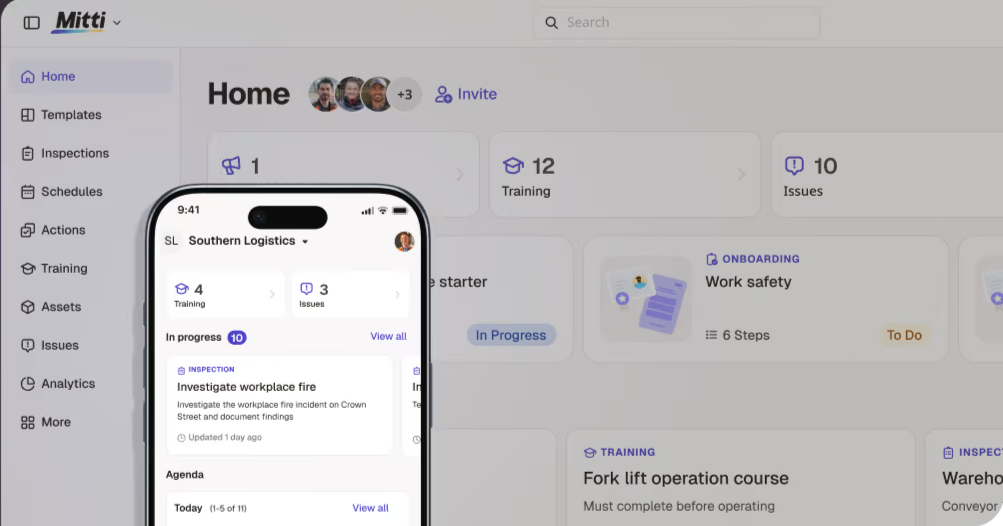
For plants looking for one familiar app to handle different types of inspections, Mitti is a solid option. New checklists can be set up quickly, which makes it useful for teams that want to move away from paper without a lengthy implementation.
The trade-off is that quality-specific workflows, like escalating a failed check, get built by the user inside the template or handled out of the box on a manufacturing-first platform like Weever.
Key features
- Drag-and-drop checklist builder: Teams can turn paper forms or spreadsheets into digital checklists using a simple editor. Conditional logic can show, hide, or flag questions based on responses.
- Photo, video, and signature capture: Evidence stays attached to the inspection item. Flagged responses can trigger follow-up actions, although users generally need to assign those actions themselves.
- Weighted scoring: Templates can give different questions different point values, allowing critical items to carry more weight in the overall score.
- Recurring inspections and reminders: Routine checks can be scheduled to repeat automatically, with reminders for teams across sites.
- System integrations: Data can feed dashboards or be exported to tools such as Power BI, Tableau, and ERP systems.
Pricing
Paid tier starts at $29/seat/month with a free plan available for up to 10 seats. Custom enterprise pricing for teams of more than 100.
Pros
- Existing checklists can be imported straight from PDF, Word, or Excel
- Multilingual interface, useful for plants with mixed-language crews
- Photo annotation lets inspectors mark up images, not just attach them
- Barcode and QR code scanning built into the inspection flow
Why we picked this platform
Mitti's broad template library and cross-industry reach make it a familiar starting point for teams new to digital inspections.
What customers are saying
Mitti has a 4.6 rating on both G2 (483 reviews) and Capterra (355 reviews). Reviewers consistently praise how quickly new templates can be built and how little training new hires need to get started.
The trade-offs tend to be cost and flexibility. Seat-based pricing gets more expensive as teams grow, while the scoring and action workflows can feel restrictive for teams that want to tailor the software to their own processes. For larger, multi-site operations, platforms like Weever avoid that per-seat pricing model altogether.
3. Flowdit - Best for manufacturers that need quality checks to work offline
Flowdit runs inspections, audits, and quality checks as digital workflows that plant and field teams complete on a phone or tablet. It’s particularly suited to teams working in construction, energy, and industrial environments where connectivity can be unreliable. The app continues working when there’s no signal and automatically syncs completed work once the connection returns.
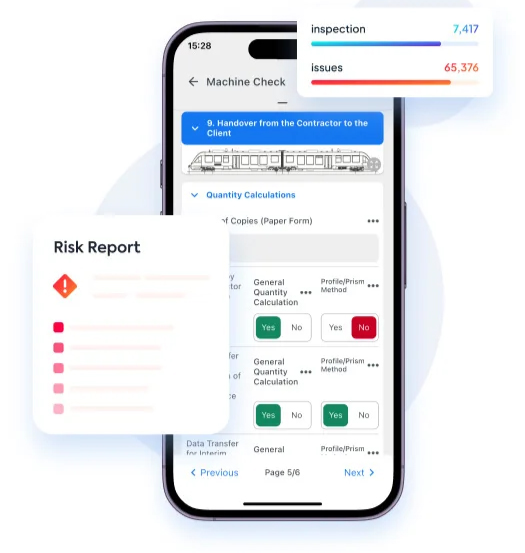
Key features
- Drag-and-drop checklist builder: Teams can create checklists with conditional logic, making questions appear, disappear, or become required based on previous answers.
- Photo, video, and signature capture: Inspectors can attach photos, videos, signatures, barcode scans, and GPS data to checklist items as evidence of what was checked and where.
- Offline capture with workflow logic: Validation rules, required fields, and conditional logic keep running without a signal.
- Minimal training for frontline operators: App can be rolled out to floor and field staff with no formal training session, since the mobile interface mirrors a simple form.
- Recurring scheduling and reporting: Inspections can run on recurring schedules with overdue alerts, while completed data can feed dashboards or be exported to PDF, Excel, and ERP systems such as SAP.
Pricing
Flowdit has a free plan (basic checklists, small teams) while paid tiers run $15/user/month. Custom Enterprise pricing is available for large-scale, on-premise needs
Pros
- Multilingual interface, available in nine languages, including German, French, and Spanish
- GDPR and ISO 27001 compliance built into the platform
- Role-based access controls keep permissions specific to each user
- Live sensor and asset data can feed into the same system as checklists
Why we picked this platform
Most offline modes only store basic entries. Flowdit keeps full checklist logic, including validation, running with no signal at all
What customers are saying
Flowdit has decent ratings on G2 (4.8 from 28 reviews) and Capterra (4.9 from 44 reviews), although its review base is smaller than those of more established checklist platforms.
Several reviewers highlight being able to complete inspections in areas with no signal without losing photos or field entries. Others say onboarding is straightforward enough that new staff can get started with little formal training.
The friction tends to show up with more complex workflows. Setting up nested conditional logic takes some planning upfront, and several reviewers would like more flexibility when customizing dashboards and reports.
4. L2L - Best for manufacturers that want checklists tied to downtime and OEE
L2L is a shop-floor operations platform built around production and maintenance data, with digital checklists as part of the broader system. It features checklist completion alongside downtime, OEE, and open equipment issues for a line, so a missed check and a stopped machine can be viewed in the same place.
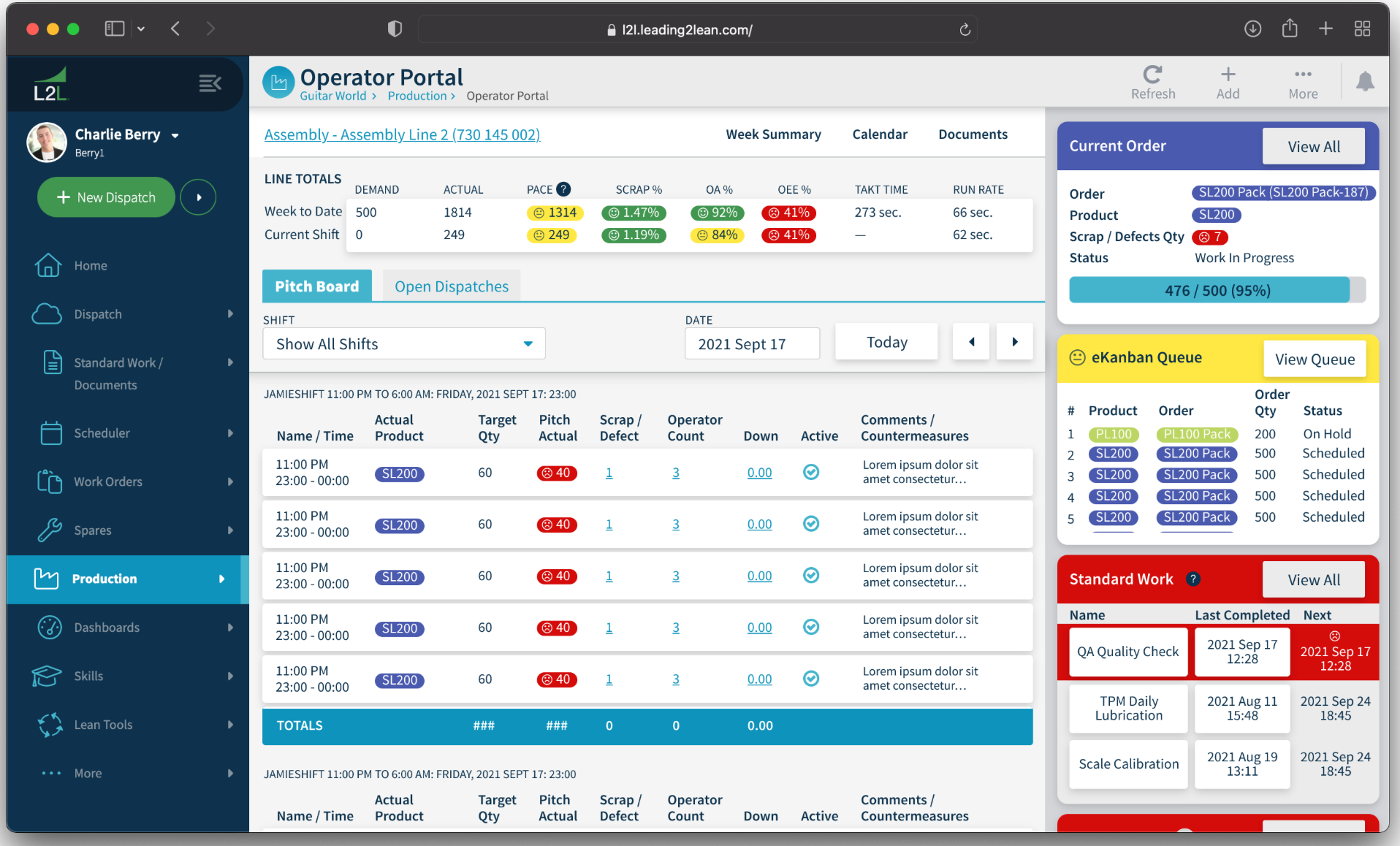
Operators complete checks from the floor. If a check shows that maintenance is needed, the operator creates a Dispatch directly from the checklist. L2L then handles the routing, assignment, and escalation. Weever removes that manual step by automatically creating a corrective action when a check fails.
Key features
- Checklist and work-instruction builder: Teams can create checklists and step-by-step work instructions with a drag-and-drop editor, templates, and different field types.
- Visual feedback and sign-off: Operators can add visual feedback to checklist steps and sign off as part of the workflow, keeping evidence with the inspection record.
- Deviation alerts: Failed or flagged items can notify the appropriate person or team by email or Microsoft Teams, so issues don't sit unnoticed in a completed form.
- Guided step-by-step checklists: Mobile checklists and work instructions guide operators through each step with visual prompts.
- Trend reporting and integrations: Pareto and trend charts help teams track recurring failures, downtime, and checklist completion across lines and sites.
Pricing
L2L uses custom, quote-based pricing, billed per user or per site depending on features and scale. Exact figures require contacting L2L directly
Pros
- QR codes give instant access to work orders, documents, and spare parts info
- Checklists can auto-launch at the start or end of a build sequence
- Checklists can be imported using a spreadsheet template instead of built by hand
- Work instructions and comments can be translated for multilingual teams
Why we picked this platform
L2L makes the most sense for manufacturers that want quality checks connected to their existing downtime and maintenance workflows.
What customers are saying
L2L holds a 4.3 rating on G2 (216 reviews) and 4.5 on Capterra (95 reviews). One maintenance technician described dispatches arriving “nearly instantaneously” once flagged, while several other reviewers highlighted how little training new staff need to start using checklists.
Not every review is as positive. Multiple reviewers find the image annotation editor fiddly, while others want more control over report customization. The pricing is also quite steep for what the platform delivers.
5. MasterControl - Best for regulated life sciences and medical device manufacturers needing full document control
MasterControl is a full quality management system where audit checklists feed into a broader document and compliance workflow. A completed checklist, customer complaint, or out-of-spec result can flow into the same CAPA and change-control process, with the record linked back to training, SOPs, and the original finding.
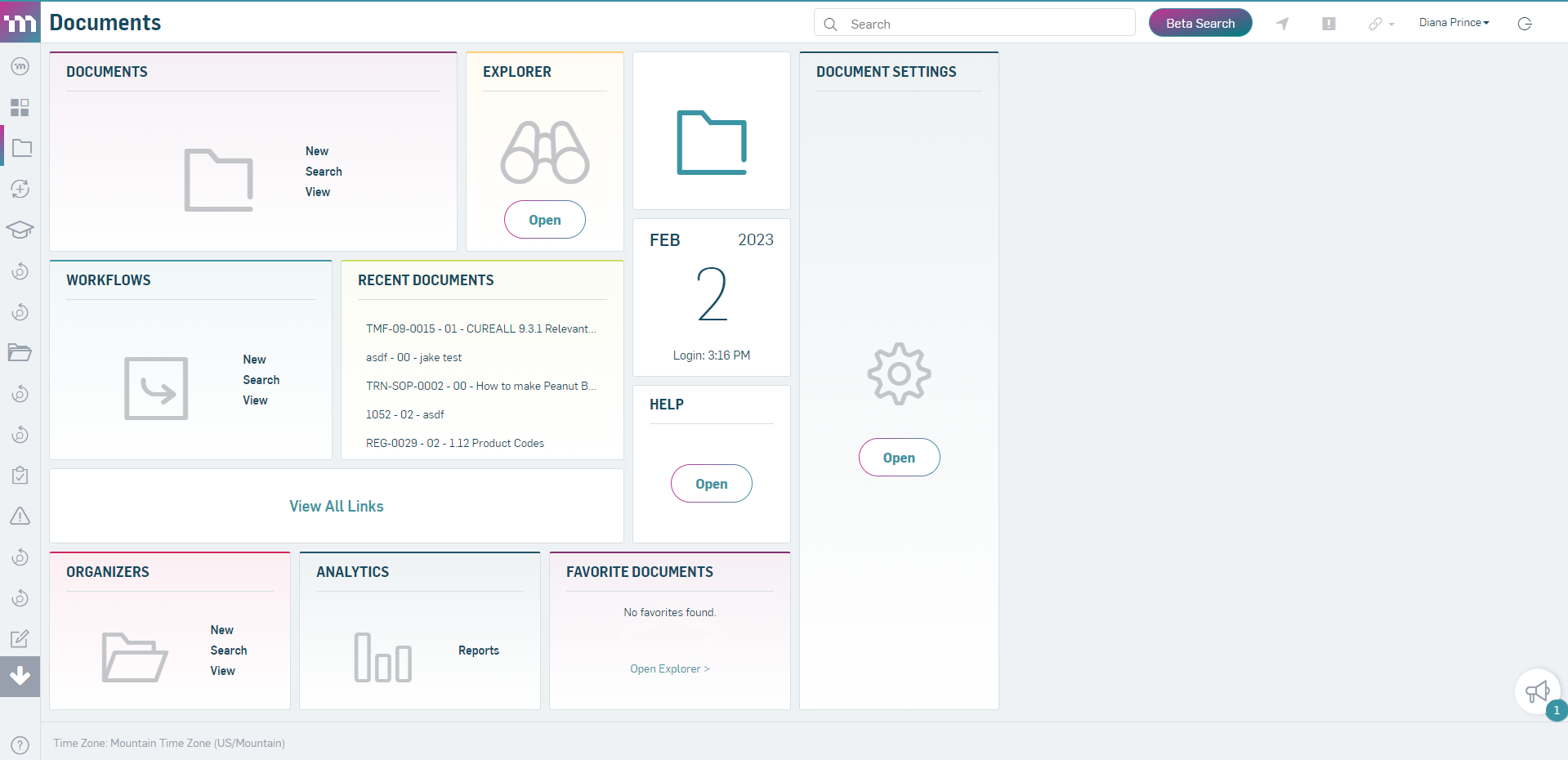
It’s designed for quality teams that need FDA, ISO, and GMP documentation, training records, and audit findings managed in one validated system rather than across separate tools.
Key features
- Audit checklist builder with scoring: Teams can build checklists around specific standards and clause-level criteria, with optional scoring to grade results rather than relying on simple pass/fail answers
- Risk-based triage: A risk matrix considers factors such as impact and frequency to determine whether a finding needs full corrective action, simple containment, or just an observation
- Automated training updates: When a CAPA or audit finding changes an SOP, MasterControl can require staff to complete retraining before the updated procedure takes effect, keeping training records aligned.
- Custom e-forms: Teams can create lightweight forms for lower-risk findings that don't require a full investigation, keeping minor issues from entering a heavier workflow.
- Reporting and analytics: Dashboards and reports track CAPA status, audit trends, and compliance metrics, giving managers visibility when preparing for inspections.
Pricing
MasterControl uses named-user licensing across packaged tiers, from pre-configured startup bundles to custom enterprise plans. Exact figures require contacting sales directly
Pros
- Electronic signatures capture signer name, date, and meaning per 21 CFR Part 11
- Documents and checklists are available in more than 20 languages
- More than 100 configurable permissions control who can see or edit each record
- Bulk document upload supports migrating large document libraries at once
Why we picked this platform
A checklist finding can become validated regulatory evidence, giving MasterControl a deeper compliance trail than most standalone checklist tools.
What customers are saying
MasterControl has a 4.3 rating on G2 (527 reviews) and 4.5 on Capterra (526 reviews). A common thread in reviews is how naturally a finding traces back through CAPA, audits, and training once the system is set up. Reviewers also note it holds up well under FDA and ISO scrutiny.
The main drawbacks are cost and a steep learning curve, with some reviewers saying it can be difficult to justify for smaller companies.
How we evaluated the featured platforms
We built this list around how frontline quality and operations teams actually use checklists day to day, rather than comparing vendor feature lists.
- The configuration test: We looked at how much control manufacturers have over fields, logic, workflows, and follow-up steps. The strongest platforms adapt to the way a plant already works instead of forcing teams into rigid, predefined templates
- The failure-to-action test: We looked at what happens when a check fails, not just whether the failure gets recorded. On Weever, for example, a failed check automatically creates an owned, due-dated action in the same workflow, without someone having to re-enter the issue elsewhere.
- Floor-tested, not demo-tested: We considered how each platform holds up in real plant conditions, including shared devices, gloved hands, and unreliable connectivity, rather than judging it on office Wi-Fi during a sales demo.
- Independent verification: We checked feature, pricing, and integration claims against vendor documentation, then compared them with customer reviews and independent sources to separate actual capabilities from marketing claims.
- Honest scope: We noted what each platform leaves out, because no tool does everything equally well. A platform’s limits matter as much as its features, so we stated them plainly.
How to choose the right manufacturing quality control checklist software
Weigh these factors before committing to a platform.
- Match the software to the problem: Decide whether you need to prove checks are happening on the floor or manage a broader regulated quality system with document control, training, and CAPA. A full QMS can be unnecessary if your main problem is paper-based floor checks.
- Test the failure workflow: Ask the vendor to fail a check during the demo. On Weever, a failed check automatically creates and assigns a corrective action, while other platforms may require someone to intervene. That small difference can add up across hundreds of checks.
- Think about who will use it: Operators and shift leads, not just quality managers, will use the software every day. Check whether it works well on shared devices and whether language support is included in the plan you’re considering.
- Plan for your existing systems: Find out how checklist and corrective-action data gets into your ERP, CMMS, QMS, or BI tools. An integration that requires IT intervention for every change may create more work than it saves.
- Price for the rollout, not the pilot: Model the cost across every operator, shift, and site you expect to onboard. Per-user pricing can look attractive during a small trial but become expensive as adoption grows. Site-wide pricing, like Weever’s, can make costs more predictable.
Streamline quality control with Weever
Your quality process shouldn't have to change just because your software can't keep up. Rigid templates often force manufacturers to work around the system instead of configuring it around the checks, fields, logic, and workflows they already use.
Weever gives teams the flexibility to build quality workflows around how their plant actually operates. You can configure checklists, conditional logic, approvals, and follow-up actions to match your process. And when a check fails, Weever can automatically create an owned, due-dated corrective action with the supporting evidence attached.
With site-wide pricing and integrations with ERP, CMMS, and BI tools, the same approach can scale across operators, shifts, lines, and sites.
Want to see how Weever can fit around your quality process? Book a demo today.
Frequently asked questions (FAQs)
1. Can quality control checklist software also run other frontline programs like 5S or maintenance?
Yes. Some platforms cover more than quality checks. Weever, for example, runs quality checklists alongside 5S audits, master sanitation scheduling, autonomous maintenance, and safety observations. That lets plants replace several paper-based programs with one system instead of managing separate tools.
2. What's the difference between quality control checklist software and a full quality management system (QMS)?
Checklist software focuses on floor inspections, evidence capture, failed checks, and corrective actions. A full QMS adds capabilities such as document control, formal training records, supplier qualification, and validated change control. If your main gap is proving checks happen and issues get addressed, a full QMS may be more than you need.
3. Can AI meaningfully improve how quality control checklists catch and prevent defects, or is it just marketing?
In most cases, AI can improve quality control programs. Weever Radar, for example, looks for patterns across historical checks, observations, and sign-offs and lets teams ask questions about what's happening on the floor. This surfaces recurring failures a supervisor might otherwise miss until they add up.
4. How is quality control checklist software different from a general-purpose digital forms app?
General-purpose form tools can digitize almost any process. Quality control checklist software is built around manufacturing workflows. Some even come with features such as pass/fail logic, out-of-spec checks, corrective actions, scheduling, and audit trails built in.
5. How long does it typically take to implement quality control checklist software?
For one site with existing paper checklists, implementation can often take 1-3 weeks, including setup, piloting, and training. Multi-site rollouts typically take longer as each plant's checklists, languages, and equipment need to be configured.



Spend Less Time on Admin. More Time Improving Operations.
See how Weever automates data entry, reporting, and action items so you can focus on improvement not admin.